Fehlende Windows Studio-Effekte auf einem Dell Laptop
Riepilogo: Erfahren Sie, wie Sie Windows Studio-Effekte wiederherstellen, die auf einem Dell Laptop fehlen.
Questo articolo si applica a
Questo articolo non si applica a
Questo articolo non è legato a un prodotto specifico.
Non tutte le versioni del prodotto sono identificate in questo articolo.
Sintomi
Windows Studio-Effektoptionen fehlen möglicherweise im Abschnitt USB-Videogerät in den Einstellungen.
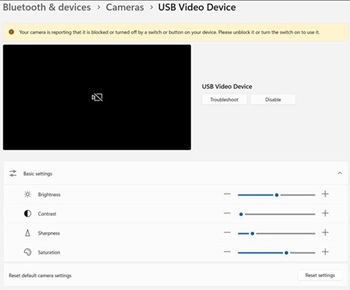
Betroffene Plattformen:
- Dell 14 DC14255
- Dell Pro 14 Essential PV14255
- Dell Pro 14 PC14255
- Dell Pro 16 PC16255
Causa
Keine Information zur Ursache verfügbar.
Risoluzione
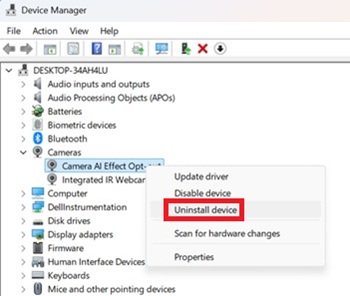
- Öffnen Sie den Geräte-Manager. Klicken Sie mit der rechten Maustaste auf Opt-out für Kamera-AI-Effekt und wählen Sie Gerät deinstallieren.
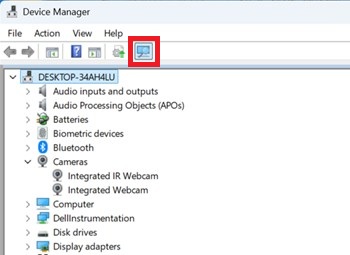
- Drücken Sie die Scan-Taste, um sicherzustellen, dass die integrierte IR-Webcam vorhanden ist.
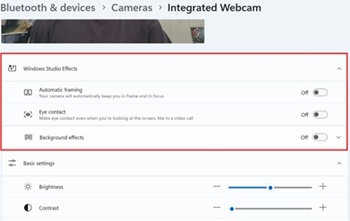
- Überprüfen Sie, ob die Windows Studio-Effektoptionen in den Einstellungen verfügbar sind.
Prodotti interessati
Dell 14 DC14255, Dell Pro 14 PC14255, Dell Pro 16 PC16255, Dell Pro 14 Essential PV14255Proprietà dell'articolo
Numero articolo: 000407521
Tipo di articolo: Solution
Ultima modifica: 24 mag 2026
Versione: 2
Trova risposta alle tue domande dagli altri utenti Dell
Support Services
Verifica che il dispositivo sia coperto dai Servizi di supporto.