Avamar: VM image backups fail with "No Proxy" because vCenter proxy is powered off
概要: Avamar VM image backups fail with "No Proxy" because the proxy is powered off in vCenter.
この記事は次に適用されます:
この記事は次には適用されません:
この記事は、特定の製品に関連付けられていません。
すべての製品パージョンがこの記事に記載されているわけではありません。
現象
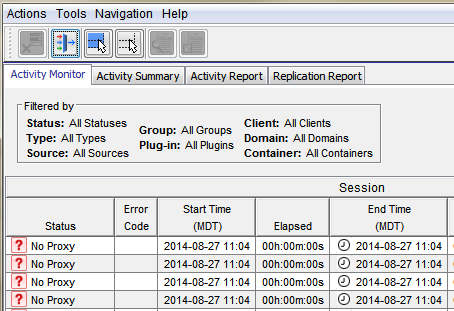
The Activity Monitor in the Avamar UI shows 'No Proxy'.
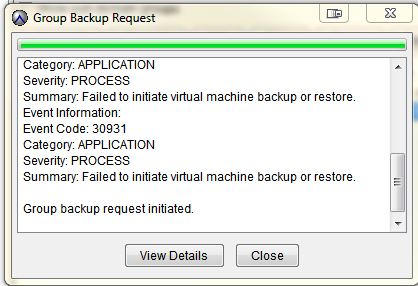
On-demand VMware Image backup fails with the following:
Category: APPLICATION
Severity: PROCESS
Summary: Failed to initiate virtual machine backup or restore.
Event Information:
Event Code: 30931
Category: APPLICATION
Severity: PROCESS
Summary: Failed to initiate virtual machine backup or restore.
If a group backup request is initiated.
原因
The proxy is powered off in vCenter.
解決方法
- Open vCenter and check if the proxy is powered off.
- If the proxy is powered off, power on the proxy.
その他の情報
The following articles discuss issues which have the same generic "No Proxy" error.
- Avamar VM image backups fail with "No Proxy" because no proxy servers are configured to protect the datastore holding the client’s VMDKs
- Avamar VM image backups fails with "No Proxy" error due to an interruption to the vCenter connection
- Avamar VM image backups fails with "No Proxy" error due to the VM not having any hard disks
- Avamar VM image backups fails with "No Proxy" error due to the proxy being powered off in vCenter
- Avamar VM image backups fail with "No Proxy" error due to proxies not resolving in DNS
対象製品
Avamar製品
Avamar文書のプロパティ
文書番号: 000033569
文書の種類: Solution
最終更新: 05 2月 2025
バージョン: 4
質問に対する他のDellユーザーからの回答を見つける
サポート サービス
お使いのデバイスがサポート サービスの対象かどうかを確認してください。