ECS:OBS:xDoctor: RAP025:1つ以上のネットワーク インターフェイスがダウンしているか、見つかりません
概要: xDoctorは、ECSインターフェイスの1つがスイッチに対してダウンしていることを示す警告エラーを報告します。
この記事は次に適用されます:
この記事は次には適用されません:
この記事は、特定の製品に関連付けられていません。
すべての製品パージョンがこの記事に記載されているわけではありません。
現象
ECS xDoctor v4.8-109.0およびObjectScale xDoctor v5.1-109.0以降では、RAP025(1つ以上のネットワーク インターフェイスがダウンしているか欠落している)が自動ヒーラーとして実装されています。スイッチ接続の問題が設定されたエラーまたは重要 の重大度しきい値を超えると、xDoctorはRAP025アラートを発行し、統合された修復オーケストレーション ワークフローを自動的に開始します。xDoctor自動修復が有効になっている場合、このワークフローは必要な修復アクションを実行します。
注:お使いの環境でECS xDoctor v4.8-109.0またはObjectScale xDoctor v5.1-109.0より前のバージョンのxDoctorを実行している場合、RAP025自動修復機能は使用できません。これらのバージョンでは、以下で説明する AutoPilotプロセスを使用するか、「解決方法」セクションで説明されている手動の修復手順に従って、修復を実行する必要があります。
RAP025自動修復をトリガーするアラート
RAP025自動修復ワークフローは、ノード インターフェイスの障害が検出され、設定された エラーまたは重大な 重大度しきい値を超えた場合にトリガーされます。このしきい値を超えると、xDoctorはRAP025アラートを生成します。これは、自動修復プロセスのトリガーとして機能します。
アラート出力の例
注:ECS xDoctor v4.8-109.0およびObjectScale xDoctor v5.1-109.0より前のxDoctorバージョンでは、この状態によってアラートのみが発生します。自動修復は実行されません。
----------------------------------------------
INFO - Auto Healer for interface_down disabled
----------------------------------------------
Extra     = Auto Healer for interface_down disabled
Timestamp = 2026-03-24_205634
PSNT      = CKM00190800120 @ 4.8-109.0

-------------------------------------------------------------------------------------
ERROR - (Cached) One or more network interfaces are down or missing
-------------------------------------------------------------------------------------
Node      = Nodes
Extra     = {"Nodes": {"169.254.1.4": ["pslave-1"]}}
RAP       = RAP025
Solution  = KB 503814
Timestamp = 2026-04-01_190513
PSNT      = CKMXXXXXXXXXXX @ 4.8-109.0
自動修復ツールの修復(例)
自動修復が有効になっている場合、xDoctorは、このナレッジベースに記載されている一般的な対応処置を適用して、検出されたノード インターフェイス障害の修復を自動的に開始します。
----------------------------------------
FIXED - Auto Healer fixed interface_down
----------------------------------------
Node      = Nodes
Extra     = {"Nodes": {"169.254.1.1": ["pslave-0"]}}
Timestamp = 2026-04-01_190513
PSNT      = CKMXXXXXXXXXXX @ 4.8-109.0
自動ヒーラーの要件
この修復を実行するには、xDoctor自動修復機能を有効にする必要があります。自動修復は、以下に示す手順に従って、インストール中またはインストール後に有効にすることができます。
KB:「ECS:xDoctor:ツールのインストール後にxDoctor自動修復を有効にする方法
手動検証:
- クラスターのインターフェイス リンク ステータスを確認します。次の例では、ノード4にNO-CARRIERがあり、これはセカンダリー0インターフェイスへの接続がないことを意味します。
コマンド:
# viprexec -i 'ip link show | egrep "slave-|public"'
Example:
admin@node1:~> viprexec -i 'ip link show | egrep "slave-|public"'

Output from host : 1xx.1xx.219.1
bash: public: command not found
3: slave-0: <BROADCAST,MULTICAST,SLAVE,UP,LOWER_UP> mtu 1500 qdisc mq master public state UP mode DEFAULT group default qlen 1000
5: slave-1: <BROADCAST,MULTICAST,SLAVE,UP,LOWER_UP> mtu 1500 qdisc mq master public state UP mode DEFAULT group default qlen 1000
10: public: <BROADCAST,MULTICAST,MASTER,UP,LOWER_UP> mtu 1500 qdisc noqueue state UP mode DEFAULT group default

Output from host : 1xx.1xx.219.2
bash: public: command not found
3: slave-0: <BROADCAST,MULTICAST,SLAVE,UP,LOWER_UP> mtu 1500 qdisc mq master public state UP mode DEFAULT group default qlen 1000
5: slave-1: <BROADCAST,MULTICAST,SLAVE,UP,LOWER_UP> mtu 1500 qdisc mq master public state UP mode DEFAULT group default qlen 1000
10: public: <BROADCAST,MULTICAST,MASTER,UP,LOWER_UP> mtu 1500 qdisc noqueue state UP mode DEFAULT group default

Output from host : 1xx.1xx8.219.3
bash: public: command not found
4: slave-0: <BROADCAST,MULTICAST,SLAVE,UP,LOWER_UP> mtu 1500 qdisc mq master public state UP mode DEFAULT group default qlen 1000
5: slave-1: <BROADCAST,MULTICAST,SLAVE,UP,LOWER_UP> mtu 1500 qdisc mq master public state UP mode DEFAULT group default qlen 1000
10: public: <BROADCAST,MULTICAST,MASTER,UP,LOWER_UP> mtu 1500 qdisc noqueue state UP mode DEFAULT group default

Output from host : 1xx.1xx.219.4
bash: public: command not found
2: slave-0: <NO-CARRIER,BROADCAST,MULTICAST,SLAVE,UP> mtu 1500 qdisc mq master public state DOWN mode DEFAULT group default qlen 1000
5: slave-1: <BROADCAST,MULTICAST,SLAVE,UP,LOWER_UP> mtu 1500 qdisc mq master public state UP mode DEFAULT group default qlen 1000
10: public: <BROADCAST,MULTICAST,MASTER,UP,LOWER_UP> mtu 1500 qdisc noqueue state UP mode DEFAULT group default
- 個々のインターフェイスによって検出されたリンクがあることを確認します。
コマンド:
# viprexec -i "echo slave-0;sudo ethtool slave-0 | grep 'Link detected:';echo slave-1;sudo ethtool slave-1 | grep 'Link detected:'"
Example:
admin@node1:~> viprexec -i "echo slave-0;sudo ethtool slave-0 | grep 'Link detected:';echo slave-1;sudo ethtool slave-1 | grep 'Link detected:'" Output from host : 1xx.1xx.219.1 slave-0 Link detected: yes slave-1 Link detected: yes Output from host : 1xx.1xx.219.2 slave-0 Link detected: yes slave-1 Link detected: yes Output from host : 1xx.1xx.219.3 slave-0 Link detected: yes slave-1 Link detected: yes Output from host : 1xx.1xx.219.4 slave-0 Link detected: no slave-1 Link detected: yes
- スイッチがGen 1またはGen 2ではAristaであり、Gen 3環境ではDell(またはその他のモデル)であることを確認します。
メモ: スイッチがAristaまたはDellのスイッチでない場合は、ユーザーが管理するスイッチです。修復のために接続が切断されていることをユーザーに通知する必要があります。
コマンド:
# viprexec -i "sudo lldpcli show neigh | grep SysDescr"
例:
第1世代または第2世代
第1世代または第2世代
admin@ecssh121:~> viprexec -i "sudo lldpcli show neigh | grep SysDescr"

Output from host : 1xx.1xx.219.1
    SysDescr:     Arista Networks EOS version 4.11.7.2 running on an Arista Networks DCS-7150S-24
    SysDescr:     Arista Networks EOS version 4.11.7.2 running on an Arista Networks DCS-7150S-24
    SysDescr:     Arista Networks EOS version 4.15.6M running on an Arista Networks DCS-7048T-A

Output from host : 1xx.1xx.219.2
    SysDescr:     Arista Networks EOS version 4.11.7.2 running on an Arista Networks DCS-7150S-24
    SysDescr:     Arista Networks EOS version 4.11.7.2 running on an Arista Networks DCS-7150S-24
    SysDescr:     Arista Networks EOS version 4.15.6M running on an Arista Networks DCS-7048T-A

Output from host : 1xx.1xx.219.3
    SysDescr:     Arista Networks EOS version 4.11.7.2 running on an Arista Networks DCS-7150S-24
    SysDescr:     Arista Networks EOS version 4.11.7.2 running on an Arista Networks DCS-7150S-24
    SysDescr:     Arista Networks EOS version 4.15.6M running on an Arista Networks DCS-7048T-A

Output from host : 1xx.1xx.219.4
    SysDescr:     Arista Networks EOS version 4.11.7.2 running on an Arista Networks DCS-7150S-24
    SysDescr:     Arista Networks EOS version 4.11.7.2 running on an Arista Networks DCS-7150S-24
    SysDescr:     Arista Networks EOS version 4.15.6M running on an Arista Networks DCS-7048T-A
Example:
Gen 3
Gen 3
admin@ecsnode1:~> viprexec -i "sudo lldpcli show neigh | grep SysDescr"

Output from host : 1xx.1xx.219.1
    SysDescr:     OS10
    SysDescr:     OS10
    SysDescr:     OS10
    SysDescr:     OS10

Output from host : 1xx.1xx.219.2
    SysDescr:     OS10
    SysDescr:     OS10
    SysDescr:     OS10
    SysDescr:     OS10

Output from host : 1xx.1xx.219.3
    SysDescr:     OS10
    SysDescr:     OS10
    SysDescr:     OS10
    SysDescr:     OS10

Output from host : 1xx.1xx.219.4
    SysDescr:     OS10
    SysDescr:     OS10
    SysDescr:     OS10
    SysDescr:     OS10

Output from host : 1xx.1xx.219.5
    SysDescr:     OS10
    SysDescr:     OS10
    SysDescr:     OS10
    SysDescr:     OS10

Output from host : 1xx.1xx.219.6
    SysDescr:     OS10
    SysDescr:     OS10
    SysDescr:     OS10
    SysDescr:     OS10

Output from host : 1xx.1xx.219.7
    SysDescr:     OS10
    SysDescr:     OS10
    SysDescr:     OS10
    SysDescr:     OS10

Output from host : 11xx.1xx.219.8
    SysDescr:     OS10
    SysDescr:     OS10
    SysDescr:     OS10
    SysDescr:     OS10
- 手順2のコマンドでリンクが検出されなかったノードで、パブリック用のセカンダリー0とセカンダリー1をボンディングするためにパブリック インターフェイス構成を確認します。
コマンド:
# sudo cat /etc/sysconfig/network/ifcfg-public
Example:
admin@node4:~> sudo cat /etc/sysconfig/network/ifcfg-public
BONDING_MASTER=yes
BONDING_MODULE_OPTS="miimon=100 mode=4 xmit_hash_policy=layer3+4"
BONDING_SLAVE0=slave-0
BONDING_SLAVE1=slave-1
BOOTPROTO=static
IPADDR=xxx.xxx.xxx.xxx/xx
MTU=1500
STARTMODE=auto
- 正しいリンク アグリゲーション コントロール プロトコル(LACP)パラメーターがノードに設定されていることを確認します(IEEE 802.3adダイナミック リンク アグリゲーションはデフォルト設定であり、想定されています)。
コマンド:
# viprexec -i "grep Mode /proc/net/bonding/public"
Example:
admin@node1:~> viprexec -i "grep Mode /proc/net/bonding/public"

Output from host : 1xx.1xx.219.1
Bonding Mode: IEEE 802.3ad Dynamic link aggregation

Output from host : 1xx.1xx.219.2
Bonding Mode: IEEE 802.3ad Dynamic link aggregation

Output from host : 1xx.1xx.219.3
Bonding Mode: IEEE 802.3ad Dynamic link aggregation

Output from host : 1xx.1xx.219.4
Bonding Mode: IEEE 802.3ad Dynamic link aggregation
- 次のコマンドを実行して、ポートへの接続が一致していること、およびインターフェイスが接続されていることを確認します。
ECS Gen 1またはGen 2:
ノードのGen 1またはGen 2 ECSマッピングは、対応するスイッチ ポートに対して以下のように行われます。
Ethernet9 = ノード1
Ethernet10 = ノード2
Ethernet11 = ノード3
Ethernet12 = ノード4
Ethernet13 = ノード5
Ethernet14 = ノード6
Ethernet15 = ノード7
Ethernet16 = ノード8
Ethernet10 = ノード2
Ethernet11 = ノード3
Ethernet12 = ノード4
Ethernet13 = ノード5
Ethernet14 = ノード6
Ethernet15 = ノード7
Ethernet16 = ノード8
コマンド:
# viprexec -i "sudo lldpcli show neigh | egrep 'SysName|PortID'"
例(Gen 1またはGen 2 ECSの例):
admin@ecssh121:~> viprexec -i "sudo lldpcli show neigh | egrep 'SysName|PortID'"
Output from host : 1xx.1xx.219.1
    SysName:      rabbit
    PortID:       ifname Ethernet9
    SysName:      hare
    PortID:       ifname Ethernet9
    SysName:      turtle
    PortID:       ifname Ethernet1

Output from host : 1xx.1xx.219.2
    SysName:      rabbit
    PortID:       ifname Ethernet10
    SysName:      hare
    PortID:       ifname Ethernet10
    SysName:      turtle
    PortID:       ifname Ethernet2

Output from host : 1xx.1xx.219.3
    SysName:      hare
    PortID:       ifname Ethernet11
    SysName:      rabbit
    PortID:       ifname Ethernet11
    SysName:      turtle
    PortID:       ifname Ethernet3

Output from host : 1xx.1xx.219.4
    SysName:      hare
    PortID:       ifname Ethernet12
    SysName:      turtle
    PortID:       ifname Ethernet4
メモ: 前記の例では、ノード4でEthernet12 rabbitへの接続が欠落しています。これまでに収集したすべての情報から、ポート12がrabbitスイッチ上にあり、ノード4のセカンダリー0インターフェイスに接続されていることがわかりました。
ECS Gen 3:
ノードのGen 3 ECSマッピングは、対応するスイッチ ポートに対して以下のように行われます。
ノードのGen 3 ECSマッピングは、対応するスイッチ ポートに対して以下のように行われます。
ethernet1/1/1 = ノード1
ethernet1/1/2 = ノード2
ethernet1/1/3 = ノード3
ethernet1/1/4 = ノード4
ethernet1/1/5 = ノード5
ethernet1/1/6 = ノード6
ethernet1/1/7 = ノード7
ethernet1/1/8 = ノード8
ethernet1/1/2 = ノード2
ethernet1/1/3 = ノード3
ethernet1/1/4 = ノード4
ethernet1/1/5 = ノード5
ethernet1/1/6 = ノード6
ethernet1/1/7 = ノード7
ethernet1/1/8 = ノード8
- 4つのECS Gen 3スイッチ(フロントエンドのrabbitとhareのバックエンドのfoxとhound)に接続しているECSの接続が確立されていることを確認します。
コマンド:
# viprexec -i "sudo lldpcli show neigh | egrep 'SysName|PortID'"
Example:
admin@ecsnode1:~> viprexec -i "sudo lldpcli show neigh | egrep 'SysName|PortID'"

Output from host : 1xx.1xx.219.1
    SysName:      rabbit
    PortID:       ifname ethernet1/1/1
    SysName:      hare
    PortID:       ifname ethernet1/1/1
    SysName:      fox
    PortID:       ifname ethernet1/1/1
    SysName:      hound
    PortID:       ifname ethernet1/1/1

Output from host : 192.168.219.2
    SysName:      rabbit
    PortID:       ifname ethernet1/1/2
    SysName:      hare
    PortID:       ifname ethernet1/1/2
    SysName:      fox
    PortID:       ifname ethernet1/1/2
    SysName:      hound
    PortID:       ifname ethernet1/1/2

Output from host : 1xx.1xx.219.3
    SysName:      rabbit
    PortID:       ifname ethernet1/1/3
    SysName:      hare
    PortID:       ifname ethernet1/1/3
    SysName:      fox
    PortID:       ifname ethernet1/1/3
    SysName:      hound
    PortID:       ifname ethernet1/1/3

Output from host : 1xx.1xx.219.4
    SysName:      rabbit
    PortID:       ifname ethernet1/1/4
    SysName:      hare
    PortID:       ifname ethernet1/1/4
    SysName:      fox
    PortID:       ifname ethernet1/1/4
    SysName:      hound
    PortID:       ifname ethernet1/1/4

Output from host : 1xx.1xx.219.5
    SysName:      rabbit
    PortID:       ifname ethernet1/1/5
    SysName:      hare
    PortID:       ifname ethernet1/1/5
    SysName:      fox
    PortID:       ifname ethernet1/1/5
    SysName:      hound
    PortID:       ifname ethernet1/1/5

Output from host : 1xx.1xx.219.6
    SysName:      rabbit
    PortID:       ifname ethernet1/1/6
    SysName:      hare
    PortID:       ifname ethernet1/1/6
    SysName:      fox
    PortID:       ifname ethernet1/1/6
    SysName:      hound
    PortID:       ifname ethernet1/1/6

Output from host : 1xx.1xx.219.7
    SysName:      rabbit
    PortID:       ifname ethernet1/1/7
    SysName:      hare
    PortID:       ifname ethernet1/1/7
    SysName:      fox
    PortID:       ifname ethernet1/1/7
    SysName:      hound
    PortID:       ifname ethernet1/1/7

Output from host : 1xx.1xx.219.8
    SysName:      rabbit
    PortID:       ifname ethernet1/1/8
    SysName:      hare
    PortID:       ifname ethernet1/1/8
    SysName:      fox
    PortID:       ifname ethernet1/1/8
    SysName:      hound
    PortID:       ifname ethernet1/1/8
- 管理者の資格情報を使用してrabbitに接続し、インターフェイスのステータスを確認します。
コマンド:
ECS Gen 1またはGen 2
ECS Gen 1またはGen 2
# ssh <switch name>
# show interfaces show interfaces Ethernet<Interface Number>
Example:
ECS Gen 1またはGen 2
admin@ecs1:~> ssh rabbit
Password:
Last login: Tue Sep  5 11:13:30 2017 from 1xx.1xx.219.1
rabbit>show interfaces Ethernet12
Ethernet12 is down, line protocol is notpresent (notconnect)
  Hardware is Ethernet, address is 444c.a8de.8f83 (bia 444c.a8de.8f83)
  Description: MLAG group 4
  Member of Port-Channel4
  Ethernet MTU 9214 bytes , BW 10000000 kbit
  Full-duplex, 10Gb/s, auto negotiation: off, uni-link: n/a
  Loopback Mode : None
  0 link status changes since last clear
  Last clearing of "show interface" counters never
  5 minutes input rate 0 bps (0.0% with framing overhead), 0 packets/sec
  5 minutes output rate 0 bps (0.0% with framing overhead), 0 packets/sec
     0 packets input, 0 bytes
     Received 0 broadcasts, 0 multicast
     0 runts, 0 giants
     0 input errors, 0 CRC, 0 alignment, 0 symbol, 0 input discards
     0 PAUSE input
     0 packets output, 0 bytes
     Sent 0 broadcasts, 0 multicast
     0 output errors, 0 collisions
     0 late collision, 0 deferred, 0 output discards
     0 PAUSE output
コマンド:
ECS Gen 3
# ssh <switch name>
# show interfaces ethernet 1/1/<Interface Number>
例:
ECS Gen 3
rabbit# show interface ethernet 1/1/4
Ethernet 1/1/9 is up, line protocol is down
Description: VLT Group 9
Port is part of Port-channel 9
Hardware is Dell EMC Eth, address is d8:9e:f3:c6:31:09
    Current address is d8:9e:f3:c6:31:09
Pluggable media not present

Interface index is 17305276
Internet address is not set
Mode of IPv4 Address Assignment: not set
Interface IPv6 oper status: Enabled
MTU 9216 bytes, IP MTU 9184 bytes
LineSpeed 0, Auto-Negotiation off
FEC is auto
Flowcontrol rx off tx off
ARP type: ARPA, ARP Timeout: 60
Last clearing of "show interface" counters: 6 days 17:39:09
Queuing strategy: fifo
Input statistics:
     0 packets, 0 octets
     0 64-byte pkts, 0 over 64-byte pkts, 0 over 127-byte pkts
     0 over 255-byte pkts, 0 over 511-byte pkts, 0 over 1023-byte pkts
     0 Multicasts, 0 Broadcasts, 0 Unicasts
     0 runts, 0 giants, 0 throttles
     0 CRC,  overrun, 0 discarded
Output statistics:
     0 packets, 0 octets
     0 64-byte pkts, 0 over 64-byte pkts, 0 over 127-byte pkts
     0 over 255-byte pkts, 0 over 511-byte pkts, 0 over 1023-byte pkts
     0 Multicasts, 0 Broadcasts, 0 Unicasts
     0 throttles, 0 discarded, 0 Collisions, 0 wreddrops
Rate Info(interval 299 seconds):
     Input 0 Mbits/sec, 0 packets/sec, 0% of line rate
     Output 0 Mbits/sec, 0 packets/sec, 0% of line rate
Time since last interface status change: 6 days 17:39:10
ネットワーク インターフェイス(NIC)カードに問題がないかどうかを確認します
影響を受けるノードで最近発生したNICの問題に関するノード メッセージ バッファー(dmesg)かどうかを確認するための別のコンポーネント。次の例では、NICがアップ状態とダウン状態の間でループしています。
dmesgにNICアラートがある場合は、交換が必要になる場合があります。
- ECS Gen 1またはGen 2の場合:ECSサポート ハードウェア エンジニアに分析のための出力を提供します。
- ECS Gen 3の場合 - EXシリーズ ハードウェアのエキスパートであるDellハードウェア チームに出力を提供します。
コマンド:
# sudo dmesg -T
Example:
admin@node1:~> sudo dmesg -T
[Tue Jul  6 09:40:56 2021] public: link status definitely up for interface slave-1, 25000 Mbps full duplex
[Tue Jul  6 09:40:56 2021] bnxt_en 0000:04:00.1 slave-1: NIC Link is Down
[Tue Jul  6 09:40:56 2021] public: link status definitely down for interface slave-1, disabling it
[Tue Jul  6 09:40:57 2021] public: link status definitely down for interface slave-1, disabling it
[Tue Jul  6 09:41:09 2021] bnxt_en 0000:04:00.1 slave-1: NIC Link is Up, 25000 Mbps full duplex, Flow control: ON - receive & transmit
[Tue Jul  6 09:41:09 2021] bnxt_en 0000:04:00.1 slave-1: FEC autoneg off encodings: None
[Tue Jul  6 09:41:09 2021] public: link status definitely up for interface slave-1, 25000 Mbps full duplex
[Tue Jul  6 09:41:10 2021] bnxt_en 0000:04:00.1 slave-1: NIC Link is Down
[Tue Jul  6 09:41:10 2021] bnxt_en 0000:04:00.1 slave-1: speed changed to 0 for port slave-1
[Tue Jul  6 09:41:11 2021] public: link status definitely down for interface slave-1, disabling it
[Tue Jul  6 09:41:20 2021] bnxt_en 0000:04:00.1 slave-1: NIC Link is Up, 25000 Mbps full duplex, Flow control: ON - receive & transmit
[Tue Jul  6 09:41:20 2021] bnxt_en 0000:04:00.1 slave-1: FEC autoneg off encodings: None
[Tue Jul  6 09:41:20 2021] public: link status definitely up for interface slave-1, 25000 Mbps full duplex
[Tue Jul  6 09:41:22 2021] bnxt_en 0000:04:00.1 slave-1: NIC Link is Down
[Tue Jul  6 09:41:22 2021] bnxt_en 0000:04:00.1 slave-1: speed changed to 0 for port slave-1
[Tue Jul  6 09:41:22 2021] public: link status definitely down for interface slave-1, disabling it
[Tue Jul  6 09:41:31 2021] bnxt_en 0000:04:00.1 slave-1: NIC Link is Up, 25000 Mbps full duplex, Flow control: ON - receive & transmit
[Tue Jul  6 09:41:31 2021] bnxt_en 0000:04:00.1 slave-1: FEC autoneg off encodings: None
[Tue Jul  6 09:41:32 2021] public: link status definitely up for interface slave-1, 25000 Mbps full duplex
[Tue Jul  6 09:41:33 2021] bnxt_en 0000:04:00.1 slave-1: NIC Link is Down
原因
考えられる原因
この問題は、次の条件の1つ以上が原因で発生する可能性があります。
-
SFPが正しく取り付けられていない
取り付け時に、Small Form-Factor Pluggable (SFP)モジュールが完全に装着されていない可能性があります。 -
ユーザー管理スイッチの変更
ファームウェアのアップグレード、構成の変更、メンテナンス作業など、Dellが制御できないお客様が管理するスイッチで変更を行うと、ネットワーク リンクがダウンし、「解決方法」の項で説明されているように再ネゴシエーションが発生する可能性があります。 -
障害が発生したECSネットワーキング ハードウェア(以下を含む):
- ネットワーク インターフェイス カード(NIC)
- ネットワークケーブル
- スモール フォーム ファクター プラグ可能(SFP)モジュール
- ネットワーク スイッチまたはスイッチ ポート
解決方法
xDoctor自動ヒーラー: ObjectScale xDoctor v5.1-109.0/ECS xDoctor v4.8-109.0以降
- 有効な自動修復を手動でトリガーするには、次のコマンドを
master.rackノード。これにより、Rack Analyzerが起動し、ノードの検証と自動修復が一度に1つずつ行われます。
コマンド:
# sudo xdoctor --rap=RAP025
Example:
admin@ecsnode1:~> admin@ecsnode1:~> sudo xdoctor --rap=RAP025
2026-04-01 19:05:13,590: xDoctor_4.8-109.0 - INFO    : Initializing xDoctor v4.8-109.0 ...
2026-04-01 19:05:14,143: xDoctor_4.8-109.0 - INFO    : Removing orphaned session - session_1775070174.306
2026-04-01 19:05:14,146: xDoctor_4.8-109.0 - INFO    : Starting xDoctor session_1775070313.036 ... (SYSTEM)
2026-04-01 19:05:14,146: xDoctor_4.8-109.0 - INFO    : Primary Node Control Check ...
2026-04-01 19:05:14,336: xDoctor_4.8-109.0 - INFO    : xDoctor Composition - Analyzer(s):ac_interface_check
2026-04-01 19:05:14,352: xDoctor_4.8-109.0 - INFO    : Session limited to 0:40:00
2026-04-01 19:05:15,410: xDoctor_4.8-109.0 - INFO    : --------------------
2026-04-01 19:05:15,410: xDoctor_4.8-109.0 - INFO    : ECS Version: 3.8.1.4
2026-04-01 19:05:15,410: xDoctor_4.8-109.0 - INFO    : --------------------
2026-04-01 19:05:15,525: xDoctor_4.8-109.0 - INFO    : xDoctor Pre Features
2026-04-01 19:05:15,526: xDoctor_4.8-109.0 - INFO    : Cron Activation
2026-04-01 19:05:15,526: xDoctor_4.8-109.0 - INFO    : xDoctor already active ...
[... Truncated Output ...]
2026-04-01 19:05:21,987: xDoctor_4.8-109.0 - INFO    : ------------------------------
2026-04-01 19:05:21,992: xDoctor_4.8-109.0 - INFO    : Analyzing collected data ...
2026-04-01 19:05:21,992: xDoctor_4.8-109.0 - INFO    : Analysis Limit: 0:13:00
2026-04-01 19:05:21,993: xDoctor_4.8-109.0 - INFO    : ANALYZER [ac_interface_check]
2026-04-01 19:05:22,291: xDoctor_4.8-109.0 - INFO    : Autohealing interface_down on node 169.254.1.4 ...
2026-04-01 19:08:39,599: xDoctor_4.8-109.0 - INFO    : Autohealing interface_down on node 169.254.1.1 ...
2026-04-01 19:11:19,874: xDoctor_4.8-109.0 - INFO    : All data analyzed in 0:05:57
2026-04-01 19:11:20,709: xDoctor_4.8-109.0 - INFO    : --------------------
2026-04-01 19:11:20,709: xDoctor_4.8-109.0 - INFO    : Diagnosis Summary
2026-04-01 19:11:20,709: xDoctor_4.8-109.0 - INFO    : --------------------
2026-04-01 19:11:20,709: xDoctor_4.8-109.0 - INFO    : PSNT: CKM00190800120
2026-04-01 19:11:20,709: xDoctor_4.8-109.0 - INFO    : --------------------
2026-04-01 19:11:20,710: xDoctor_4.8-109.0 - INFO    : FIXED             =  1
2026-04-01 19:11:20,710: xDoctor_4.8-109.0 - INFO    : CRITICAL          =  0
2026-04-01 19:11:20,710: xDoctor_4.8-109.0 - INFO    : CRITICAL (CACHED) =  0
2026-04-01 19:11:20,710: xDoctor_4.8-109.0 - INFO    : ERROR             =  0
2026-04-01 19:11:20,710: xDoctor_4.8-109.0 - INFO    : ERROR (CACHED)    =  1
2026-04-01 19:11:20,710: xDoctor_4.8-109.0 - INFO    : WARNING           =  0
2026-04-01 19:11:20,710: xDoctor_4.8-109.0 - INFO    : INFO              =  0
2026-04-01 19:11:20,710: xDoctor_4.8-109.0 - INFO    : VERBOSE           =  0
2026-04-01 19:11:20,710: xDoctor_4.8-109.0 - INFO    : REPORT            =  0
2026-04-01 19:11:20,826: xDoctor_4.8-109.0 - INFO    : ---------------------
2026-04-01 19:11:20,826: xDoctor_4.8-109.0 - INFO    : xDoctor Post Features
2026-04-01 19:11:20,826: xDoctor_4.8-109.0 - INFO    : ----------------
2026-04-01 19:11:20,826: xDoctor_4.8-109.0 - INFO    : Data Combiner
2026-04-01 19:11:20,826: xDoctor_4.8-109.0 - INFO    : -------------
2026-04-01 19:11:20,827: xDoctor_4.8-109.0 - INFO    : Created a Data Collection Report (data.xml)
2026-04-01 19:11:20,827: xDoctor_4.8-109.0 - INFO    : ------
2026-04-01 19:11:20,827: xDoctor_4.8-109.0 - INFO    : SysLog
2026-04-01 19:11:20,827: xDoctor_4.8-109.0 - INFO    : ------
2026-04-01 19:11:20,828: xDoctor_4.8-109.0 - INFO    : Using Fabric as Syslog Server
2026-04-01 19:11:20,828: xDoctor_4.8-109.0 - INFO    : Syslog triggered on Warning
2026-04-01 19:11:20,828: xDoctor_4.8-109.0 - INFO    : Forwarded 1 event(s) to syslog
2026-04-01 19:11:20,828: xDoctor_4.8-109.0 - INFO    : ----
2026-04-01 19:11:20,828: xDoctor_4.8-109.0 - INFO    : SNMP
2026-04-01 19:11:20,828: xDoctor_4.8-109.0 - INFO    : ----
2026-04-01 19:11:20,829: xDoctor_4.8-109.0 - INFO    : Using 10.118.165.48:162 as SNMP server
2026-04-01 19:11:20,829: xDoctor_4.8-109.0 - INFO    : SNMP triggered on Warning
2026-04-01 19:11:26,905: xDoctor_4.8-109.0 - INFO    : Triggered 1 SNMPv2c event(s) and the SNMP server acknowledged 0 event(s)
2026-04-01 19:11:26,905: xDoctor_4.8-109.0 - INFO    : ------------
2026-04-01 19:11:26,905: xDoctor_4.8-109.0 - INFO    : ProcComplete
2026-04-01 19:11:26,905: xDoctor_4.8-109.0 - INFO    : ------------
2026-04-01 19:11:26,905: xDoctor_4.8-109.0 - WARNING : ProcComplete is disabled, please re-enable it (xdoctor --config)
2026-04-01 19:11:27,023: xDoctor_4.8-109.0 - INFO    : ----------------
2026-04-01 19:11:27,023: xDoctor_4.8-109.0 - INFO    : Session Archiver
2026-04-01 19:11:27,023: xDoctor_4.8-109.0 - INFO    : ----------------
2026-04-01 19:11:27,033: xDoctor_4.8-109.0 - INFO    : Session Stored in folder      - /usr/local/xdoctor/archive/other/2026-04-01_190513
2026-04-01 19:11:27,033: xDoctor_4.8-109.0 - INFO    : Session Archived as tar       - /usr/local/xdoctor/archive/other/xDoctor-CKMXXXXXXXXXXX-2026-04-01_190513.tgz
2026-04-01 19:11:27,034: xDoctor_4.8-109.0 - INFO    : --------------------------
2026-04-01 19:11:27,034: xDoctor_4.8-109.0 - INFO    : Session Report                - sudo xdoctor --report --archive=2026-04-01_190513
2026-04-01 19:11:27,034: xDoctor_4.8-109.0 - INFO    : ---------------
2026-04-01 19:11:27,034: xDoctor_4.8-109.0 - INFO    : Session Cleaner
2026-04-01 19:11:27,034: xDoctor_4.8-109.0 - INFO    : ---------------
2026-04-01 19:11:27,046: xDoctor_4.8-109.0 - INFO    : Removing folder  (count limit) - /usr/local/xdoctor/archive/other/2026-04-01_180540
2026-04-01 19:11:27,047: xDoctor_4.8-109.0 - INFO    : Removing archive (count limit) - /usr/local/xdoctor/archive/other/xDoctor-CKMXXXXXXXXXXX-2026-04-01_180540.tgz
2026-04-01 19:11:27,051: xDoctor_4.8-109.0 - INFO    : Cleaned 2 archived session(s)
2026-04-01 19:11:27,051: xDoctor_4.8-109.0 - INFO    : -------
2026-04-01 19:11:27,051: xDoctor_4.8-109.0 - INFO    : Emailer
2026-04-01 19:11:27,051: xDoctor_4.8-109.0 - INFO    : -------
2026-04-01 19:11:27,052: xDoctor_4.8-109.0 - INFO    : Using Dedicated Server (25:25) as SMTP Server ...
2026-04-01 19:11:27,052: xDoctor_4.8-109.0 - INFO    : Email Type = Individual Events
2026-04-01 19:11:27,052: xDoctor_4.8-109.0 - INFO    : ------------------------------
2026-04-01 19:11:27,053: xDoctor_4.8-109.0 - INFO    : xDoctor session_1775070313.036 finished in 0:06:14
2026-04-01 19:11:27,075: xDoctor_4.8-109.0 - INFO    : Successful Job:1775070313 Exit Code:200
- セッション レポートを実行して、手動自動修復実行の結果を確認します。
コマンド:
注:上記のxDoctorの例に記載されている[Session Report]コマンドを使用して、手動自動修復の実行結果を確認します。
# sudo xdoctor --report --archive=<session report>
Example:
admin@ecsnode1:~> sudo xdoctor --report --archive=2026-04-01_180344

xDoctor 4.8-109.0
CKMXXXXXXXXXXX - ECS 3.8.1.4

Displaying xDoctor Report (2026-04-01_180344) Filter:[] ...

----------------------------------------
FIXED - Auto Healer fixed interface_down
----------------------------------------
Node      = Nodes
Extra     = {"Nodes": {"169.254.1.1": ["pslave-0"]}}
Timestamp = 2026-04-01_190513
PSNT      = CKMXXXXXXXXXXX @ 4.8-109.0
- 障害が発生した場合は、調査のためにSRを開きます。
失敗の例:------------------------------------------------------------------------------------- ERROR - (Cached) Auto fix failed - One or more network interfaces are down or missing ------------------------------------------------------------------------------------- Node = Nodes Extra = {"Nodes": {"169.254.1.4": ["pslave-1"]}} RAP = RAP025 Solution = KB 503814 Timestamp = 2026-04-01_190513 PSNT = CKMXXXXXXXXXXX @ 4.8-109.0
xDoctor Auto Pilot:
重要: xDoctor 4-8.104.0以降では、新機能がリリースされています。このナレッジベース(KB)はxDoctorで自動化され、ノードとスイッチの両方の詳細をチェックすることで、ノード インターフェイスのリカバリーを迅速に試行できるようになりました。スクリプトがインターフェイスをリカバリーできない場合は、検出結果の詳細なサマリーが提供されます。
xDoctor 4-8.104.0以降を使用してオートメーション リポジトリーをセットアップするには、ECSに従います。ObjectScale: KBオートメーション スクリプトを実行する方法(自動パイロット)
- xDoctor 4-8.104.0以降を搭載したノードから自動化コマンドを実行します。
注:
--target-nodeは、このアクションでサポートされています。このスクリプトは、xDoctor 4-8.104.0リリースに含まれており、バージョン3.0のAnsibleオートメーション スクリプトが含まれています。
コマンド:
# sudo xdoctor autopilot --kb 50341 --target-node <Node NAN IP>Example:
admin@ecsnode1:~> sudo xdoctor autopilot --kb 50341 --target-node 169.254.1.1
Checking for existing screen sessions...
Starting screen session 'autopilot_kb_50341_20250627_124206'...
Screen session 'autopilot_kb_50341_20250627_124206' started successfully.
Attaching to screen session 'autopilot_kb_50341_20250627_124206'...
- 自動化の概要を確認します。
Example:
>TASK [Print all summaries] ***************************************************************************************************************************************************************************
ok: [169.254.1.7] => {
    "msg": [
        "Host: 169.254.1.7",
        "*******************************************************************************",
        "Node interface summary:",
        "*******************************************************************************",
        "Interface status for switch rabbit and node interface(slave-0):",
        "                           Node Interface: UP",
        "                           Node physical link detected: yes",
        "                           Node SFP Vendor: DELL",
        "                           Node SFP PN: VXFJY",
        "                           Node SFP Type: GBIC/SFP defined by 2-wire interface ID",
        "                           Node connection detected: ethernet1/1/7",
        "                           Switch Interface: ethernet1/1/7",
        "                           Switch Speed: 25G",
        "                           Switch Status: up",
        "                           Switch SFP Model: 25GBASE-CR-3.0M",
        "                           Switch SFP Qualified: true",
        "Interface status for switch hare and node interface(slave-1):",
        "                           Node Interface: UP",
        "                           Node physical link detected: yes",
        "                           Node SFP Vendor: DELL",
        "                           Node SFP PN: VXFJY",
        "                           Node SFP Type: GBIC/SFP defined by 2-wire interface ID",
        "                           Node connection detected: ethernet1/1/7",
        "                           Switch Interface: ethernet1/1/7",
        "                           Switch Speed: 25G",
        "                           Switch Status: up",
        "                           Switch SFP Model: 25GBASE-CR-3.0M",
        "                           Switch SFP Qualified: true",
        "Interface status for switch fox and node interface(pslave-0):",
        "                           Node Interface: UP",
        "                           Node physical link detected: yes",
        "                           Node SFP Vendor: DELL",
        "                           Node SFP PN: VXFJY",
        "                           Node SFP Type: GBIC/SFP defined by 2-wire interface ID",
        "                           Node connection detected: ethernet1/1/7",
        "                           Switch Interface: ethernet1/1/7",
        "                           Switch Speed: 25G",
        "                           Switch Status: up",
        "                           Switch SFP Model: 25GBASE-CR-3.0M",
        "                           Switch SFP Qualified: true",
        "Interface status for switch hound and node interface(pslave-1): ",
        "                           Node Interface:UP",
        "                           Node physical link detected:yes",
        "                           Node SFP Vendor: DELL",
        "                           Node SFP PN: VXFJY",
        "                           Node SFP Type: GBIC/SFP defined by 2-wire interface ID",
        "                           Node connection detected: ethernet1/1/7",
        "                           Switch Interface: ethernet1/1/7",
        "                           Switch Speed: 25G",
        "                           Switch Status: up",
        "                           Switch SFP Model: 25GBASE-CR-3.0M",
        "                           Switch SFP Qualified: true",
        "*******************************************************************************",
        "Actions taken and Reccomendations:",
        "*******************************************************************************",
        "Validated node(s) to switch connection are correct: PASS: Node(s) are correctly connected on all reachable Dell managed switches",
        "Validated SFP on the node(s): PASS: SFP detected on all interfaces",
        "Validated interface status on the node(s): PASS: All interfaces are up",
        "Validated SFP on the switches are qualified: PASS: All SFPs are qualified.",
        "Validated Frontend switch(es): PASS: All frontend switches appear to be Dell managed switches.",
        "Validated Backend switch(es): PASS: All backend switch(es) are reachable",
        "*******************************************************************************"
    ]
}

TASK [Fail if validation fails] **********************************************************************************************************************************************************************
skipping: [169.254.1.7] => {"changed": false, "skip_reason": "Conditional result was False", "skipped": true}

PLAY RECAP *******************************************************************************************************************************************************************************************
169.254.1.7                : ok=70   changed=6    unreachable=0    failed=0
localhost                  : ok=8    changed=1    unreachable=0    failed=0

Playbook execution successful
20241112 22:28:58.932: | PASS (2 min 44 sec)
================================================================================
Status: PASS
Time Elapsed: 3 min 1 sec
Debug log: /opt/emc/caspian/service-console/log/20241112_222531_run_KB_Fix/dbg_robot.log
HTML log: /opt/emc/caspian/service-console/log/20241112_222531_run_KB_Fix/log.html
================================================================================

[screen is terminating]
注:スイッチがAristaまたはDellのスイッチでない場合は、ユーザーが管理するスイッチです。修復のために接続が切断されていることをユーザーに通知する必要があります。確認が完了したら、記事「ECS:xDoctorからのスイッチ アラートをフィルタリングして 、ユーザーが管理するスイッチに対する分析を無効にする方法。
以下に、手動による手順を示します。
作業を行う前に、次のことを行います。ファームウェアのアップグレードなど、ユーザーが管理するスイッチが維持された場合、リンクがダウンし、再ネゴシエートされる可能性があります。次の例は、ユーザーが管理するFEスイッチでユーザーからのファームウェア アップグレード後にセカンダリー0をダウンさせるものです。インターフェイスを再ネゴシエートするには、次のコマンドを使用します。
ethtool -r <i/f name>

admin@ecs-n-1:~> sudo ethtool slave-0
Settings for slave-0:
        Supported ports: [ FIBRE ]
        Supported link modes:   1000baseX/Full
                                10000baseSR/Full
        Supported pause frame use: Symmetric
        Supports auto-negotiation: Yes
        Advertised link modes:  1000baseX/Full
                                10000baseSR/Full
        Advertised pause frame use: No
        Advertised auto-negotiation: Yes
        Speed: Unknown!
        Duplex: Unknown! (255)
        Port: FIBRE
        PHYAD: 0
        Transceiver: internal
        Auto-negotiation: off
        Supports Wake-on: g
        Wake-on: g
        Current message level: 0x0000000f (15)
                               drv probe link timer
        Link detected: no
admin@ecs-n-1:~>

admin@ecs-n-1:~> sudo ethtool -r slave-0
admin@ecs-n-1:~>

admin@ecs-n-1:~> sudo ethtool slave-0
Settings for slave-0:
        Supported ports: [ FIBRE ]
        Supported link modes:   1000baseX/Full
                                10000baseSR/Full
        Supported pause frame use: Symmetric
        Supports auto-negotiation: Yes
        Advertised link modes:  1000baseX/Full
                                10000baseSR/Full
        Advertised pause frame use: No
        Advertised auto-negotiation: Yes
        Speed: 10000Mb/s
        Duplex: Full
        Port: FIBRE
        PHYAD: 0
        Transceiver: internal
        Auto-negotiation: off
        Supports Wake-on: g
        Wake-on: g
        Current message level: 0x0000000f (15)
                               drv probe link timer
        Link detected: yes
注:インターフェイスがまだダウンしていて再ネゴシエートできない場合は、Dellの担当者がオンサイトでSFPとケーブルを検査し、抜き差しする必要があります。これでも問題が解決しない場合は、スイッチからノードへのSFPとケーブル接続を交換することをお勧めします。
銅線またはファイバーのいずれかを使用するさまざまなSFPモデルがあります。また、バックエンド スイッチとフロントエンド スイッチでは、異なるタイプのSFPワイヤを使用する場合があります。交換する前に、必要なパーツを確認します。
その他の情報
ECSハードウェア ガイドGen 1またはGen 2からの抜粋:
ネットワークのケーブル接続
ネットワーク ケーブル接続図は、Dellまたはお客様提供のラック内のUシリーズ、Dシリーズ、CシリーズのECSアプライアンスに適用されます。
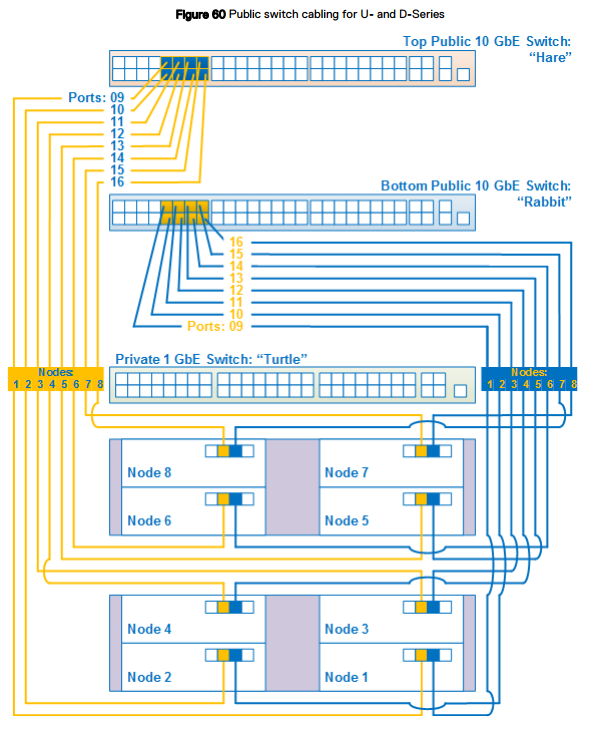
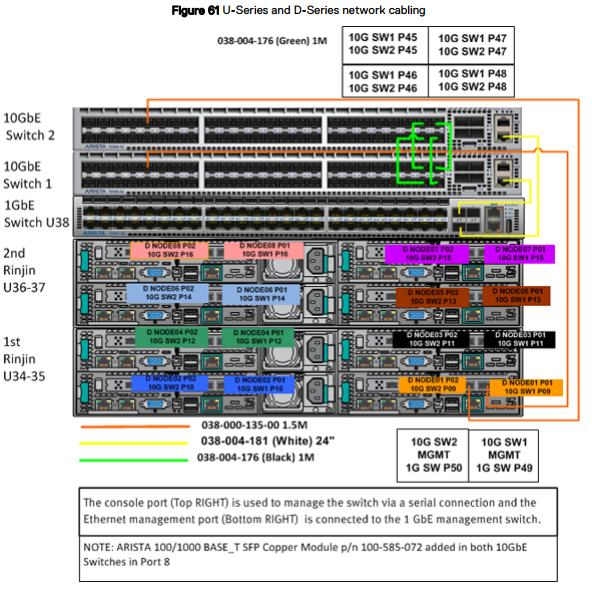
ネットワークのケーブル接続
ネットワーク ケーブル接続図は、Dellまたはお客様提供のラック内のUシリーズ、Dシリーズ、CシリーズのECSアプライアンスに適用されます。
3つのスイッチを区別するために、各スイッチにはニックネームがあります。
- Hare:10 GbEパブリック スイッチで、UシリーズまたはDシリーズのラック最上部、またはCシリーズ セグメントの最上部スイッチに位置します。
- Rabbit:10 GbEパブリック スイッチで、UシリーズまたはDシリーズのラック上部のHareの下、またはCシリーズ セグメントのHareスイッチの下に位置します。
- Turtle:1 GbEプライベート スイッチで、Uシリーズのラック上部のrabbitの下、またはCシリーズ セグメントのhareスイッチの下に位置します。
UシリーズとDシリーズのネットワーク ケーブル接続
次の図は、Dellまたはお客様が構成したUシリーズまたはDシリーズのECSの8ノード ラック構成のシンプルなネットワーク ケーブル接続図です。この図の後に、ポート、ラベル、ケーブルの色に関する情報を示すその他の詳細な図と表があります。
次の図は、Dellまたはお客様が構成したUシリーズまたはDシリーズのECSの8ノード ラック構成のシンプルなネットワーク ケーブル接続図です。この図の後に、ポート、ラベル、ケーブルの色に関する情報を示すその他の詳細な図と表があります。
一致するスイッチとポートについては下の表を、適切なスイッチ ポート番号については図も参照してください。
スイッチ1 = Rabbit = 下部スイッチ
スイッチ2 = Hare = 上部スイッチ
ノード ポート:
セカンダリー - 0 = P01 = 右ポート - スイッチ1/Rabbit/下部スイッチに接続。
セカンダリー - 1 = P02 = 左ポート - スイッチ2/Hare/上部スイッチに接続。
スイッチ1 = Rabbit = 下部スイッチ
スイッチ2 = Hare = 上部スイッチ
ノード ポート:
セカンダリー - 0 = P01 = 右ポート - スイッチ1/Rabbit/下部スイッチに接続。
セカンダリー - 1 = P02 = 左ポート - スイッチ2/Hare/上部スイッチに接続。
対象製品
ECS Appliance製品
ECS Appliance, ECS Appliance Gen 1, ECS Appliance Gen 2, ECS Appliance Gen 3, ECS Appliance Hardware Gen1 U-Series, Elastic Cloud Storage文書のプロパティ
文書番号: 000050341
文書の種類: Solution
最終更新: 03 4月 2026
バージョン: 11
質問に対する他のDellユーザーからの回答を見つける
サポート サービス
お使いのデバイスがサポート サービスの対象かどうかを確認してください。