Switch de rede aberta - Como identificar a etiqueta de serviço no ambiente de instalação de rede aberta (ONIE)
概要: Este artigo apresenta informações sobre como verificar a etiqueta de serviço do switch de rede aberta no ambiente de instalação de rede aberta (ONIE) usando um comando.
この記事は次に適用されます:
この記事は次には適用されません:
この記事は、特定の製品に関連付けられていません。
すべての製品パージョンがこの記事に記載されているわけではありません。
手順
Resumo do artigo
Este artigo apresenta informações sobre como identificar a etiqueta de serviço do switch no ambiente de instalação de rede aberta (ONIE).
Produtos em que é aplicável:
- Dell Networking S3048-ON
- Dell Networking S4048-ON
- Dell Networking S4048T-ON
- Dell Networking S6000-ON
- Dell Networking S6010-ON
- Dell Networking S6100-ON
- Dell Networking Z9100-ON
Como identificar a etiqueta de serviço
-
Conecte-se ao switch com um console serial por meio da porta do console serial.
-
Desligue e ligue o switch para reiniciar.
-
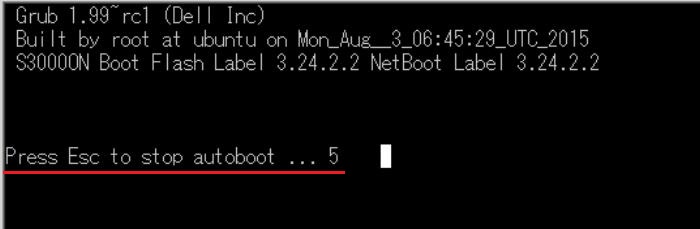
Após a reinicialização, pressione a tecla ESC dentro de cinco segundos assim que a mensagem "Press ESC to stop autoboot..." for exibida no software do terminal.
-
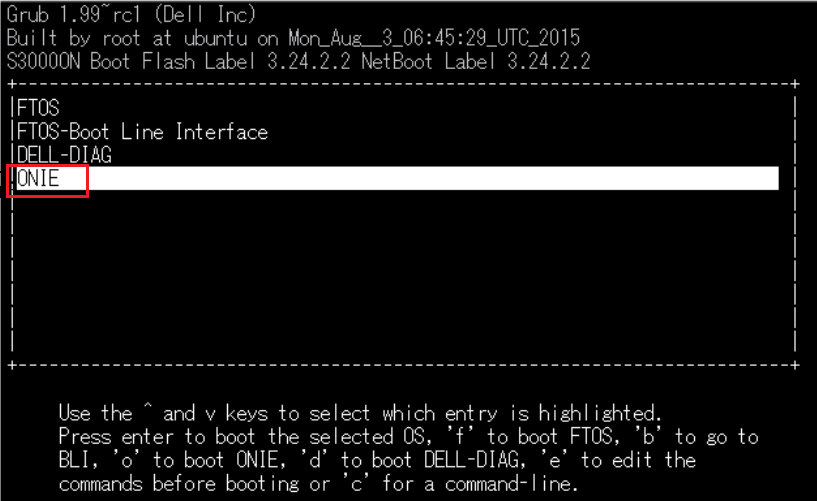
Selecione ONIE no menu do Grub e pressione a tecla Enter.
-
Selecione Rescue no menu do ONIE e pressione a tecla Enter.
Se o NOS estiver instalado, verifique se Rescue está selecionado, pois o sistema operacional não inicializará se "Install OS" estiver selecionado.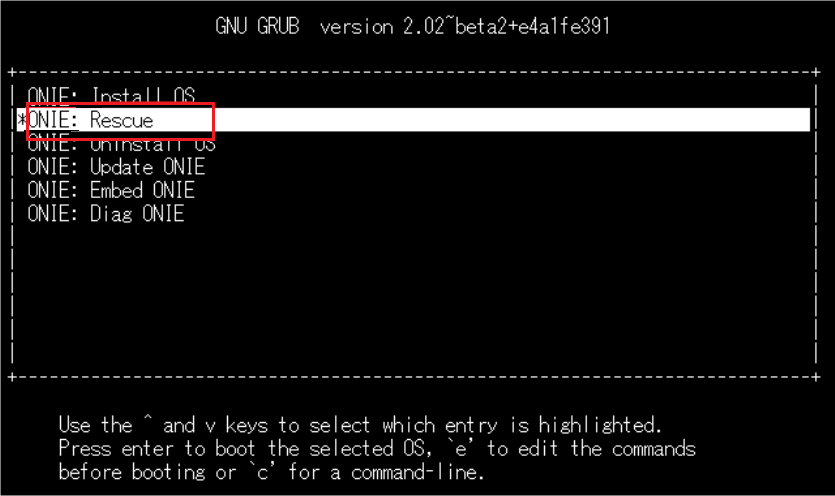
-
Execute o comando:
onie-syseepromno prompt do ONIE.
A etiqueta de serviço será exibida na linha "Service Tag".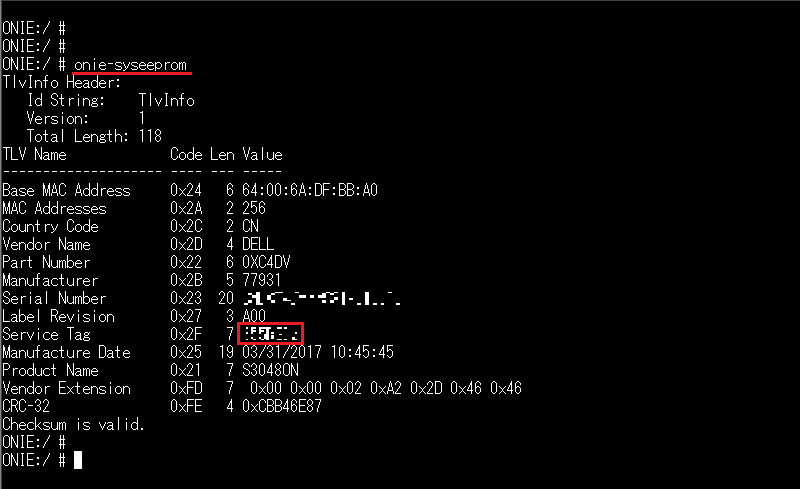
対象製品
Networking, PowerSwitch S3048-ON, PowerSwitch S4048-ON, PowerSwitch S6000 ON, PowerSwitch S4048T-ON, PowerSwitch S6010-ON, PowerSwitch S6100-ON, PowerSwitch Z9100-ON文書のプロパティ
文書番号: 000122325
文書の種類: How To
最終更新: 29 7月 2025
バージョン: 5
質問に対する他のDellユーザーからの回答を見つける
サポート サービス
お使いのデバイスがサポート サービスの対象かどうかを確認してください。