How to create a Stack on a Dell Networking Force10 S4810 model Switch
概要: This article explains how to Stack a Dell Networking Force10 S4810 model Switch with one or more other S4810 switches.
この記事は次に適用されます:
この記事は次には適用されません:
この記事は、特定の製品に関連付けられていません。
すべての製品パージョンがこの記事に記載されているわけではありません。
手順
Important Points to Remember
- Stacking is supported on the S4810 platform with Dell Networking Operating System version. 8.3.7.1, version 8.3.10.2 and 8.3.12.0 to current
- You may stack up to six S4810 systems
- The S4810 cannot be stacked with other system types.
- Data ports are configured as stacking ports in a predefined groups of four 10g ports called stack-groups. When using the 40g ports, you can configure a single port as a stack port; each 40g port is a stack-group.
- All the ports in a stack-group are placed in stacking mode. Unused ports in that group cannot be used as data ports
- The stack-group must contain only ports of the same type (all 10g or all 40g).
- All stack units must have the same version of Dell Networking OS
- Stacking is accomplished through front-end user ports on the chassis.
NOTE: The S4810 commands accept Unit ID 0-11, though the S4810 only supports stacking up to three units with Dell Networking OS version 8.3.7.1 and version 8.3.10.2. Starting at version 8.3.12.0 and newer of the Dell Networking OS you can stack up to six units.
Dell Networking OS elects a management (primary) unit, a standby unit, and all other units are member units.
The different units are presented like line cards; for example, to access tengigabitethernet port 1 on Stack Unit 0, enter interface tengigabitethernet 0/1 from configuration mode.
NOTE: You cannot enable stacking simultaneously with virtual link trunking (VLT). If you enable both at the same time, unexpected behavior occurs.
Create a Stack
On the S4810, the SFP and QSFP ports act as the stacking ports. The SFP ports are labeled 0-47 and the QSFP ports are labeled 48 and 56 (lower ports) and 52 and 60 (upper ports).
Ports are divided into 16 stack-groups (0-15).
- Stack-group 0 corresponds to ports 0-3, stack-group 1 corresponds to ports 4-7. so on thru stack-group 11
- Stack-group 12 corresponds to the 40gb port 48, stack-groups 13 corresponds to port 52, so on through stack group 15
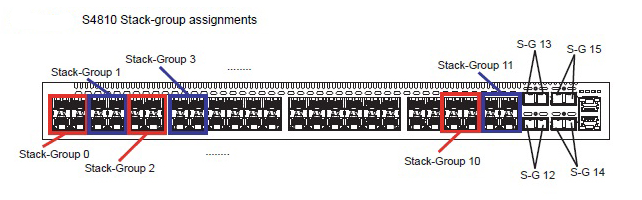
Commands for setting stack groups
These same commands will need to be run on the remaining switches that are stacking together.
|
Command |
Purpose |
|
FTOS# configure |
Enter configuration mode. |
|
FTOS(conf)# stack-unit 0 stack-group 12 |
Set ports to stack mode. This example sets the standalone Unit 0 40gb port Fo 0/48 into stack mode. |
|
FTOS(conf)#exit |
Exit configuration mode. |
|
FTOS# write memory |
Save running configuration to start up configuration. |
|
FTOS# reload |
Restarts the switch to set the stack port hardware configuration. |
Once a stack-group is turned on for stacking then all individual ports in the stack group are used for stacking only. They can no longer be used as an ethernet port until the stack-group is removed.
NOTE: It is always recommended to save your configuration to the startup-config before any reload. This will ensure that any new configuration changes will not be lost.
Cabling
You can connect the units while they are powered down or up. Stacking ports are bi-directional. The S4810 supports stacking in either a ring or a cascade topology.
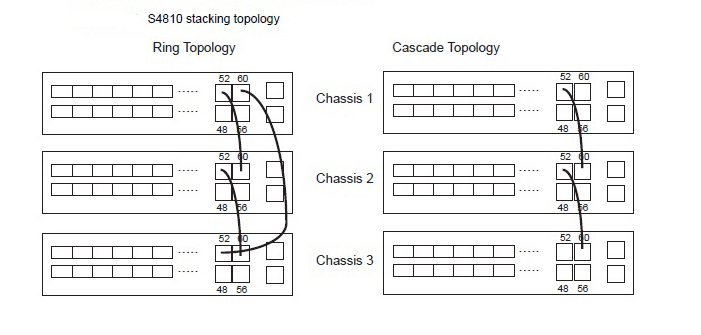
Verify Stack Members
FTOS#show system brief
Stack MAC : 00:01:e8:8c:53:32
Reload Type : normal-reload [Next boot : normal-reload]
-- Stack Info --
Unit UnitType Status ReqTyp CurTyp Version Ports
----------------------------------------------------------------------------------------------------
0 Standby online S4810 S4810 4810-8-3-12-1447 64
1 Management online S4810 S4810 4810-8-3-12-1447 64
FTOS#show system stack-ports
Topology: Ring
Interface Connection Link Speed Admin Status Link Status Trunk Group
---------------------------------------------------------------------------------------------------------
0/56 3/56 40 up up
0/60 3/60 40 up up
3/48 40 up down
3/52 40 up down
3/56 0/56 40 up up
3/60 0/60 40 up up
対象製品
PowerSwitch S4810P, PowerSwitch S4810-ON文書のプロパティ
文書番号: 000122545
文書の種類: How To
最終更新: 05 6月 2025
バージョン: 6
質問に対する他のDellユーザーからの回答を見つける
サポート サービス
お使いのデバイスがサポート サービスの対象かどうかを確認してください。