How to Reinstall Individual Modern Apps Included with Windows 10
概要: This article provides the information about reinstalling individual modern applications that are included with Windows 10.
この記事は次に適用されます:
この記事は次には適用されません:
この記事は、特定の製品に関連付けられていません。
すべての製品パージョンがこの記事に記載されているわけではありません。
現象
原因
No cause information is available.
解決方法
Reinstall Individual Modern Apps
This guide should be only used for trying to resolve individual app issues.
How to Reinstall an Individual App
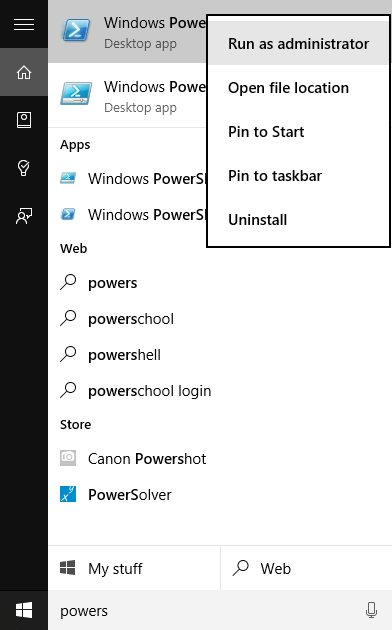
- Open Windows PowerShell as an Administrator by typing Powers on the search bar on your taskbar. Next to the start button (See image below), right-clicking or touch and hold then select Run as Administrator from the drop-down list.
- Type in the following command listed in the table below under the "Remove PowerShell Command" column to remove the associated native app.
| Native App | Remove PowerShell Command | App Name in Store |
|---|---|---|
| Alarms & Clocks | get-appxpackage *Microsoft.WindowsAlarms* | remove-appxpackage |
Windows Alarms & Clock  |
| Calculator | get-appxpackage *Microsoft.WindowsCalculator* | remove-appxpackage |
Windows Calculator |
| Camera | get-appxpackage *Microsoft.WindowsCamera* | remove-appxpackage |
Windows Camera |
| Groove Music | get-appxpackage *Microsoft.ZuneMusic* | remove-appxpackage |
Groove Music |
| Mail & Calendar | get-appxpackage *microsoft.windowscommunicationsapps* | remove-appxpackage |
Mail & Calendar |
| Maps | get-appxpackage *Microsoft.WindowsMaps* | remove-appxpackage |
Windows Maps |
| Movies & TV | get-appxpackage *Microsoft.ZuneVideo* | remove-appxpackage |
Movies & TV |
| OneNote | get-appxpackage *Microsoft.Office.OneNote* | remove-appxpackage |
OneNote |
| People | get-appxpackage *Microsoft.People* | remove-appxpackage |
Microsoft People |
| Photos | get-appxpackage *Microsoft.Windows.Photos* | remove-appxpackage |
Microsoft Photos |
| Voice Recorder | get-appxpackage *Microsoft.WindowsSoundRecorder * | remove-appxpackage |
Windows Voice Recorder |
| Xbox | get-appxpackage *Microsoft.XboxApp* | remove-appxpackage |
Xbox |
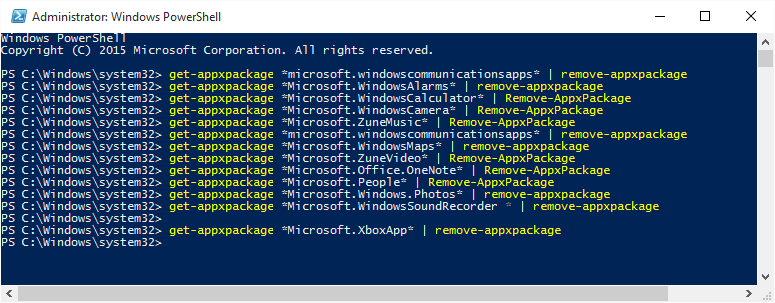
The app can be reinstalled using the Store App or by following the link that is listed in the table below. Exit the Store app if it is already open before reinstalling the app.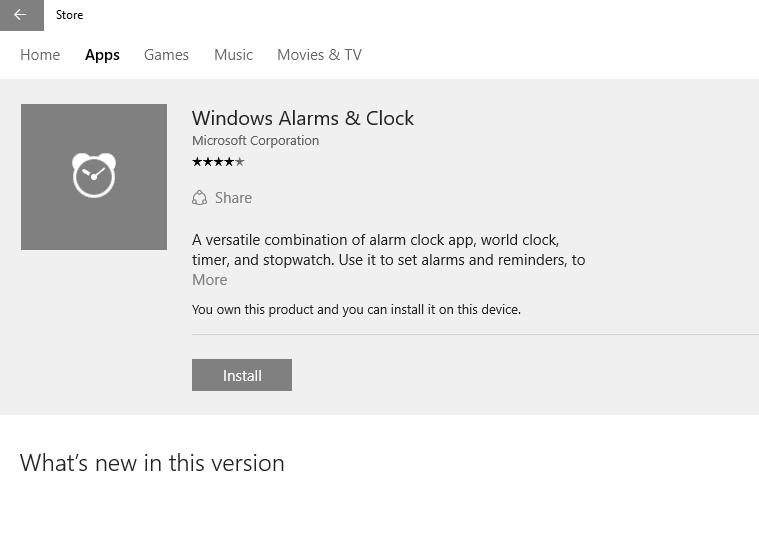
対象製品
Alienware, Dell All-in-One, Dell Pro All-in-One, Dell Pro Max Micro, Dell Pro Max Slim, Dell Pro Max Tower, Dell Pro Micro, Dell Pro Slim, Dell Pro Tower, Dell Slim, Dell Tower, Inspiron, OptiPlex, Vostro, XPS, G Series, G Series, Alienware
, Dell Laptops, Dell Plus, Dell Pro, Dell Pro Max, Dell Pro Plus, Dell Pro Premium, Inspiron, Latitude, Dell Pro Rugged, Vostro, XPS, Fixed Workstations, Mobile Workstations, Dell Pro Max Micro XE FCM2250, Dell Pro Max Slim XE FCS1250, Dell Pro Max Tower T2 XE FCT2250, Dell Pro Max 16 XE MC16250, Dell Pro Micro Plus XE QBM1250, Dell Pro Slim Plus XE5 QBS1250, Dell Pro Tower Plus XE5 QBT1250
...
文書のプロパティ
文書番号: 000125529
文書の種類: Solution
最終更新: 16 7月 2025
バージョン: 7
質問に対する他のDellユーザーからの回答を見つける
サポート サービス
お使いのデバイスがサポート サービスの対象かどうかを確認してください。