Windows 10 Activation Error Code 0xC004C008
概要: Windows 10 activation Error Code 0xC004C008 issue on a new system received from Dell
この記事は次に適用されます:
この記事は次には適用されません:
この記事は、特定の製品に関連付けられていません。
すべての製品パージョンがこの記事に記載されているわけではありません。
現象
N/A
原因
N/A
解決方法
Follow the guidelines provided in this article to resolve a Windows 10 Activation Error Code 0xC004C008 (Product key already in use) on system activation out of the box (OOB).
Error Code 0xC004C008
You may encounter a Windows 10 activation issue on a new system received from Dell. On the initial system boot, you may see the following error (Figure 1):
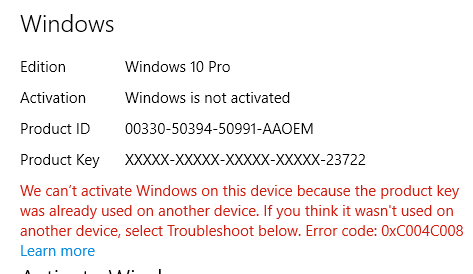
Figure 1: Windows 10 activation error that product key is already in use
This error originates by the activation server finding out that the Windows 10 product key may have been used on multiple Personal Computers. When you install the Windows 8.1 or Windows 10 Operating System product a specific number of times, the error code 0xC004C008 appears because the Windows 8.1 or Windows 10 license can only be installed on a single device.
Solution
 NOTE: Some activation errors are resolved by performing a couple of system reboots and then retrying the activation sequence. Reference: Microsoft Windows IT Center Article: Windows 10 edition upgrade
You can also see the Activation Troubleshooter to try to solve this issue. The troubleshooter expedites the download of a required update for OA3 (OEM Activation Process 3.0).
If the issue continues to occur, then Contact Microsoft by dialing the Support number listed on the activation screen ("in the United States and Canada for example: 1-800-936-5700") and explain that the error message you are receiving is on a new Dell computer.
Microsoft can provide phone activation.
対象製品
Alienware, Inspiron, Legacy Desktop Models, OptiPlex, Vostro, XPS, G Series, G Series, Alienware, Inspiron, Latitude, Vostro, XPS, Legacy Laptop Models, Fixed Workstations, Mobile Workstations文書のプロパティ
文書番号: 000130292
文書の種類: Solution
最終更新: 17 7月 2025
バージョン: 6
質問に対する他のDellユーザーからの回答を見つける
サポート サービス
お使いのデバイスがサポート サービスの対象かどうかを確認してください。