Precision 7740: Keyboard Function guide
概要: This article provides a guide to the keyboard shortcut functions on the Dell Precision 7740 Mobile Workstation
この記事は次に適用されます:
この記事は次には適用されません:
この記事は、特定の製品に関連付けられていません。
すべての製品パージョンがこの記事に記載されているわけではありません。
現象
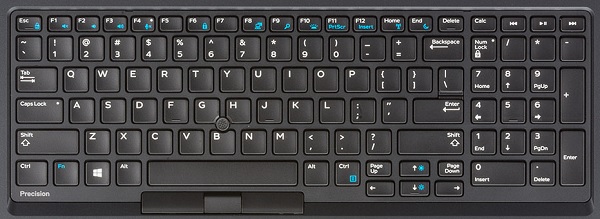
The following guide lists the keyboard shortcuts available and the functions they perform on the Dell Precision 7740 Mobile Workstation
Keyboard Shortcut Key Functions
The below table is a list of combination short-cut key functions available on the Precision 7740 Mobile Workstation
原因
| Function key combo | Result |
|---|---|
| Fn + Esc | Toggle the Fn-Key Lock |
| Fn + F1 | Toggle the Mute Audio |
| Fn + F2 | Decrease Volume |
| Fn + F3 | Increase Volume |
| Fn + F4 | Toggles Microphone Mute
LED Off - Microphone capable of recording audio LED On - Microphone Muted and incapable of recording audio |
| Fn + F6 | Used as Scroll Lock Key |
| Fn + F8 | Toggles Video Output |
| Fn + F10 | Keyboard Backlight Illumination
Disable, Dim, Bright |
| Fn + F11 | Used as Print Screen Key |
| Fn + F12 | Used as Insert Key |
| Fn + Right Ctrl | Used as Context Menu Key |
| Fn + Left Cursor | Used as Home Key |
| Fn + Right Cursor | Used as End Key |
| Fn + B | Used as Pause/Break Key |
| Fn + Arrow Key (Up) | LCD Brightness Decrease |
| Fn + Arrow Key (Down) | LCD Brightness Increase |
| Fn + Home | Toggles the WiFi Radio |
| Fn + End | S3 Sleep Mode |
解決方法
 Visit our Keyboard knowledge base for additional resources and information.
 For additional articles and information visit our Touchpad support page.
 Additional articles and information can also be found on our Mouse support page.
対象製品
Precision 7740文書のプロパティ
文書番号: 000134169
文書の種類: Solution
最終更新: 29 4月 2026
バージョン: 5
質問に対する他のDellユーザーからの回答を見つける
サポート サービス
お使いのデバイスがサポート サービスの対象かどうかを確認してください。