Windows 11 - Incorrect Operating System Version Reported
概要: This article talks about an issue where specific applications and computer settings on Windows 11 detects the Operating System as Windows 10.
この記事は次に適用されます:
この記事は次には適用されません:
この記事は、特定の製品に関連付けられていません。
すべての製品パージョンがこの記事に記載されているわけではありません。
現象
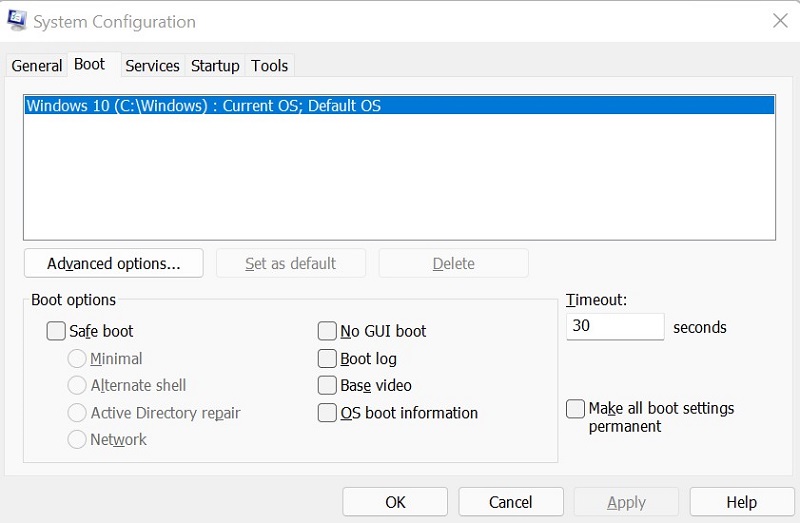
In multiple applications and computer settings, Windows 11 identifies as Windows 10 to prevent application incompatibilities.
System settings that identify as Windows 10
- Microsoft Edge and other Chromium-based browsers such as Google Chrome Browser, Brave, and so on show Windows 10 in the user agent string.
- Mozilla/5.0 (Windows NT 10.0; Win64; x64) AppleWebKit/537.36 (KHTML, like Gecko) Chrome/95.0.4638.69 Safari/537.36
- Websites that use the user agent string to identify the actual Windows version for digital content such as driver downloads and self-help may direct to incorrect content.
- Windows Command Prompt identifies as Version 10.

- Microsoft Account Device properties.

- System Configuration (MSCONFIG).
原因
Windows uses the internal build number (as shown in Figure 4 [English only]) to differentiate between Windows 11 (Build 22000 and higher) and Windows 10 (Build below 22000).

解決方法
To correctly identify the windows version on your computer, use Winver. For instructions, see Microsoft knowledge-base article: Which version of Windows operating system am I running
対象製品
Alienware, Inspiron, OptiPlex, Vostro, XPS, G Series, G Series, Alienware, Inspiron, Latitude, Vostro, XPS, Fixed Workstations, Mobile Workstations文書のプロパティ
文書番号: 000193571
文書の種類: Solution
最終更新: 19 4月 2025
バージョン: 6
質問に対する他のDellユーザーからの回答を見つける
サポート サービス
お使いのデバイスがサポート サービスの対象かどうかを確認してください。