NMM: SQL backup fails with ERROR: nsrsqlsv reporting a bad page
概要: NetWorker Module for Microsoft (NMM) backup fails when SQL client running Module for Microsoft Applications (NMM) and database CHECKSUM enabled for Page verification.
この記事は次に適用されます:
この記事は次には適用されません:
この記事は、特定の製品に関連付けられていません。
すべての製品パージョンがこの記事に記載されているわけではありません。
現象
The Backup session of an SQL database fails through NetWorker, and it cannot be skipped.
NMM reports the following errors to nsrsqlsv log on client side under nsr/applogs path:
nsrsqlsv: Microsoft SQL server documentation provides details about the following SQL Server Provider error:
nsrsqlsv: BACKUP 'DB-name' detected an error on page (1:#) in file 'DB-name.mdf'.
nsrsqlsv: (Error: 3043)
原因
When SQL client configuration has selected database CHECKSUM in NMC:
Either have the client wizard Selected "Perform Checksum Before Writing to media" option,
OR the manual client properties have -k parameter added to backup command field like "nsrsqlsv -k" in a client resource.
解決方法
Disable the SQL database CHECKSUM attribute:
1. Connect to the NetWorker Management Console (NMC).
2. Go to the Protection tab and click Clients.
3. Adjust the SQL client configuration from the NMC. The client can be modified using one of the following methods:
Modify Client Wizard:
a. Right-click the client and click Modify Client Wizard.
b. In the Specify the Backup Options pane keep Perform Checksum Before Writing to media checkbox cleared.
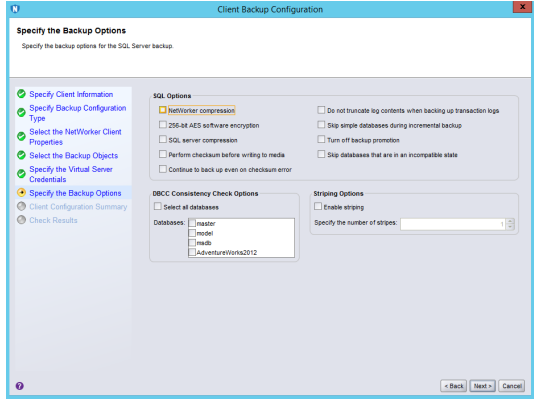
Modify Client Properties:
a. Right-click the click and select Modify Client Properties.
b. From the Apps and Modules tab, remove the '-k' switch from the backup command field.
4. Run backup again.
その他の情報
To confirm that this NMM backup failure is not related to the NetWorker issue, have the SQL Database Administrator perform the following:
- Test same SQL database backup running NATIVE SQL tool, From SQL Server Management Studio (SSMS) T-SQL like:
- BACKUP DATABASE [
nameofDB] toDIsk='somediskpathwithspace'with CHECKSUM - NOTE: TSQL Backup Database defaults to NO_CHECKSUM.
- BACKUP DATABASE [
対象製品
NetWorker Family, NetWorker, NetWorker Module, NetWorker Module for Microsoft文書のプロパティ
文書番号: 000194757
文書の種類: Solution
最終更新: 13 1月 2026
バージョン: 2
質問に対する他のDellユーザーからの回答を見つける
サポート サービス
お使いのデバイスがサポート サービスの対象かどうかを確認してください。