Dell Wireless DW58XXe 4G LTE WWAN Module Card Unable to See 4G
概要: Steps to switch DW58XXe WWAN cards from 3G to 4G after 3G network shutdown.
この記事は次に適用されます:
この記事は次には適用されません:
この記事は、特定の製品に関連付けられていません。
すべての製品パージョンがこの記事に記載されているわけではありません。
現象
You may not be able to connect to your WWAN cellular network or swap from a 3G to 4G network. You may also receive a "No Service" error message from within Windows.
原因
3G and 4G networks use different Access Point Names (APN) and must be manually selected within Windows. This is more common as Internet Service Providers (ISPs) are retiring 3G networks.
解決方法
Single Unit/Manual Change:
Update Windows and WWAN drivers to the latest version possible and then configure a new 4G APN.
- If you have a Dell DW5811e, DW5820e, or DW5821e card, update to the latest Snapdragon driver by visiting Dell.com/Support/Drivers
- Create a new APN by going to Network & Internet Setting > Cellular > Advance Options (Figure 1).
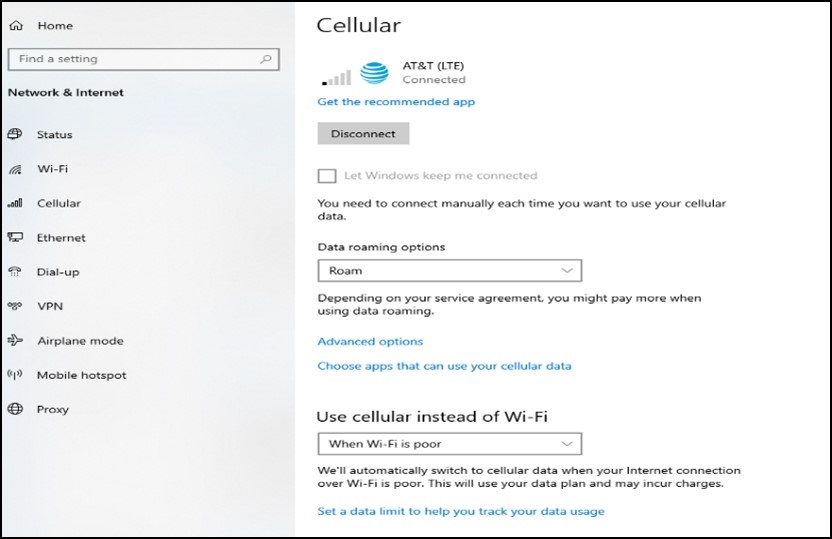
Figure 1 - Go to "Add APN" and enter your APN information (Figure 2).
- APN information can be obtained from your ISP.
- The APN Type must be "Internet and Attach."
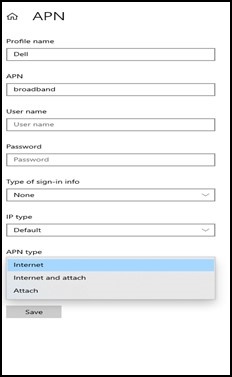
Figure 2
- Ensure that "Apply to Profile" is checked.
- Click "Save."
Note: Dell DW5808e module Users are required to reimage your computer or upgrade to a version of Windows greater than Windows 10 version 1903. Installing the latest DW5808e driver should also be done. On these modules, when configuring the APN, there may be no "Internet and Attach" option, but the new version of Windows allows the computer to find the correct firmware without the 3G routing table.
Bulk/Automation:
Enterprise Users can review the article below if they must configure multiple APNs inside your network.
How to Script Cellular APN Changes using Microsoft Configuration Designer
対象製品
G Series, Alienware, Inspiron, Latitude, Vostro, XPS, Mobile Workstations文書のプロパティ
文書番号: 000197488
文書の種類: Solution
最終更新: 25 7月 2025
バージョン: 11
質問に対する他のDellユーザーからの回答を見つける
サポート サービス
お使いのデバイスがサポート サービスの対象かどうかを確認してください。