「VxRail:アップグレード エラー:カスタマイズされたデポの設定に失敗しました
概要: VxRailアップグレード エラー「バンドルのアップロードに失敗しました: Trigger set customized depot meets exception」というメッセージが表示されると、オンライン デポのURLが無効であるか、現在アクセスできません。
この記事は次に適用されます:
この記事は次には適用されません:
この記事は、特定の製品に関連付けられていません。
すべての製品パージョンがこの記事に記載されているわけではありません。
現象
VxRail 7.0.xにアップグレードする前に、VxRailでvLCMが有効になっている。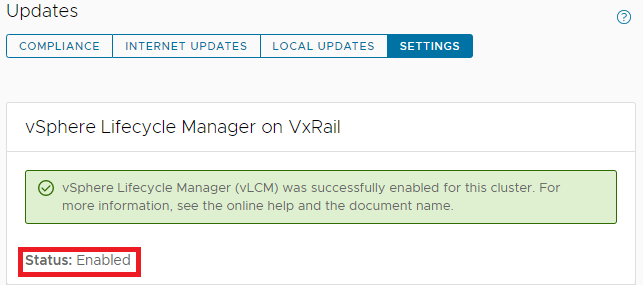
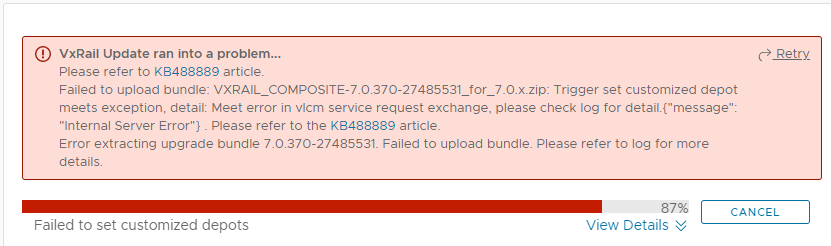
その後、VxRail 7.0.xへのアップグレードの実行中に、次のエラーで失敗します。
Failed to upload bundle: VxRail_COMPOSITE-XXXX.zip Trigger set customized depot
meets exception, detail: Meet error in vlcm service request exchange.....
lcm-web.log:
2022-05-17 02:49:13,848 ERROR [SURROGATE] [org.springframework.amqp.rabbit.RabbitListenerEndpointContainer#1-1] c.v.l.a.LCMServiceImpl [LCMServiceImpl.java:913] Trigger set customized depot meets exception, detail:
com.dellemc.vxrail.lcm.data.provider.out.VlcmServiceWriteException: Meet error in vlcm service request exchange, please check log for detail.{"message": "Internal Server Error"}

        at com.dellemc.vxrail.lcm.data.provider.utils.HttpUtilsForVlcm.postVlcmHttpResponse(HttpUtilsForVlcm.java:94)
        at com.dellemc.vxrail.lcm.data.provider.repositories.service.VlcmAPIService.setOnlineDepots(VlcmAPIService.java:164)
        at com.dellemc.vxrail.lcm.data.provider.out.VlcmServiceMicroWriter.setCustomizedOnlineDepots(VlcmServiceMicroWriter.java:95)
        at com.vce.lcm.api.LCMServiceImpl.vlcmCustomizedDepotProcess(LCMServiceImpl.java:890)
        at com.vce.lcm.api.LCMServiceImpl.uploadLocalCompositeBundle(LCMServiceImpl.java:828)
        at com.vce.lcm.api.LCMServiceImpl.resumeUploadCompositeBundle(LCMServiceImpl.java:1146)
        at com.vce.lcm.api.LCMServiceImpl.uploadAcgCompositeBundle(LCMServiceImpl.java:1134)
        at com.vce.lcm.api.LCMServiceImpl.uploadACGUpgradeBundle(LCMServiceImpl.java:362)
        at com.emc.mystic.manager.upgrade.service.VirtualApplianceServiceImpl.startUploadOfUpgradeBundle(VirtualApplianceServiceImpl.java:775)
        at com.emc.mystic.manager.upgrade.service.VirtualApplianceServiceImpl.triggerUploadOfUpgradeBundleFromDeployMessage(VirtualApplianceServiceImpl.java:557)
        at com.emc.mystic.manager.upgrade.service.VirtualApplianceServiceImpl.processUploadOfUpgradeBundle(VirtualApplianceServiceImpl.java:495)
short.term.log:
2022-05-16-07:12:08 microservice.do-cluster "2022-05-16 07:12:08,275 [ERROR] <Dummy-1149:140446016676424> request.py log_response() (131): [REQUEST END] The request could not be understood by the server due to malformed syntax. Response status: 400 BAD REQUEST, Response body: ['{""error_type"": ""INVALID_ARGUMENT"", ""messages"": [{""args"": [""https://<vxm_ip_or_fqdn>/vlcm/depot/vlcm/components/ESXi-7.0.3_19482537-8f99f6c1/index.xml""], ""default_message"": ""Online Depot URL \'https://<vxm_ip_or_fqdn>/vlcm/depot/vlcm/components/ESXi-7.0.3_19482537-8f99f6c1/index.xml\' is not valid or cannot be reached now."", ""localized"": ""Online Depot URL \'https://<vxm_ip_or_fqdn>/vlcm/depot/vlcm/components/ESXi-7.0.3_19482537-8f99f6c1/index.xml\' is not valid or cannot be reached now."", ""id"": ""com.vmware.vcIntegrity.lifecycle.depots.online.Invalid""}]}']"
2022-05-16-07:12:08 microservice.vlcm "2022-05-16 07:12:08,276 - DEBUG - connectionpool(461) - http://api-gateway:8080 ""POST /rest/vxm/internal/do/v1/vc/api/esx/settings/depots/online HTTP/1.1"" 400 556"
2022-05-16-07:12:08 microservice.vlcm "2022-05-16 07:12:08,278 - INFO - do(112) - Call do response status code: 400. "
2022-05-16-07:12:08 microservice.vlcm "2022-05-16 07:12:08,278 - INFO - online_depot_service(42) - INVALID_ARGUMENT"
2022-05-16-07:12:08 microservice.vlcm "2022-05-16 07:12:08,278 - ERROR - app(1892) - Exception on /vlcm/v1/depot/online [POST]"
2022-05-16-07:12:08 microservice.vlcm "Traceback (most recent call last):"
2022-05-16-07:12:08 microservice.vlcm "  File ""/usr/local/venv/lib64/python3.6/site-packages/flask/app.py"", line 1950, in full_dispatch_request"
2022-05-16-07:12:08 microservice.vlcm "    rv = self.dispatch_request()"
2022-05-16-07:12:08 microservice.vlcm "  File ""/usr/local/venv/lib64/python3.6/site-packages/flask/app.py"", line 1936, in dispatch_request"
2022-05-16-07:12:08 microservice.vlcm "    return self.view_functions[rule.endpoint](**req.view_args)"
2022-05-16-07:12:08 microservice.vlcm "  File ""/usr/local/venv/lib64/python3.6/site-packages/flask_restplus/api.py"", line 325, in wrapper"
2022-05-16-07:12:08 microservice.vlcm "    resp = resource(*args, **kwargs)"
2022-05-16-07:12:08 microservice.vlcm "  File ""/usr/local/venv/lib64/python3.6/site-packages/flask/views.py"", line 89, in view"
2022-05-16-07:12:08 microservice.vlcm "    return self.dispatch_request(*args, **kwargs)"
2022-05-16-07:12:08 microservice.vlcm "  File ""/usr/local/venv/lib64/python3.6/site-packages/flask_restplus/resource.py"", line 44, in dispatch_request"
2022-05-16-07:12:08 microservice.vlcm "    resp = meth(*args, **kwargs)"
2022-05-16-07:12:08 microservice.vlcm "  File ""/home/app/api/vlcm_api.py"", line 64, in post"
2022-05-16-07:12:08 microservice.vlcm "    depot_service.add_depot(depot_url)"
2022-05-16-07:12:08 microservice.vlcm "  File ""/home/app/services/online_depot_service.py"", line 46, in add_depot"
2022-05-16-07:12:08 microservice.vlcm "    raise Exception(response.content)"
2022-05-16-07:12:08 microservice.vlcm "Exception: b'{""error_type"":""INVALID_ARGUMENT"",""messages"":[{""args"":[""https://<vxm_ip_or_fqdn>/vlcm/depot/vlcm/components/ESXi-7.0.3_19482537-8f99f6c1/index.xml""],""default_message"":""Online Depot URL \'https://<vxm_ip_or_fqdn>/vlcm/depot/vlcm/components/ESXi-7.0.3_19482537-8f99f6c1/index.xml\' is not valid or cannot be reached now."",""localized"":""Online Depot URL \'https://<vxm_ip_or_fqdn>/vlcm/depot/vlcm/components/ESXi-7.0.3_19482537-8f99f6c1/index.xml\' is not valid or cannot be reached now."",""id"":""com.vmware.vcIntegrity.lifecycle.depots.online.Invalid""}]}'"
原因
vLCMを有効にした後、VxRail Manager SSL証明書が再生成されました。vCenter ServerはVxRail Managerの証明書を信頼できません。
通常、VxRail ManagerのSSL証明書は自己署名証明書に置き換えられます。
通常、VxRail ManagerのSSL証明書は自己署名証明書に置き換えられます。
解決方法
次の手順に従って、VMCAによって署名されたVxRail Manager SSL証明書を置き換えます。
- VxRail Managerで次のスクリプトを実行して、VxRail Manager SSL証明書を再生成します。
内部vCenter:
python /etc/vmware-marvin/scripts/lcm/scripts/import_vc_generated_vxm_cert_enhance.py -c <vc_fqdn> -u <vc_mgmt_account> -p <vc_mgmt_passwd> -s root -t <vc_root_passwd> -x <vxm_ip> -n <vxm_fqdn>
Note: Add a ' at the beginning and end of the passwords IF you have special characters in the password.
外部vCenter:
python /etc/vmware-marvin/scripts/lcm/scripts/import_vc_generated_vxm_cert_enhance.py -c <vc_fqdn> -u <vc_mgmt_account> -p <vc_mgmt_passwd> -s root -t <vc_root_passwd> -x <vxm_ip> -n <vxm_fqdn> -v
Note: Add a ' at the beginning and end of the passwords IF you have special characters in the password.
python /etc/vmware-marvin/scripts/lcm/scripts/import_vc_generated_vxm_cert_enhance.py -h

Usage: import_vc_generated_vxm_cert_enhance.py [options]

Options:
  -h, --help            show this help message and exit
  -c ADDRESS, --address=ADDRESS
                        Address of VC to connect to
  -u MGT_USERNAME, --management-username=MGT_USERNAME
                        user name to use when connecting to VC
  -p MGT_PASSWORD, --management-password=MGT_PASSWORD
                        Password to use when connecting to VC
  -s GUEST_USERNAME, --guest-username=GUEST_USERNAME
                        user name to use when running guest OS operation on VC
  -t GUEST_PASSWORD, --guest-password=GUEST_PASSWORD
                        Password to use when running guest OS operation to VC
  -x VXM_IP, --vxm-ip=VXM_IP
                        The VXM IP, must provide it when this script is not
                        running on VXM server
  -n VXM_FQDN, --vxm-fqdn=VXM_FQDN
                        The VXM fqdn, must provide it when this script is not
                        running on VXM server
  -v, --external-vc     The external vc flag, must set true if VC is external.
  -e, --encrypted-auth  The flag to claim provided auth are encrypted, need to
                        decrypt when script running.
  -m, --m2m-enabled     The flag to claim if hosts enable m2m
以下は、内部vCenterを使用した実習での出力例です。
vxm:/home/mystic # python /etc/vmware-marvin/scripts/lcm/scripts/import_vc_generated_vxm_cert_enhance.py -c vcluster101-vcsa.vv009.local -u administrator@vsphere.local -p 'Testvxrail123!' -s root -t Testvxrail123! -x 172.16.10.200 -n vcluster101-vxm.vv009.local
メモ: パスワードに特殊文字が含まれている場合は、パスワードの先頭と末尾に「'」を追加します。
スクリプト出力は次のとおりです。
Start to connect VC: vcluster101-vcsa.vv009.local

Succeed to connect VC

VXM ip: 172.16.10.200, VXM fqdn: vcluster101-vxm.vv009.local, VC fqdn: vcluster101-vcsa.vv009.local


Getting VM via ip: vcluster101-vcsa.vv009.local

VC VM: vcluster101-vcsa.vv009.local 172.16.10.201

Create temporary SSL cert folder on VC: /tmp/ssl_cert-172.16.10.200-5203

Generate private key for vxm cert

Generate certtool config file

Generate vxm cert

Backup root cert

Generate import ssl cert API script

 #!/bin/sh
# Import cert
get_cert_data() {
  while read -r line; do
  # first line and not empty line
    if [[ -z $x ]] && [[ -n $line ]]; then
      x=$x"$line"
  # other line and not empty line
    elif [[ ! -z $line ]]; then
      x=$x"\n""$line"
    fi
  done <$1
  echo $x
}

generate_post_data() {
cat <<EOF
{"cert":"${vxm_cert}","primary_key":"${vxm_private_key}","root_cert_chain":"${root_cert}","password":"testpassword"}
EOF
}

vxm_key_file=$1
vxm_crt_file=$2
root_crt_file=$3
vxm_key_filter_file=$4


cat $vxm_key_file | sed -n -e "/BEGIN RSA PRIVATE KEY/, $"p >$vxm_key_filter_file

vxm_cert=$(get_cert_data $vxm_crt_file)
echo "vxm cert: $vxm_cert"
echo ""

root_cert=$(get_cert_data $root_crt_file)
echo "root cert: $root_cert"
echo ""

vxm_private_key=$(get_cert_data $vxm_key_filter_file)
echo "vxm private key: $vxm_private_key"
echo ""

echo $(generate_post_data)

i=1
while [[ $i -le 5 ]]; do
  result=`curl -k -X POST -H "Content-Type:application/json" -H "Authorization: Basic $5" https://$6/rest/vxm/$7/certificates/import-vxm --data "$(generate_post_data)"`

  echo "result: $result"
  echo ""

  message=$(echo $result | grep "message")

  if [[ $message =~ "successfully" ]]; then
    echo "Successfully"
    exit 0
  else
    echo "Import cert retry: $i"
    echo ""
    let i++
    sleep 60
  fi
done

if [[ $i -eq 5 ]]; then
  echo "Fail"
  exit 1
fi

Run import SSL cert API script

Finish to import VC generated cert to VXM.
- アップグレードの再試行
対象製品
VxRail, VxRail Appliance Series, VxRail Software文書のプロパティ
文書番号: 000199795
文書の種類: Solution
最終更新: 25 2月 2026
バージョン: 5
質問に対する他のDellユーザーからの回答を見つける
サポート サービス
お使いのデバイスがサポート サービスの対象かどうかを確認してください。