NetWorke: Console "unable to open socket connection to host "NetWorker server" on port 5672"
概要: Error message on NetWorker Management Console (NMC) when trying to see the details of a workflow under the monitoring tab: "Message bus unable to open socket connection to host "Networkerserver_hostname" on port 5672: A socket error occurred" appears in the NMC. ...
この記事は次に適用されます:
この記事は次には適用されません:
この記事は、特定の製品に関連付けられていません。
すべての製品パージョンがこの記事に記載されているわけではありません。
現象
NetWorker Server and NetWorker Management Console (NMC) are installed in same host.
The NMC monitoring window shows all policies as "Never Run" ; however, backup and clone jobs are completing as per schedule.
The following error appears in the NMC when trying to open workflow or action properties:
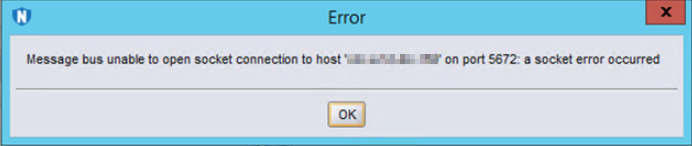
Figure 1: Screenshot of Error Message: Unable to Open Socket Connection to Host on Port 5672.
RabbitMQ uses port 5671 for communication over SSL.
Port 5672 was the old port used for non-SSL communication (no longer used).
The GSTD connects to RabbitMQ to get and display NMC information using port 5671.
When connection over port 5671 fails, NetWorker NMC fails back and tries 5672 which fails too because RabbitMQ no longer uses this port.
The error message then reports the issue to be on port 5672, but the issue is really when communicating with port 5671.
The NMC monitoring window shows all policies as "Never Run"
; however, backup and clone jobs are completing as per schedule.
The following error appears in the NMC when trying to open workflow or action properties:
Message bus unable to open socket connection to host "<NetWorker server hostname>" on port 5672: A socket error occurred
Figure 1: Screenshot of Error Message: Unable to Open Socket Connection to Host on Port 5672.
RabbitMQ uses port 5671 for communication over SSL.
Port 5672 was the old port used for non-SSL communication (no longer used).
The GSTD connects to RabbitMQ to get and display NMC information using port 5671.
When connection over port 5671 fails, NetWorker NMC fails back and tries 5672 which fails too because RabbitMQ no longer uses this port.
The error message then reports the issue to be on port 5672, but the issue is really when communicating with port 5671.
原因
GSTD is unable to communicate to RabbitMQ on port 5671.
Usually this means RabbitMQ service is down, but it can potentially mean that there is some connection issue with this port (Like described in article 210569)
Usually this means RabbitMQ service is down, but it can potentially mean that there is some connection issue with this port (Like described in article 210569)
- If RabbitMQ is working as expected, the port 5671 on the NetWorker server must be in a listening state. Verify that the port 5671 is in a listening state. To check these ports, use the below commands:
For Linux:
netstat -ano | grep 5671
ss -ano | grep 5671

For Windows:
netstat -ano | findstr 5671
- If the port does not show up, ensure that NSRD service is running (and hence that RabbitMQ should have been opened a connection to this port).
解決方法
Procedure:
- Stop NetWorker services.
- Go to /nsr/tmp folder, and rename the RabbitMQ folder to RabbitMQ_old.
- Start the NetWorker services. Verify a new RabbitMQ folder is generated in the /nsr/tmp folder.
- Check the status of port 5671 on the NetWorker server.
- Open the NetWorker Management Console and check the workflow status.
- If the issue is resolved, delete RabbitMQ_old from /nsr/tmp.
その他の情報
Connection test commands:
See related Dell articles:
Linux:
curl -kv <NetWorker server>:5671
openssl s_client -connect <NetWorker server>:5671

Windows (PowerShell):
tnc <NetWorker server> -port 5671
See related Dell articles:
対象製品
NetWorker製品
NetWorker Family, NetWorker Series文書のプロパティ
文書番号: 000200132
文書の種類: Solution
最終更新: 09 10月 2024
バージョン: 9
質問に対する他のDellユーザーからの回答を見つける
サポート サービス
お使いのデバイスがサポート サービスの対象かどうかを確認してください。