Dell Unity: Impossibile accedere all'interfaccia di gestione di Unity utilizzando https://FQDN o https://ip.address (correggibile dall'utente)
概要: Impossibile accedere all'interfaccia di gestione di Unity utilizzando https://FQDN o https://ip.address L'accesso a Unity avviene utilizzando https://FQDN/?casHome=LOCAL e https://ip.address/?casHome=LOCAL ...
この記事は次に適用されます:
この記事は次には適用されません:
この記事は、特定の製品に関連付けられていません。
すべての製品パージョンがこの記事に記載されているわけではありません。
現象
Impossibile accedere all'interfaccia di gestione di Unity tramite https://FQDN o https://ip.address
L'accesso a Unity avviene utilizzando https://FQDN/?casHome=LOCAL e https://ip.address/?casHome=LOCAL
L'accesso a Unity avviene utilizzando https://FQDN/?casHome=LOCAL e https://ip.address/?casHome=LOCAL
原因
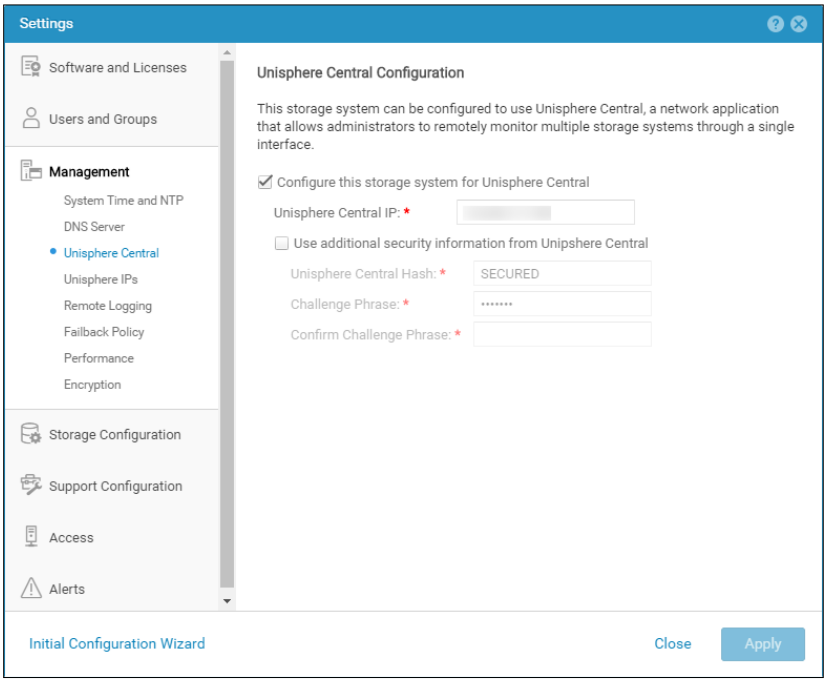
Unisphere Central è abilitato su Unity anche se Unisphere Central non è in uso.
解決方法
Selezionare "Configure this storage system for Unisphere Central" solo se Unisphere Central è in uso. In caso contrario, rimuovere il controllo abilitando Unisphere Central.
対象製品
Dell EMC Unity文書のプロパティ
文書番号: 000205133
文書の種類: Solution
最終更新: 15 5月 2026
バージョン: 6
質問に対する他のDellユーザーからの回答を見つける
サポート サービス
お使いのデバイスがサポート サービスの対象かどうかを確認してください。