Data Domain: SRM Discovery Issues with Timed Out Errors
概要: The article describes timeout failures during SRM discovery of Data Domain systems. Long polling cycles and TTL expirations are caused by the maxBulkSize value being too large.
この記事は次に適用されます:
この記事は次には適用されません:
この記事は、特定の製品に関連付けられていません。
すべての製品パージョンがこの記事に記載されているわけではありません。
現象
Discovery issues occur on Data Domain systems. Timeout errors are reported. These same Data Domain systems were discovered earlier without issues. Increasing the timeout to 1200 only cleared the issue for some Dell Data Domain appliances.
The Data Domain collector log shows the following generic errors:
WARNING -- [2023-02-15 10:59:00 MST] -- PollingUnitPollingGroup::waitAtEndOfPollingCycle(): Polling group 300.EMC-DATA-DOMAIN-BOOST.EMC-DATA-DOMAIN-CIFS.EMC-DATA-DOMAIN-DISK.EMC-DATA-DOMAIN-ENV.EMC-DATA-DOMAIN-FS.GENERIC-INTERFACES.GENERIC-HOST-RESOURCES-PROCESSOR.GENERIC-HOST-RESOURCES-STORAGE.EMC-DATA-DOMAIN-MTREE.EMC-DATA-DOMAIN-NFS.EMC-DATA-DOMAIN-QUOTA.EMC-DATA-DOMAIN-REPLICATION.GENERIC-SYSUPTIME.EMC-DATA-DOMAIN-SYSTEM.EMC-DATA-DOMAIN-VTL is taking too long: Completed in 425081ms. Skipping next polling cycle. 174919ms until next polling, at timestamp: 1676484115000

WARNING -- [2023-02-15 11:01:56 MST] -- PollingUnitTable::closeSession(): Interrupted session on xxx-xxxxxx.xx.xx.org:161 : Time to live has expired.
原因
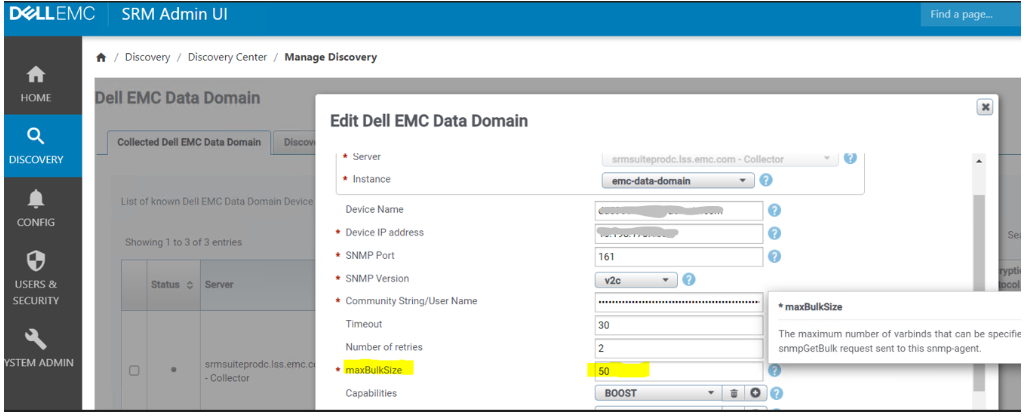
The default maxBulkSize of 50 was causing discovery timedout errors.
解決方法
In the incident that generated this KB article, reducing the maxBulkSize value cleared the discovery issue.
Set the maxBulkSize value to a lower number, such as 15.
文書のプロパティ
文書番号: 000210196
文書の種類: Solution
最終更新: 17 7月 2026
バージョン: 5
質問に対する他のDellユーザーからの回答を見つける
サポート サービス
お使いのデバイスがサポート サービスの対象かどうかを確認してください。