Dell Networking SONiC MC-LAG wird betroffen, wenn der Keepalive-Sitzungsstatus ausfällt.
概要: In diesem Artikel wird erläutert, wie mc-LAG betroffen ist, wenn der Status der Keepalive-Sitzung in SONiC ausfällt.
この記事は次に適用されます:
この記事は次には適用されません:
この記事は、特定の製品に関連付けられていません。
すべての製品パージョンがこの記事に記載されているわけではありません。
現象
MC-LAG ist betroffen, wenn der Status der Keepalive-Sitzung in SONiC ausfällt.
Der folgende MC-LAG-Status wird zum Zeitpunkt der Keepalive-Sitzung angezeigt:
Der folgende MC-LAG-Status wird zum Zeitpunkt der Keepalive-Sitzung angezeigt:
SONIC-1# show mclag brief

Domain ID            : 1
Role                 : active
Session Status       : down
Peer Link Status     : up
Source Address       : 192.168.2.1
Peer Address         : 192.168.2.2
Peer Link            : PortChannel100
Keepalive Interval   : 1 secs
Session Timeout      : 30 secs
Delay Restore        : 300 secs
System Mac           : XX:XX:XX:XX:XX:XX
Mclag System Mac     : 00:00:00:00:00:01


Number of MLAG Interfaces:1
-----------------------------------------------------------
MLAG Interface       Local/Remote Status
-----------------------------------------------------------
PortChannel1             up/unknown
原因
MC-LAG wird betroffen, wenn der Status der Keepalive-Sitzung in SONiC ausfällt. Der Keepalive in SONiC ist mit IPv4-L3-Kommunikation konfiguriert, ähnlich wie der Backuplink in OS9 und OS10, was in der Regel keinen Einfluss auf den VLT-Port-Channel-Status hat. Der Peer-Link-Status in OS9 und OS10 wirkt sich stattdessen auf den VLT-Portchannel-Status aus. In SONiC muss der Status der Keepalive-Sitzung jedoch "up" sein, damit MC-LAG aktiv ist. Für den Keepalive-Link überträgt periodischen Heartbeat zwischen MC-LAG-Peer-Geräten und wird auch verwendet, um den Status zwischen MC-LAG-Peer-Geräten zu synchronisieren. Im Gegensatz zu SONiC verwenden OS9 und OS10 den Peer-Link, um den Status zwischen VLT-Peer-Geräten zu synchronisieren.
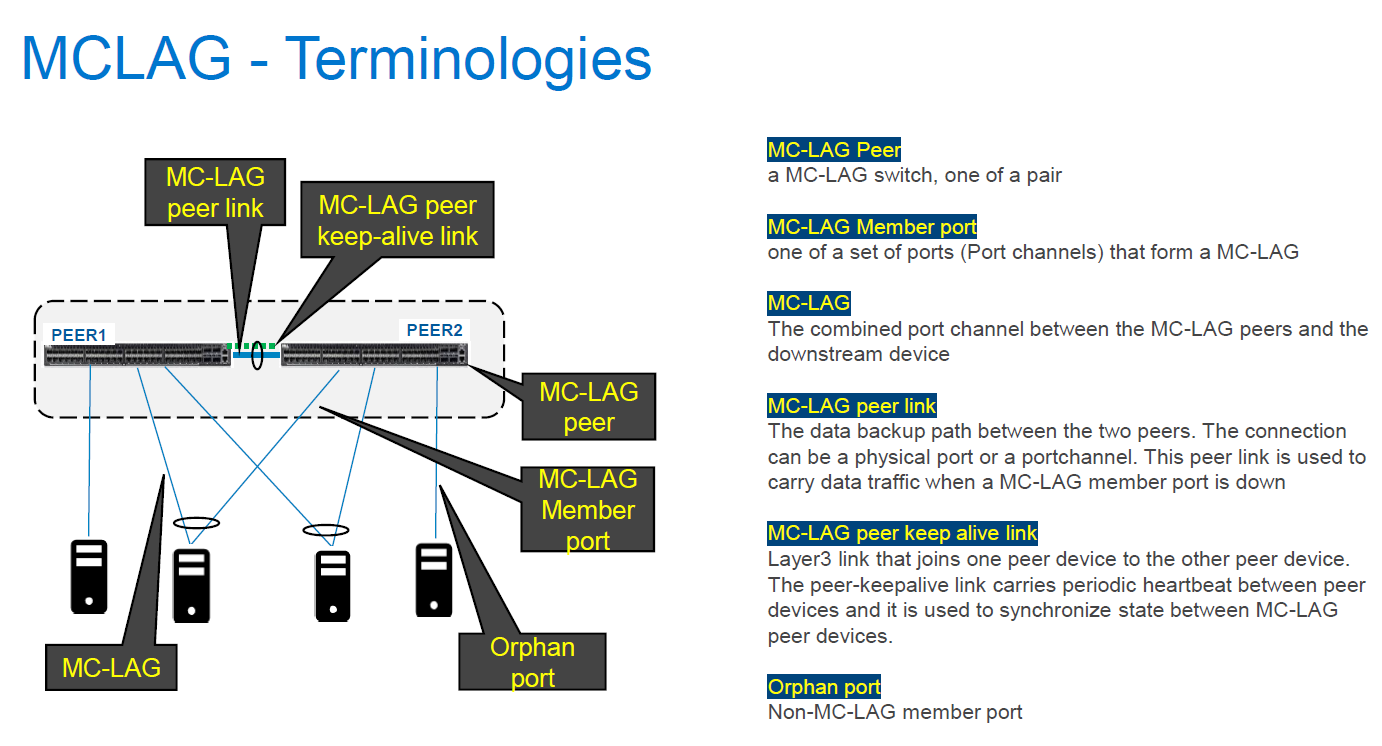
Sobald der Keepalive-Sitzungslink ausfällt, wird der MC-LAG-Status auf beiden MC-LAG-Peer-Geräten aufgrund des Synchronisationsfehlers zwischen beiden Peer-Geräten aktiv/unbekannt.
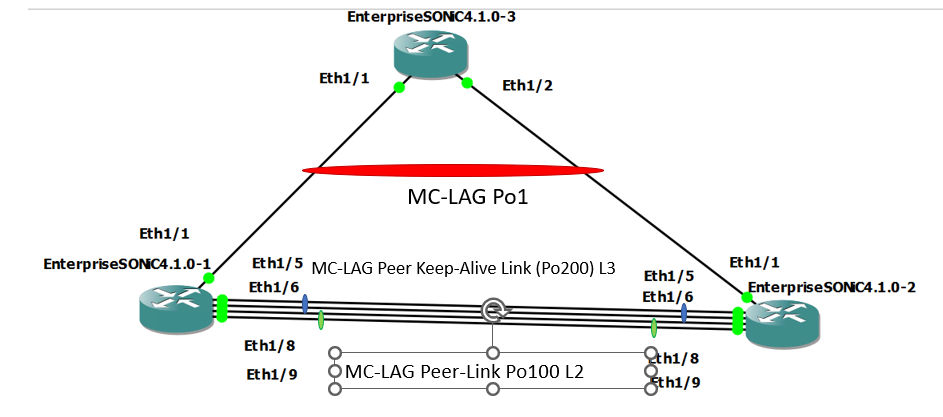
Im Normalzustand
Im Problemstatus (Keepalive-Link-Status down durch Herunterfahren von Po200-Mitgliedsports)
Sobald der Keepalive-Sitzungslink ausfällt, wird der MC-LAG-Status auf beiden MC-LAG-Peer-Geräten aufgrund des Synchronisationsfehlers zwischen beiden Peer-Geräten aktiv/unbekannt.
Im Normalzustand
SONIC-1#show version

Software Version  : 4.1.0-Enterprise_Base
Product           : Enterprise SONiC Distribution by Dell Technologies
Distribution      : Debian 10.13
Kernel            : 5.10.0-8-2-amd64
Config DB Version : version_4_1_1
Build Commit      : 93589a15db
Build Date        : Tue Apr 18 17:56:48 UTC 2023
Built By          : sonicbld@sonic-lvn-csg-001
Platform          : x86_64-kvm_x86_64-r0
HwSKU             : DellEMC-S5248f-P-25G-DPB

SONIC-1# show ip interfaces
Flags: U-Unnumbered interface, A-Anycast IP
-----------------------------------------------------------------------------------------------------------------
Interface            IP address/mask                              VRF                 Admin/Oper     Flags
-----------------------------------------------------------------------------------------------------------------
PortChannel200       192.168.2.1/24                                                   up/up
Vlan636              172.16.0.1/24                                                    up/up
SONIC-1#
SONIC-1#
SONIC-1# show PortChannel summary
Flags(oper-status):  D - Down U - Up (portchannel) P - Up in portchannel (members)
----------------------------------------------------------------------------------------------------------------------------
Group               PortChannel                   Type                Protocol          Member Ports
----------------------------------------------------------------------------------------------------------------------------
1                   PortChannel1   (U)            Eth                 LACP                 Eth1/1(P)
100                 PortChannel100 (U)            Eth                 NONE                 Eth1/8(P)
                                                                                           Eth1/9(P)
200                 PortChannel200 (U)            Eth                 LACP                 Eth1/5(P)
                                                                                           Eth1/6(P)
SONIC-1#
SONIC-1#
SONIC-1# show mclag brief

Domain ID            : 1
Role                 : active
Session Status       : up
Peer Link Status     : up
Source Address       : 192.168.2.1
Peer Address         : 192.168.2.2
Peer Link            : PortChannel100
Keepalive Interval   : 1 secs
Session Timeout      : 30 secs
Delay Restore        : 300 secs
System Mac           : XX:XX:XX:XX:XX:XX
Mclag System Mac     : 00:00:00:00:00:01


Number of MLAG Interfaces:1
-----------------------------------------------------------
MLAG Interface       Local/Remote Status
-----------------------------------------------------------
PortChannel1             up/up
SONIC-1#
SONIC-1#
SONIC-1# show running-configuration interface PortChannel 1
!
interface PortChannel1 mode active
 switchport trunk allowed Vlan 636
 no shutdown
 mclag 1
SONIC-1# show running-configuration interface PortChannel 100
!
interface PortChannel100 mode on
 switchport trunk allowed Vlan 1-4094
 no shutdown
SONIC-1# show running-configuration interface PortChannel 200
!
interface PortChannel200 mode active
 no shutdown
 ip address 192.168.2.1/24
SONIC-1#
SONIC-1#
SONIC-1# ping 172.16.0.3  //IP address assigned to VLAN636 on uplink SW.
PING 172.16.0.3 (172.16.0.3) 56(84) bytes of data.
64 bytes from 172.16.0.3: icmp_seq=1 ttl=64 time=3.26 ms
64 bytes from 172.16.0.3: icmp_seq=2 ttl=64 time=3.47 ms
64 bytes from 172.16.0.3: icmp_seq=3 ttl=64 time=3.21 ms
64 bytes from 172.16.0.3: icmp_seq=4 ttl=64 time=2.84 ms
64 bytes from 172.16.0.3: icmp_seq=5 ttl=64 time=11.1 ms
^C
SONIC-1#
SONIC-2#show version

Software Version  : 4.1.0-Enterprise_Base
Product           : Enterprise SONiC Distribution by Dell Technologies
Distribution      : Debian 10.13
Kernel            : 5.10.0-8-2-amd64
Config DB Version : version_4_1_1
Build Commit      : 93589a15db
Build Date        : Tue Apr 18 17:56:48 UTC 2023
Built By          : sonicbld@sonic-lvn-csg-001
Platform          : x86_64-kvm_x86_64-r0
HwSKU             : DellEMC-S5248f-P-25G-DPB

SONIC-2# show ip interfaces
Flags: U-Unnumbered interface, A-Anycast IP
-----------------------------------------------------------------------------------------------------------------
Interface            IP address/mask                              VRF                 Admin/Oper     Flags
-----------------------------------------------------------------------------------------------------------------
PortChannel200       192.168.2.2/24                                                   up/up
Vlan636              172.16.0.2/24                                                    up/up
SONIC-2#
SONIC-2#
SONIC-2# show PortChannel summary
Flags(oper-status):  D - Down U - Up (portchannel) P - Up in portchannel (members)
----------------------------------------------------------------------------------------------------------------------------
Group               PortChannel                   Type                Protocol          Member Ports
----------------------------------------------------------------------------------------------------------------------------
1                   PortChannel1   (U)            Eth                 LACP                 Eth1/1(P)
100                 PortChannel100 (U)            Eth                 NONE                 Eth1/8(P)
                                                                                           Eth1/9(P)
200                 PortChannel200 (U)            Eth                 LACP                 Eth1/5(P)
                                                                                           Eth1/6(P)
SONIC-2#
SONIC-2#
SONIC-2# show mclag brief

Domain ID            : 1
Role                 : standby
Session Status       : up
Peer Link Status     : up
Source Address       : 192.168.2.2
Peer Address         : 192.168.2.1
Peer Link            : PortChannel100
Keepalive Interval   : 1 secs
Session Timeout      : 30 secs
Delay Restore        : 300 secs
System Mac           : XX:XX:XX:XX:XX:XX
Mclag System Mac     : 00:00:00:00:00:01


Number of MLAG Interfaces:1
-----------------------------------------------------------
MLAG Interface       Local/Remote Status
-----------------------------------------------------------
PortChannel1             up/up
SONIC-2#
SONIC-2#
SONIC-2#
SONIC-2#
SONIC-2# show running-configuration interface PortChannel 1
!
interface PortChannel1 mode active
 switchport trunk allowed Vlan 636
 no shutdown
 mclag 1
SONIC-2# show running-configuration interface PortChannel 100
!
interface PortChannel100 mode on
 switchport trunk allowed Vlan 1-4094
 no shutdown
SONIC-2# show running-configuration interface PortChannel 200
!
interface PortChannel200 mode active
 no shutdown
 ip address 192.168.2.2/24
SONIC-2#
SONIC-2#
SONIC-2# ping 172.16.0.3
PING 172.16.0.3 (172.16.0.3) 56(84) bytes of data.
64 bytes from 172.16.0.3: icmp_seq=1 ttl=64 time=3.48 ms
64 bytes from 172.16.0.3: icmp_seq=2 ttl=64 time=2.94 ms
^CSONIC-2#
Im Problemstatus (Keepalive-Link-Status down durch Herunterfahren von Po200-Mitgliedsports)
SONIC-1# show mclag brief

Domain ID            : 1
Role                 : active
Session Status       : down
Peer Link Status     : up
Source Address       : 192.168.2.1
Peer Address         : 192.168.2.2
Peer Link            : PortChannel100
Keepalive Interval   : 1 secs
Session Timeout      : 30 secs
Delay Restore        : 300 secs
System Mac           : XX:XX:XX:XX:XX:XX
Mclag System Mac     : 00:00:00:00:00:01


Number of MLAG Interfaces:1
-----------------------------------------------------------
MLAG Interface       Local/Remote Status
-----------------------------------------------------------
PortChannel1             up/unknown
SONIC-1#
SONIC-1#
SONIC-1# ping 172.16.0.3
PING 172.16.0.3 (172.16.0.3) 56(84) bytes of data.
64 bytes from 172.16.0.3: icmp_seq=1 ttl=64 time=8.00 ms
64 bytes from 172.16.0.3: icmp_seq=2 ttl=64 time=3.08 ms
64 bytes from 172.16.0.3: icmp_seq=3 ttl=64 time=2.99 ms
64 bytes from 172.16.0.3: icmp_seq=4 ttl=64 time=2.92 ms
64 bytes from 172.16.0.3: icmp_seq=5 ttl=64 time=3.07 ms
^C
SONIC-1#
SONIC-2# show PortChannel summary
Flags(oper-status):  D - Down U - Up (portchannel) P - Up in portchannel (members)
----------------------------------------------------------------------------------------------------------------------------
Group               PortChannel                   Type                Protocol          Member Ports
----------------------------------------------------------------------------------------------------------------------------
1                   PortChannel1   (U)            Eth                 LACP                 Eth1/1(P)
100                 PortChannel100 (U)            Eth                 NONE                 Eth1/8(P)
                                                                                           Eth1/9(P)
200                 PortChannel200 (D)            Eth                 LACP                 Eth1/5(D)
                                                                                          Eth1/6(D)
SONIC-2# show mclag brief

Domain ID            : 1
Role                 : standby
Session Status       : down
Peer Link Status     : up
Source Address       : 192.168.2.2
Peer Address         : 192.168.2.1
Peer Link            : PortChannel100
Keepalive Interval   : 1 secs
Session Timeout      : 30 secs
Delay Restore        : 300 secs
System Mac           : XX:XX:XX:XX:XX:XX
Mclag System Mac     : 00:00:00:00:00:01


Number of MLAG Interfaces:1
-----------------------------------------------------------
MLAG Interface       Local/Remote Status
-----------------------------------------------------------
PortChannel1             up/unknown
SONIC-2#
SONIC-2# ping 172.16.0.3
PING 172.16.0.3 (172.16.0.3) 56(84) bytes of data.
From 172.16.0.2 icmp_seq=1 Destination Host Unreachable
From 172.16.0.2 icmp_seq=1 Destination Host Unreachable
From 172.16.0.2 icmp_seq=1 Destination Host Unreachable
From 172.16.0.2 icmp_seq=1 Destination Host Unreachable
^C
解決方法
Damit MC-LAG ohne Probleme weiter ausgeführt werden kann, muss auch der Status der Keepalive-Verbindung aktiv bleiben. Der Managementport wird normalerweise für den Keepalive-Link verwendet, aber portkanal mit zugewiesener IP-Adresse kann für die Keepalive-Verbindung zu Redundanzzwecken verwendet werden. Das in diesem KB-Artikel beschriebene Verhalten (mc-LAG wird betroffen, wenn der Keepalive-Link-Status ausfällt), wird in allen Versionen mindestens bis SONiC-Version 4.2.0 erwartet.
対象製品
Enterprise SONiC Distribution, PowerSwitch N3200-ON, PowerSwitch S5212F-ON, PowerSwitch S5224F-ON, PowerSwitch S5232F-ON, PowerSwitch S5248F-ON, PowerSwitch S5296F-ON, PowerSwitch Z9100-ON, PowerSwitch Z9264F-ON, PowerSwitch Z9332F-ON文書のプロパティ
文書番号: 000213968
文書の種類: Solution
最終更新: 23 1月 2024
バージョン: 3
質問に対する他のDellユーザーからの回答を見つける
サポート サービス
お使いのデバイスがサポート サービスの対象かどうかを確認してください。