Sådan finder du USB-donglen til Dell Pro-tastatur og -mus KM5221W
概要: Få mere at vide om, hvordan du finder Dell Pro-tastaturet og -musen KM5221W USB-donglen ved at følge disse trinvise instruktioner.
この記事は次に適用されます:
この記事は次には適用されません:
この記事は、特定の製品に関連付けられていません。
すべての製品パージョンがこの記事に記載されているわけではありません。
手順
Dell Pro-tastatur og -mus bruger KM5221W en almindelig trådløs USB-dongle til både tastatur og mus.
Berørt tastatur:
- Dell Pro-KM5221W til tastatur og mus
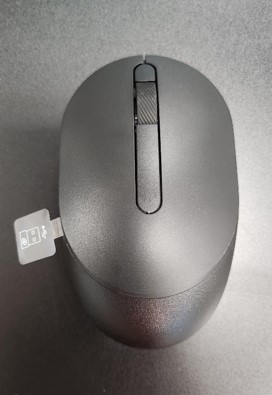
- Når du pakker KM5221W ud, skal du kigge efter USB-donglemærkaten, der stikker ud fra musen.
- Fjern forsigtigt musens topdæksel, og find derefter donglen.
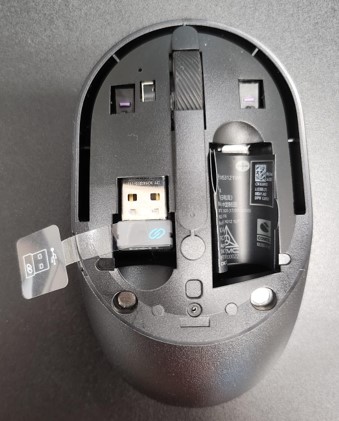
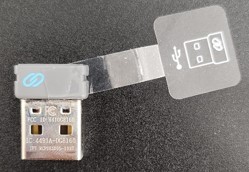
- Fjern USB-donglen fra donglelageret i musen.
- Gå til Support til Dell Pro Keyboard and Mouse KM5221W , og se Dell Pro Keyboard and Mouse KM5221W Quick Setup Guide eller brugervejledningen for at fuldføre opsætningen.
対象製品
Alienware, Dell All-in-One, Dell Pro All-in-One, Dell Pro Max Micro, Dell Pro Max Slim, Dell Pro Max Tower, Dell Pro Micro, Dell Pro Slim, Dell Pro Tower, Dell Slim, Dell Tower, Inspiron, OptiPlex, Vostro, XPS, G Series, Chromebook, G Series
, Alienware, Dell Plus, Dell Pro, Dell Pro Max, Dell Pro Plus, Dell Pro Premium, Inspiron, Latitude, Dell Pro Rugged, Vostro, XPS, Fixed Workstations, Mobile Workstations, Dell Pro Max Micro XE FCM2250, Dell Pro Keyboard and Mouse KM5221W
...
文書のプロパティ
文書番号: 000214907
文書の種類: How To
最終更新: 07 5月 2025
バージョン: 5
質問に対する他のDellユーザーからの回答を見つける
サポート サービス
お使いのデバイスがサポート サービスの対象かどうかを確認してください。