De USB-dongle voor het Dell Pro toetsenbord en de muis vinden KM5221W
概要: Volg deze stapsgewijze instructies om de Dell Pro toetsenbord en muis KM5221W USB-dongle te vinden.
この記事は次に適用されます:
この記事は次には適用されません:
この記事は、特定の製品に関連付けられていません。
すべての製品パージョンがこの記事に記載されているわけではありません。
手順
De Dell Pro toetsenbord en muis KM5221W gebruikt één gemeenschappelijke draadloze USB-dongle voor zowel het toetsenbord als de muis.
Getroffen toetsenbord:
- Dell Pro toetsenbord en muis KM5221W
- Let bij het uitpakken van de KM5221W op het label van de USB-dongle dat uit de muis steekt.

- Verwijder voorzichtig de kap van de muis en zoek vervolgens de dongle.

- Verwijder de USB-dongle uit de donglestorage in de muis.
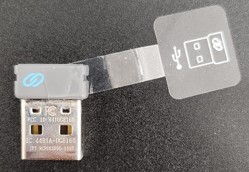
- Ga naar Support voor Dell Pro toetsenbord en muis KM5221W en raadpleeg de Dell Pro KM5221W Snelstartgids voor het toetsenbord en de muis of de gebruikershandleiding om de installatie te voltooien.
対象製品
Alienware, Dell All-in-One, Dell Pro All-in-One, Dell Pro Max Micro, Dell Pro Max Slim, Dell Pro Max Tower, Dell Pro Micro, Dell Pro Slim, Dell Pro Tower, Dell Slim, Dell Tower, Inspiron, OptiPlex, Vostro, XPS, G Series, Chromebook, G Series
, Alienware, Dell Plus, Dell Pro, Dell Pro Max, Dell Pro Plus, Dell Pro Premium, Inspiron, Latitude, Dell Pro Rugged, Vostro, XPS, Fixed Workstations, Mobile Workstations, Dell Pro Max Micro XE FCM2250, Dell Pro Keyboard and Mouse KM5221W
...
文書のプロパティ
文書番号: 000214907
文書の種類: How To
最終更新: 07 5月 2025
バージョン: 5
質問に対する他のDellユーザーからの回答を見つける
サポート サービス
お使いのデバイスがサポート サービスの対象かどうかを確認してください。