NetWorker: How to Update the Index Path for Multiple Clients
概要: After changing the location of the index folder on the NetWorker server, use this article to update the index paths for all clients in one move. Examples shown in this article are on a Linux operating system; however, these steps can be used for Windows operating system as well. ...
この記事は次に適用されます:
この記事は次には適用されません:
この記事は、特定の製品に関連付けられていません。
すべての製品パージョンがこの記事に記載されているわけではありません。
手順
NOTE: The purpose of this article is to explain how to update multiple client's Index Path configurations at once. Use the below step only if all clients have indexes in the same folder (for example, /index).
- In the NetWorker Management Console, go to Protection > Clients > Add Column > More > Index path.

Figure 1: NMC client column options
- Click the Index path column for any individual client > press CTRL + A (to select all).

Figure 2: Click Index Path for any individual Client with CTRL+A to select all.
- Right-click the Index path column > select Edit Index path.

Figure 3: Click Edit Index path for Index path column.
- Enter the path's new folder as "/nsr/new_index_folder" (see below snip) > Click OK.

Figure 4: Enter the path's new folder as "/nsr/new_index_folder
- The following error may occur:

Figure 5: Error may occur: Encountered an error updating Client 2 out of 3. Remember to move or remove original Client indexes.
NOTE: This is a confirmation pop out. Press OK and then press OK again in the "Edit index path" window. Repeat this step until the "Edit index path" window closes.
- The index path is updated successfully:
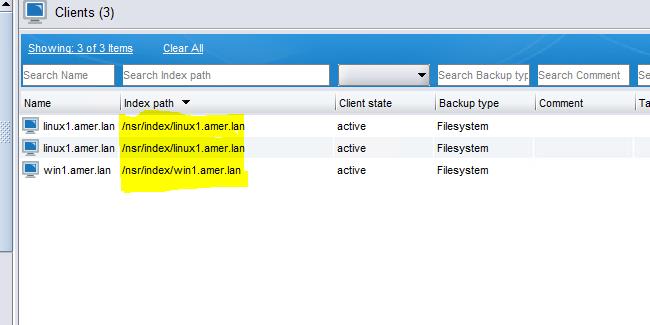
Figure 6: Screenshot of updated Index path
その他の情報
Dell KB article 80544: NetWorker: How to Move a Client File Index to a New Location
対象製品
NetWorker文書のプロパティ
文書番号: 000217030
文書の種類: How To
最終更新: 29 11月 2023
バージョン: 4
質問に対する他のDellユーザーからの回答を見つける
サポート サービス
お使いのデバイスがサポート サービスの対象かどうかを確認してください。