「IDPA:2.7.2/2.7.4 ESXiのアップグレードが失敗する: エラー番号32および/lockerが見つかりません
概要: この記事では、ESXiハイパーバイザー コンポーネントへのソフトウェアの依存関係が原因で発生した2.7.2および2.7.4のアップグレードの失敗を解決するために必要な手順について説明します。
この記事は次に適用されます:
この記事は次には適用されません:
この記事は、特定の製品に関連付けられていません。
すべての製品パージョンがこの記事に記載されているわけではありません。
現象
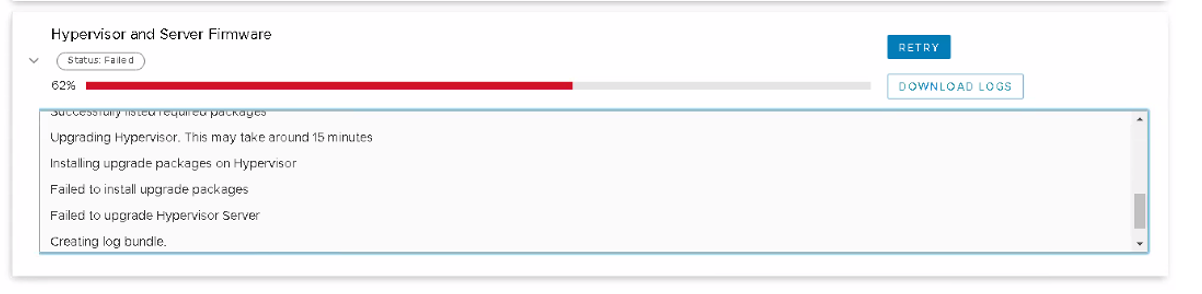
IDPAバージョン2.7.2へのアップグレードが、サブコンポーネントの進行状況が62%(または全体の進行状況が約84%)で失敗することがある |IDPAバージョン2.7.4は、次の操作で56%(または全体の進行状況は約82%)で失敗する可能性があります: "Hypervisor and Server Firmware" ワークフロー。ワークフロー パネルは次のように報告します。 "Failed to install upgrade packages" 。
アップグレードの進行状況2.7.2
アップグレードの進行状況2.7.4
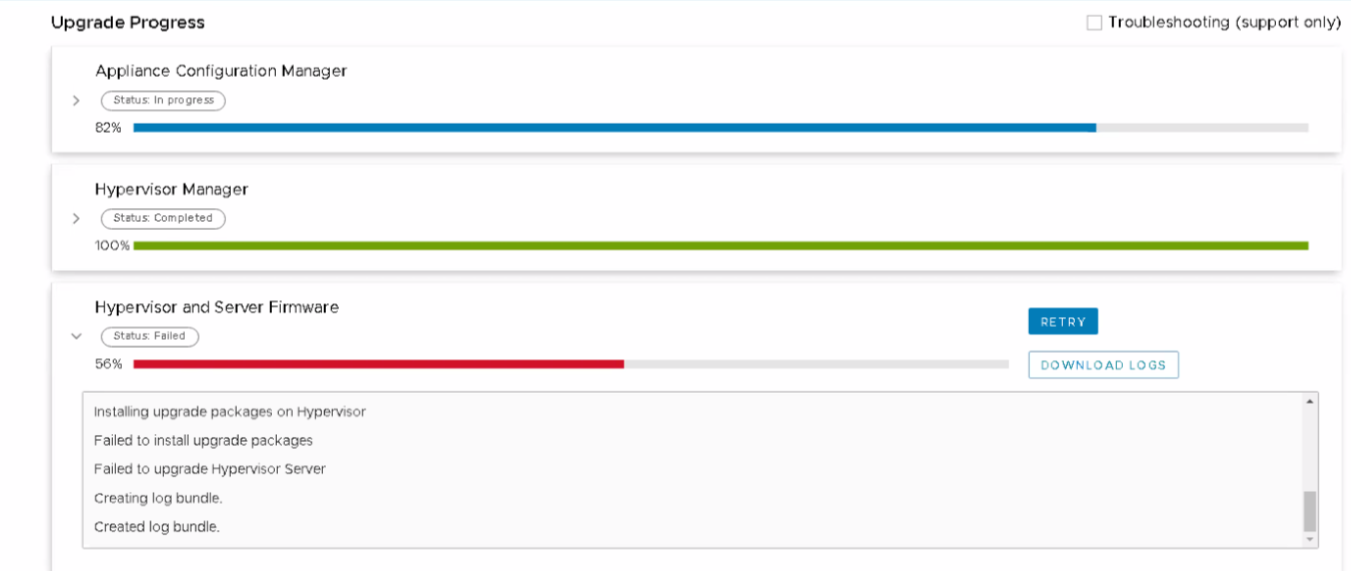
ハイパーバイザーおよびサーバー ファームウェア パネルのメッセージ
-
ハイパーバイザーをアップグレードしています。これには約15分かかる場合があります。
-
ハイパーバイザーへのアップグレード パッケージのインストール
-
アップグレード パッケージのインストールに失敗しました。
-
ハイパーバイザー サーバーのアップグレードに失敗しました。
-
ログ バンドルの作成。
-
作成されたログ バンドル。
ログ メッセージとパターン
IDPA 2.7.2アップグレードのアップグレード ログ(/data01/tmp/patch/logs/esxi_logs.log) 依存関係エラーを報告する場合があります。
27/09/23 09:20:30  main() Package name: IDPA-14G-ESXi-6.7.0-032
27/09/23 09:20:30  main() Installing upgrade packages
27/09/23 09:20:30  main() Executing install packages command: esxcli software profile update --depot=https://x.x.x.x:9443/dataprotection-upgrade/esxi_upgrade --profile=IDPA-14G-ESXi-6.7.0-032
27/09/23 09:20:30  main() Install packages command result: {'output': [u'Name                     Vendor    Acceptance Level  Creation Time        Modification Time', u'-----------------------  --------  ----------------  -------------------  -------------------', u'IDPA-14G-ESXi-6.7.0-032  Dell-EMC  PartnerSupported  2021-03-04T10:17:40  2022-01-30T05:14:46', u'Status: 0'], 'returnCode': 0}
27/09/23 09:20:48   run() Parsing returnCode, output: ['', '[InstallationError]\r\n [Errno 32] Broken pipe\r\n       vibs = VMware_locker_tools-light_11.2.5.17337674-17700514\r\n Please refer to the log file for more details.', 'Status: 1']
27/09/23 09:20:48 run_cmd_esxi_output() Command: esxcli software profile update --depot=https://x.x.x.x:9443/dataprotection-upgrade/esxi_upgrade --profile=IDPA-14G-ESXi-6.7.0-032
27/09/23 09:20:48 run_cmd_esxi_output() [InstallationError]
27/09/23 09:20:48 run_cmd_esxi_output()  [Errno 32] Broken pipe
27/09/23 09:20:48 run_cmd_esxi_output()        vibs = VMware_locker_tools-light_11.2.5.17337674-17700514
27/09/23 09:20:48 run_cmd_esxi_output()  Please refer to the log file for more details.
27/09/23 09:20:48 run_cmd_esxi_output() Status: 1
27/09/23 09:20:48  main() exit code is: 1
27/09/23 09:20:48  main() Command output is:  [Errno 32] Broken pipe
27/09/23 09:20:48  main() Failed to install packages.
IDPA 2.7.4アップグレードのアップグレード ログ(/data01/tmp/patch/logs/esxi_logs.log) 依存関係エラーを報告する場合があります。
depot=https://x.x.x.x:9443/dataprotection-upgrade/esxi_upgrade --profile=IDPA-14G-ESXi-7.0.3-041 --no-sig-check
29/09/23 06:31:50  main() Install packages command result: {'output': [u'Name                     Vendor    Acceptance Level  Creation Time        Modification Time', u'-----------------------  --------  ----------------  -------------------  -------------------', u'IDPA-14G-ESXi-7.0.3-041  Dell-EMC  PartnerSupported  2022-07-06T14:41:16  2022-09-10T03:41:07', u'Status: 0'], 'returnCode': 0}
29/09/23 06:32:42   run() Parsing returnCode, output: ['', "[InstallationError]\r\n Cannot find filesystem with path /locker\r\n      cause = Cannot find filesystem with path /locker\r\n       vibs = ['VMware_locker_tools-light_12.0.0.19345655-20036586']\r\n Please refer to the log file for more details.", 'Status: 1']
29/09/23 06:32:42 run_cmd_esxi_output() Command: esxcli software profile update --depot=https://x.x.x.x:9443/dataprotection-upgrade/esxi_upgrade --profile=IDPA-14G-ESXi-7.0.3-041 --no-sig-check
29/09/23 06:32:42 run_cmd_esxi_output() [InstallationError]
29/09/23 06:32:42 run_cmd_esxi_output()  Cannot find filesystem with path /locker
29/09/23 06:32:42 run_cmd_esxi_output()       cause = Cannot find filesystem with path /locker
29/09/23 06:32:42 run_cmd_esxi_output()        vibs = ['VMware_locker_tools-light_12.0.0.19345655-20036586']
29/09/23 06:32:42 run_cmd_esxi_output()  Please refer to the log file for more details.
29/09/23 06:32:42 run_cmd_esxi_output() Status: 1
29/09/23 06:32:42  main() exit code is: 1
29/09/23 06:32:42  main() Command output is:  Cannot find filesystem with path /locker
29/09/23 06:32:42  main() Failed to install packages.
29/09/23 06:32:42 set_firewall() Executing firewall set command: esxcli network firewall set --enabled true
29/09/23 06:32:42   run() Parsing returnCode, output: ['', 'Status: 0']
29/09/23 06:32:42 run_cmd_esxi() Command: esxcli network firewall set --enabled true
29/09/23 06:32:42 run_cmd_esxi() Status: 0
29/09/23 06:32:42 set_firewall() firewall set command status: 0
原因
ESXIのロッカー ディレクトリーと/storeディレクトリーの間にシンボリック リンクが存在しません。
ロッカー ディレクトリーと/storeディレクトリーの間にシンボリック リンクがないESXiを以下に示します。
ロッカー ディレクトリーと/storeディレクトリー間にシンボリック リンクがある場合の通常のESXi出力は、次の例のようになります。
ロッカー ディレクトリーと/storeディレクトリーの間にシンボリック リンクがないESXiを以下に示します。
[root@idpaesx:~] ls -la
drwxr-xr-x    1 root  root  512 Sep  4 11:10 locker
ロッカー ディレクトリーと/storeディレクトリー間にシンボリック リンクがある場合の通常のESXi出力は、次の例のようになります。
[root@idpaesx:~] ls -la
lrwxrwxrwx    1 root  root    6 Sep 21 08:44 locker -> /store
解決方法
- ESXIホスト(ハイパーバイザー)へのSSH/PuTTYセッションを「root」ユーザーとして開きます。
- 次のコマンドを使用して、ロッカー ディレクトリーが存在することを確認します。
ls -la
[root@idpaesx:~] ls -la
total 821
drwxr-xr-x    1 root  root 512 Sep  4 11:10 locker
- ロッカー ディレクトリーの名前を変更する
locker_old
mv locker locker_old
- ロッカーと/storeの間にシンボリック リンクを作成します。
ln -s /store locker
- ディレクトリーを一覧表示して確認します
[root@idpa-esx:~] ls -la
lrwxrwxrwx    1 root   root   6 Sep 28 08:57 locker -> /store
- アップグレードの再試行
対象製品
PowerProtect DP4400, PowerProtect DP5300, PowerProtect DP5800, PowerProtect DP8300, PowerProtect DP8800, Integrated Data Protection Appliance Family, Integrated Data Protection Appliance Software, PowerProtect DP5900, PowerProtect DP8400
, PowerProtect DP8900
...
文書のプロパティ
文書番号: 000218086
文書の種類: Solution
最終更新: 23 1月 2026
バージョン: 3
質問に対する他のDellユーザーからの回答を見つける
サポート サービス
お使いのデバイスがサポート サービスの対象かどうかを確認してください。