Avamar: Adding Data Domain to Avamar Fails with Message "Failed to run 'certificate import host application ddboost'"
概要: Adding Data Domain to Avamar fails with summary "Failed to configure certificate on Data Domain system," with reason "Failed to run 'certificate import host application ddboost'." Other error message from Data Domain "The SHA1 fingerprint for the imported host certificate is: ......**** Certificate import failed. The imported certificate is not yet valid. The Certificate becomes valid on…" ...
この記事は次に適用されます:
この記事は次には適用されません:
この記事は、特定の製品に関連付けられていません。
すべての製品パージョンがこの記事に記載されているわけではありません。
現象
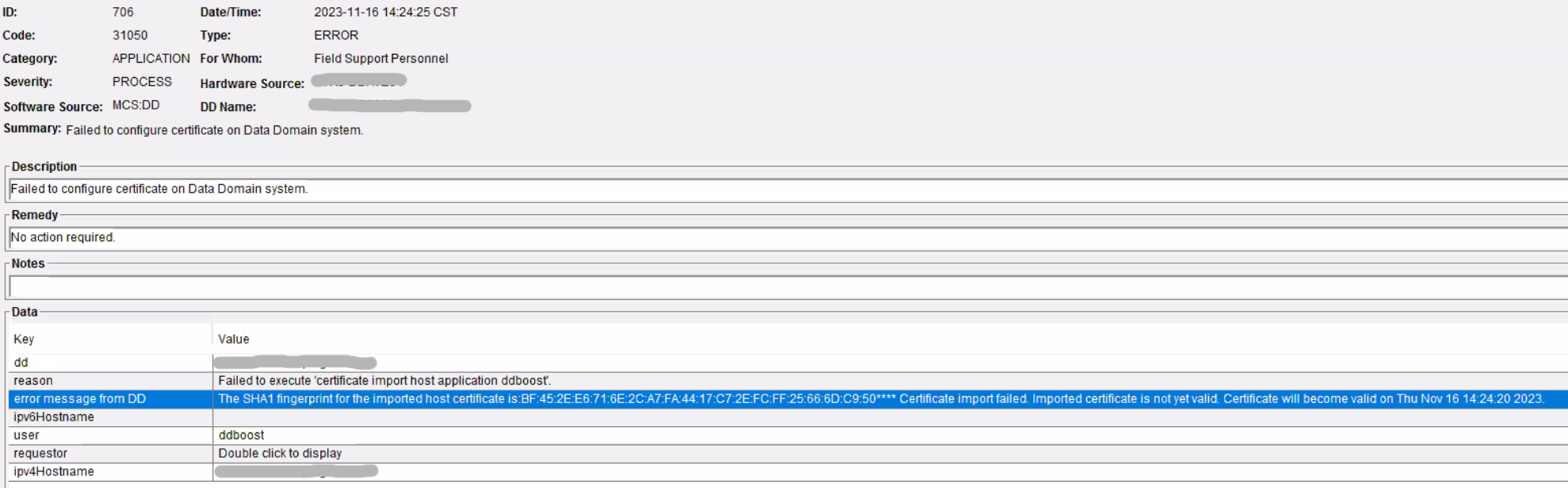
When adding a new Data Domain system to Avamar, it fails with the below message:
Description: "Failed to configure certificate on Data Domain system"
Reason: "Failed to execute 'certificate import host application ddboost'"

Error message from DD: "The SHA1 fingerprint for the imported host certificate is:42:20:7A:99:5F:AE:B0:D1:98:EB:45:40:EC:B6:70:FD:F4:34:6A:00**** Certificate import failed. Imported certificate is not yet valid. Certificate will become valid on Thu Nov 16 14:22:24 2023."
The log file /usr/local/avamar/var/mc/server_log/mcserver.log.0 shows the below error message:
11/16-14:22:30.00374 [RMI TCP Connection(1369)-172.27.247.117#52459] com.avamar.asn.service.ServiceContainerImpl.getService
FINE: Service get completed for service: com.avamar.mc.dpn.DPNProxyService
11/16-14:22:30.00375 [RMI TCP Connection(1369)-172.27.247.117#52459] com.avamar.mc.datadomain.DataDomainService.generateAndImportDdrHostCert
WARNING: Failed to execute 'certificate import host application ddboost'. Error message from DD:
The SHA1 fingerprint for the imported host certificate is:
42:20:7A:99:5F:AE:B0:D1:98:EB:45:40:EC:B6:70:FD:F4:34:6A:00

**** Certificate import failed. Imported certificate is not yet valid. Certificate will become valid on Thu Nov 16 14:22:24 2023.
The simultaneous running 'date' on both the Avamar and Data Domain shows that the time on the Avamar is ahead of the time on the Data Domain. Even though this is only several seconds different, it still causes the issue.
原因
The Network Time Protocol (NTP) setting is not working properly on either the Avamar or Data Domain which is causing the time on the Avamar to be ahead of the time on the Data Domain. When adding the Data Domain to the Avamar, Avamar generates the certificate in real time and imports it as the host certificate to Data Domain. Because the time on the Avamar is ahead of the time on the Data Domain, the certificate Avamar generated is not yet valid on Data Domain. Thus, Data Domain generates the error "Certificate import failed. The imported certificate is not yet valid. Certificate becomes valid on."
解決方法
Correct the NTP configuration on both the Avamar and the Data Domain. Alternately, manually set the time to ensure that the time on the Avamar server is no earlier than the time on the Data Domain. Readding Data Domain to Avamar should work this time.
対象製品
Avamar Server文書のプロパティ
文書番号: 000220028
文書の種類: Solution
最終更新: 03 9月 2025
バージョン: 2
質問に対する他のDellユーザーからの回答を見つける
サポート サービス
お使いのデバイスがサポート サービスの対象かどうかを確認してください。