タッチパッドまたはタッチ スクリーンを使用してデスクトップ フォルダーが応答しない
概要: Windows 11(バージョン23H2 22631.2428)でタッチパッドまたはタッチスクリーンを使用してデスクトップ フォルダーをドラッグまたはクリックできない問題に関する情報。
この記事は次に適用されます:
この記事は次には適用されません:
この記事は、特定の製品に関連付けられていません。
すべての製品パージョンがこの記事に記載されているわけではありません。
現象
タッチパッドまたはタッチスクリーンを使用している場合に、Windowsデスクトップ フォルダーをクリックしても応答がありません。
影響を受けるオペレーティング システム:
- Windows 11(バージョン23H2 22631.2428)
影響を受けるモデル:
- Latitude 5430
- Latitude 5431
- Latitude 5440
- Latitude 7030 Rugged Extremeタブレット
- Latitude 7230 Rugged Extremeタブレット
- Latitude 7320
- Latitude 7330
- Latitude 7430
- Latitude 7440
- Latitude 7640
- Latitude 7530
- Latitude 9330
- Latitude 9430
- Latitude 9440
- Dell Precision 3470
- Dell Precision 3480
- Precision 5470
- Precision 5480
- Precision 5570
- Precision 5680
- Precision 7670
- Precision 7680
- Precision 7770
- Precision 7780
- Dell Pro 13 Premium
原因
これは、Windows 11(バージョン23H2 22631.2428)の問題です。
解決方法
Windowsホットフィックス
この問題は、Windows Hotfix 22631.2861で修正され、Microsoft Storeから入手できます。
Windowsボックスをクリックし、[設定]を選択します。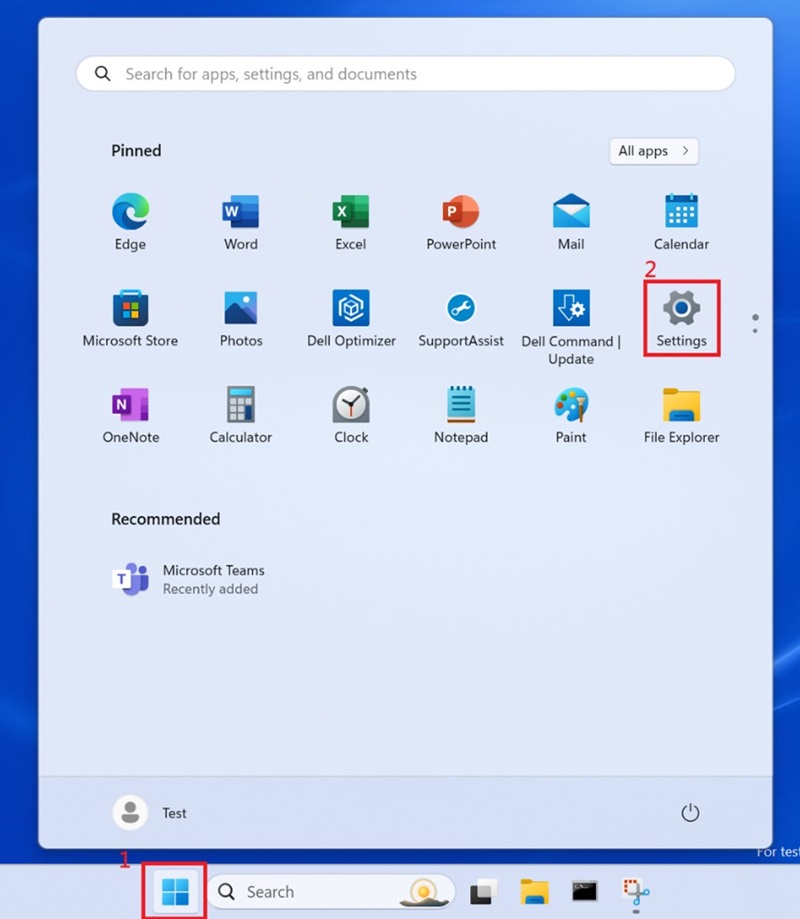
[Windows Update]を選択し、Windowsを更新します。![[Windows Settings]、[Windows Update]](https://supportkb.dell.com/img/ka0Do000000qYzTIAU/ka0Do000000qYzTIAU_ja_2.jpeg)
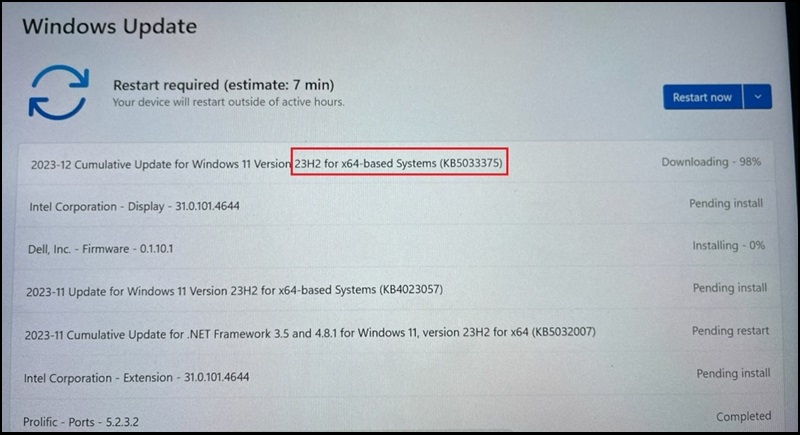
Windowsをバージョン23H2 22631.2861にアップデートする必要があります。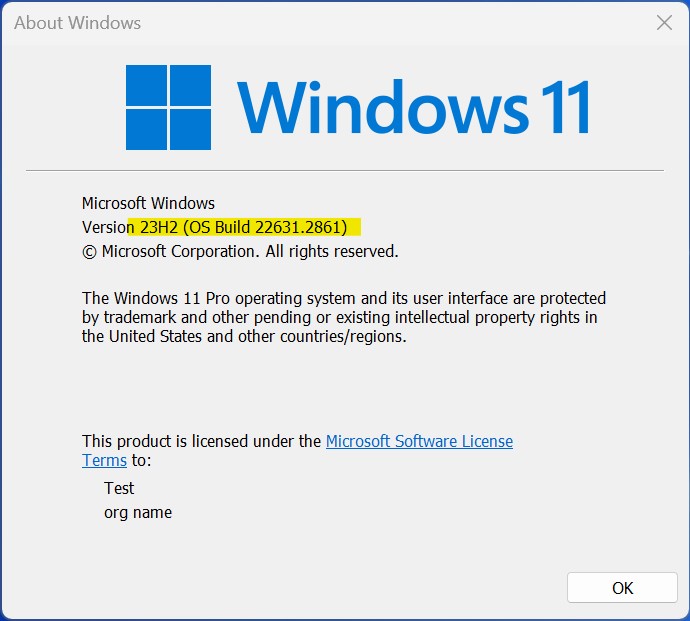
対象製品
Dell Pro 13 Premium PA13250, Latitude 7030 Rugged Extreme Tablet, Latitude 7230 Rugged Extreme Tablet, Latitude 7320, Latitude 7330, Latitude 9330, Latitude 5431, Latitude 5440, Latitude 7430, Latitude 7440, Latitude 9430, Latitude 9440 2-in-1
, Latitude 7530, Latitude 7640, Latitude 5430, Precision 3470, Precision 3480, Precision 5470, Precision 5480, Precision 5570, Precision 5680, Precision 7670, Precision 7680, Precision 7770, Precision 7780
...
文書のプロパティ
文書番号: 000220837
文書の種類: Solution
最終更新: 12 1月 2026
バージョン: 8
質問に対する他のDellユーザーからの回答を見つける
サポート サービス
お使いのデバイスがサポート サービスの対象かどうかを確認してください。