Dell Unity: The vCenter certificate is not trusted or Invalid (User Correctable)
概要: An alert on Dell Unity stating VCenter certificate is not trusted or Invalid.
この記事は次に適用されます:
この記事は次には適用されません:
この記事は、特定の製品に関連付けられていません。
すべての製品パージョンがこの記事に記載されているわけではありません。
現象
Alert: The certificate that is used to access the vCenter is either not trusted or not valid. Verify the validity of the certificate and, if necessary, update it. Verify the certificate from VMware > vCenters under Access. If the problem persists, contact your service provider.
原因
Dell Unity has been upgraded to a new version.
A new certificate has been added to vCenter.
解決方法
Verify the certificate: ACCESS >> VMware >> vCenters
Customers should check with VMware to ensure the vCenter certificate is valid.
Once confirmed valid, follow the below steps in Unisphere:
ACCESS >> VMware >> vCenters >> select vCenter >> More Actions >> Verify Certificate >>Accept >> Refresh.
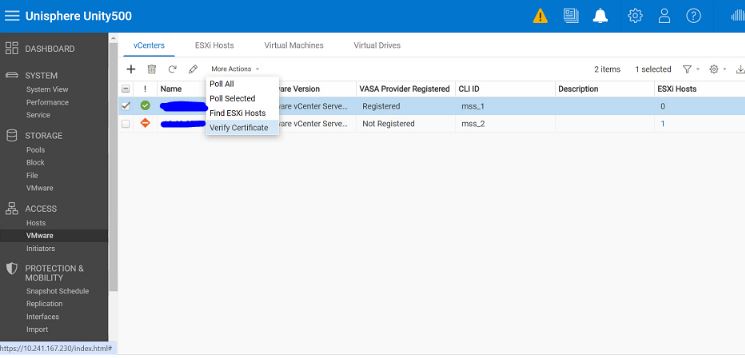
If the problem persists, contact the service provider.
対象製品
Dell EMC Unity Family製品
Dell EMC Unity Family |Dell EMC Unity All Flash文書のプロパティ
文書番号: 000224021
文書の種類: Solution
最終更新: 02 5月 2024
バージョン: 1
質問に対する他のDellユーザーからの回答を見つける
サポート サービス
お使いのデバイスがサポート サービスの対象かどうかを確認してください。