Error When Setting Up the Dell Optimizer Application in the SCCM Task Sequence
概要: This article provides information about an error with the Dell Optimizer software and System Center Configuration Manager (SCCM) deployment.
この記事は次に適用されます:
この記事は次には適用されません:
この記事は、特定の製品に関連付けられていません。
すべての製品パージョンがこの記事に記載されているわけではありません。
現象
Dell Optimizer Error
You may see that you got an error "Code 7" when you try to deploy a Dell Optimizer application with Task Sequence.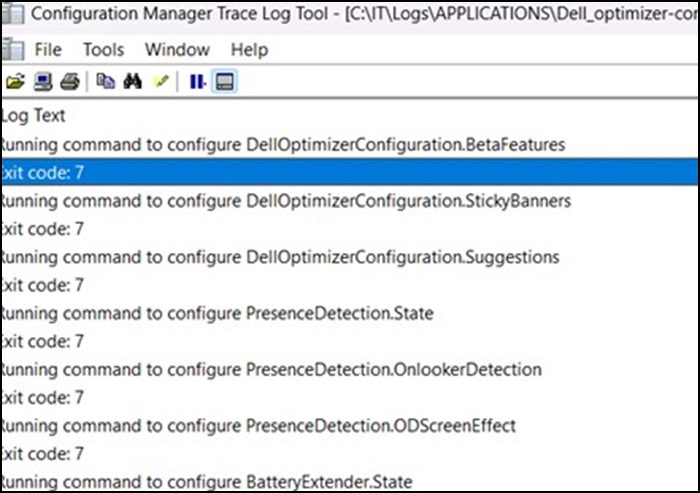
原因
This is working by design.
解決方法
It is working as designed, as a service is required to initialize within the Operating System. The Dell optimizer cannot be deployed using a Task Sequence, but the application can be injected into the base Operating System (OS WIM).
The recommendation is to have the application deploy after the Task Sequence has completed.
対象製品
Alienware, Dell All-in-One, Dell Pro All-in-One, Dell Pro Max Micro, Dell Pro Max Slim, Dell Pro Max Tower, Dell Pro Micro, Dell Pro Slim, Dell Pro Tower, Dell Slim, Dell Tower, Inspiron, OptiPlex, Vostro, XPS, G Series, G Series, Alienware
, Dell Plus, Dell Pro, Dell Pro Max, Dell Pro Plus, Dell Pro Premium, Inspiron, Latitude, Dell Pro Rugged, Vostro, XPS, Fixed Workstations, Mobile Workstations, Dell Pro Max Micro XE FCM2250, Dell Pro Max Slim XE FCS1250, Dell Pro Max Tower T2 XE FCT2250, Dell Pro Max 16 XE MC16250, Dell Pro Micro Plus XE QBM1250, Dell Pro Slim Plus XE5 QBS1250, Dell Pro Tower Plus XE5 QBT1250
...
文書のプロパティ
文書番号: 000227659
文書の種類: Solution
最終更新: 19 5月 2025
バージョン: 2
質問に対する他のDellユーザーからの回答を見つける
サポート サービス
お使いのデバイスがサポート サービスの対象かどうかを確認してください。