PowerFlex:Debianベースのサーバー(Debian、Ubuntu、またはProxmox)にSDCをインストールする方法
概要: 次の手順では、Debianベースのサーバーに外部SDCを手動でインストールする方法について説明します。 以下の手順の手順は、Proxmox仮想環境を含むDebianおよびUbuntuオペレーティングシステムに関連しています。
この記事は次に適用されます:
この記事は次には適用されません:
この記事は、特定の製品に関連付けられていません。
すべての製品パージョンがこの記事に記載されているわけではありません。
手順
SDCソフトウェアを取得します。
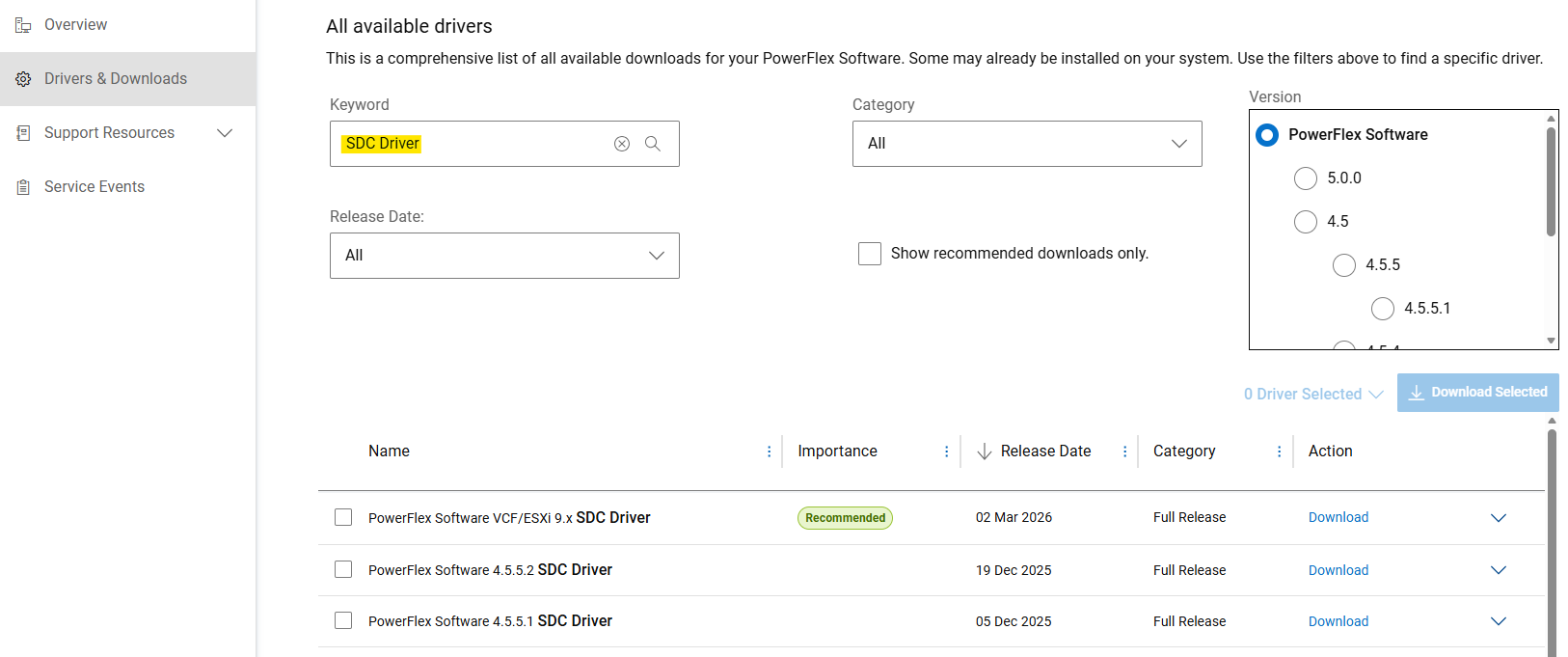
- Dellサポート サイトから手動インストール用のSDCドライバーを入手します
- [Drivers & Downloads]セクションで、キーワードとして「SDC Driver」を検索します。
- 「
PowerFlex_*_SDCs_for_manual_install.zip」ファイルを、インストールするPowerFlexのバージョンに一致させます。
(SDCは、PowerFlexシステム バージョンと下位互換性と上位互換性があります。リリース ノートを参照してください)
Debianベース パッケージの解凍(.deb)
PowerFlexコンポーネント パッケージは .tar Debianベースのオペレーティングシステム用のファイル。インストール前に、 .deb パッケージは、提供されたものを使用して抽出する必要があります siob_extract ユーティリティ:
- SDCの抽出
.zip特定の OS リリースのファイル(PowerFlex_*_SDCs_for_manual_install.zip" アーカイブ) - 整合性(md5またはsha256)を確認し、SDCを拡張する
.zipファイル - アンコンピュート」
EMC-ScaleIO-sdc-*" .tarファイル - [Extract]
.deb次を使用したパッケージ化siob_extractリセットする方法」
# Extract SDC for Debian 12 (bookworm) / Proxmox VE 8.x
unzip PowerFlex_*_SDCs_for_manual_install.zip "*Debian12_SDC.*"

# Check integrity & inflate zip file
cd PowerFlex_*_SDCs_for_manual_install/
sha256sum PowerFlex_*_Debian12_SDC.zip
cat PowerFlex_*_Debian12_SDC.sha256
unzip PowerFlex_*_Debian12_SDC.zip

# Extract .deb package (using `siob_extract` utility)
cd PowerFlex_*_Debian12_SDC/
tar -xvf EMC-ScaleIO-sdc-*.Debian12.x86_64.tar
chmod +x siob_extract
./siob_extract EMC-ScaleIO-sdc-*.Debian12.x86_64.siob
ls EMC-ScaleIO-sdc-*.Debian12.x86_64.debその他のOSリリースの場合は、次を使用します。」*Debian13_SDC*」または「*Ubuntu24.04_SDC*」
サーバーにSDCをインストールし、PowerFlexに接続します。
- PowerFlexシステムのMDM仮想IPアドレス(またはすべてのMDMマネージャーIP)を収集する
- SDCパッケージのインストール
- ドライバーがロードされていることを確認します
MDM_IP="<MDM_IP1>,<MDM_IP2>,..." dpkg -i EMC-ScaleIO-sdc-*.deb
systemctl status scini.service
「Fusion」 scini.service 起動に失敗すると、"sciniドライバがカーネルリリースと互換性がない可能性があります。この場合は、 driver_sync の設定方法(この記事を表示するには、Dellサポートへのログインが必要な場合があります)またはオンデマンド編集を参照してください。また 、SDCでのセキュア ブートの使用には いくつかの制限があり、追加の手順が必要です。
推奨される導入後のタスク、またはボリュームをSDCにマッピングするには、ドキュメントを参照してください。
対象製品
PowerFlex rack, PowerFlex Appliance, PowerFlex custom node, ScaleIO, PowerFlex Software文書のプロパティ
文書番号: 000462918
文書の種類: How To
最終更新: 12 6月 2026
バージョン: 3
質問に対する他のDellユーザーからの回答を見つける
サポート サービス
お使いのデバイスがサポート サービスの対象かどうかを確認してください。