Dell Encryption scales improperly with UI resolution
요약: Dell Encryption (formerly Dell Data Protection | Encryption) scales improperly on 4k displays when scaling is set to 250% in Windows 10.
이 문서는 다음에 적용됩니다.
이 문서는 다음에 적용되지 않습니다.
이 문서는 특정 제품과 관련이 없습니다.
모든 제품 버전이 이 문서에 나와 있는 것은 아닙니다.
증상
Note:
- As of May 2022, Dell Endpoint Security Suite Enterprise has reached End of Maintenance. For more information, reference Product Life Cycle (End of Support / End of Life) Policy for Dell Data Security
- As of January 2019, Dell Endpoint Security Suite Pro has reached End of Service. For more information, reference Product Life Cycle (End of Support / End of Life) Policy for Dell Data Security
- As of February 2018, Dell Data Protection | Security Tools has reached End of Service. For more information, reference Product Life Cycle (End of Support / End of Life) Policy for Dell Data Security
- Reference Endpoint Security for additional information about current products.
Affected Products:
- Dell Encryption Enterprise
- Dell Encryption Personal
- Dell Endpoint Security Suite Enterprise
- Dell Data Protection | Enterprise Edition
- Dell Data Protection | Personal Edition
- Dell Endpoint Security Suite Pro
- Dell Data Protection | Security Tools
Affected Versions:
- v8.10 and 8.17
Affected Operating Systems:
- Windows 10 (RTM, 1511, 1607, 1703)
원인
Not Applicable
해결
Note: This issue has been resolved in v8.18.
On certain devices that are shipped with UHD (4k) screens, and the UI scaling within Windows 10 is set to 250%, the UI may display improperly and be difficult to navigate within the Dell Data Security Console application.
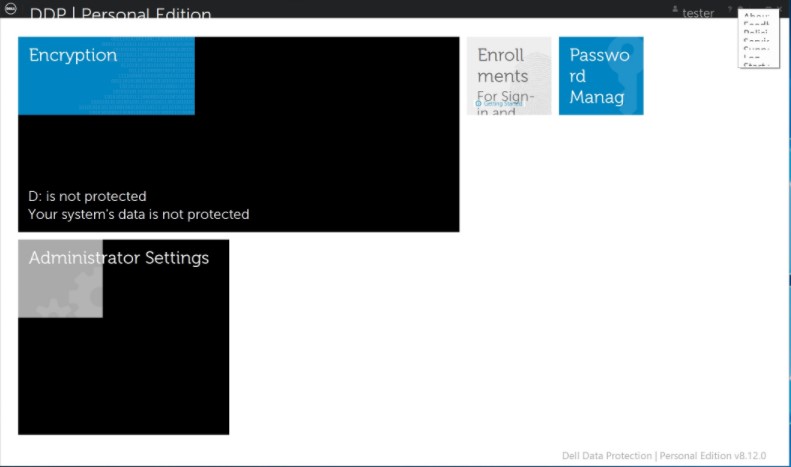
This can be temporarily resolved by running the Dell Data Security Console application in Compatibility Mode for Windows 8.
To enable compatibility mode:
- Right-click the icon and select Properties.

- Select the Compatibility Tab.

- Check that the box for Compatibility mode is labeled Run this program in compatibility mode for: And leave the setting on Windows 8.

- Click Apply and then OK to enforce the changes.
To contact support, reference Dell Data Security International Support Phone Numbers.
Go to TechDirect to generate a technical support request online.
For additional insights and resources, join the Dell Security Community Forum.
해당 제품
Dell Encryption, Dell Endpoint Security Suite Pro, Dell Endpoint Security Suite Enterprise문서 속성
문서 번호: 000124977
문서 유형: Solution
마지막 수정 시간: 18 6월 2024
버전: 12
다른 Dell 사용자에게 질문에 대한 답변 찾기
지원 서비스
디바이스에 지원 서비스가 적용되는지 확인하십시오.