NetWorker Family: DD Boost device is Marked as suspect
Podsumowanie: DD Boost device is Marked as suspect, which result in backups not progressing. And Mounting and Unmounting operation for the device fails.
Ten artykuł dotyczy
Ten artykuł nie dotyczy
Ten artykuł nie jest powiązany z żadnym konkretnym produktem.
Nie wszystkie wersje produktu zostały zidentyfikowane w tym artykule.
Objawy
- NetWorker DD Boost devices are marked as Suspect impacting data protection operations
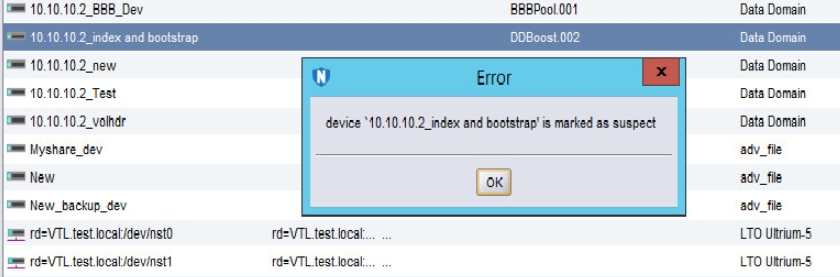
- Any activity on the device such as a "Mount and Unmount" operation fails, stating the following error:
"Device name is Marked as Suspect."
Przyczyna
There are multiple causes for the device to be marked as suspect. The Most likely reasons are as follows:
- The NetWorker Server/Storage node losses connection to the DD and conversely.
- The Username/password has changed and the same is not being updated in the "Device Properties."
- The Password for the user has expired.
- The account for the User has been locked from the DD end.
Rozwiązanie
1. Has the ddboost user password been changed recently?
a. If the ddboost user password was changed recently, open the Device properties in NetWorker.
b. Go to the Configuration tab and update the ddboost user password:
b. Go to the Configuration tab and update the ddboost user password:
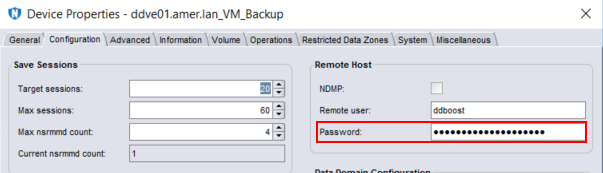
c. Once the password has been updated, click Ok.
NOTE: This process must be repeated for any ddboost device configured using the same ddboost user account.
d. Right-click the device and select disable.
e. Right-click the device and select enable.
f. Mount the device.
2. If the ddboost user password was not changed, ensure that it is not expired or locked.
a. Data Domain: DD Boost user shows locked status.
b. Disable and enable the device from NetWorker.
c. Perform a Mount operation.
b. Disable and enable the device from NetWorker.
c. Perform a Mount operation.
3. Check communication between the NetWorker Server or Storage node:
Produkty, których dotyczy problem
NetWorkerProdukty
NetWorker Family, Data DomainWłaściwości artykułu
Numer artykułu: 000050014
Typ artykułu: Solution
Ostatnia modyfikacja: 17 kwi 2026
Wersja: 6
Znajdź odpowiedzi na swoje pytania u innych użytkowników produktów Dell
Usługi pomocy technicznej
Sprawdź, czy Twoje urządzenie jest objęte usługą pomocy technicznej.