OptiPlex 5080: Visual Guide to your computer
Resumo: The following article provides a visual guide to your OptiPlex 5080 Computer and lists the external ports and features of your PC.
Este artigo aplica-se a
Este artigo não se aplica a
Este artigo não está vinculado a nenhum produto específico.
Nem todas as versões do produto estão identificadas neste artigo.
Sintomas
Note: For a more detailed description about each location, please go to the system manuals at www.dell.com/support
Table of Contents:
- Mini Tower (MT) Front View
- Mini Tower (MT) Rear View
- Small Form Factor (SFF) Front View
- Small Form Factor (SFF) Rear View
- Micro Form Factor (MFF) Front View
- Micro Form Factor (MFF) Rear View
- Additional Info:
Mini Tower (MT) Front View
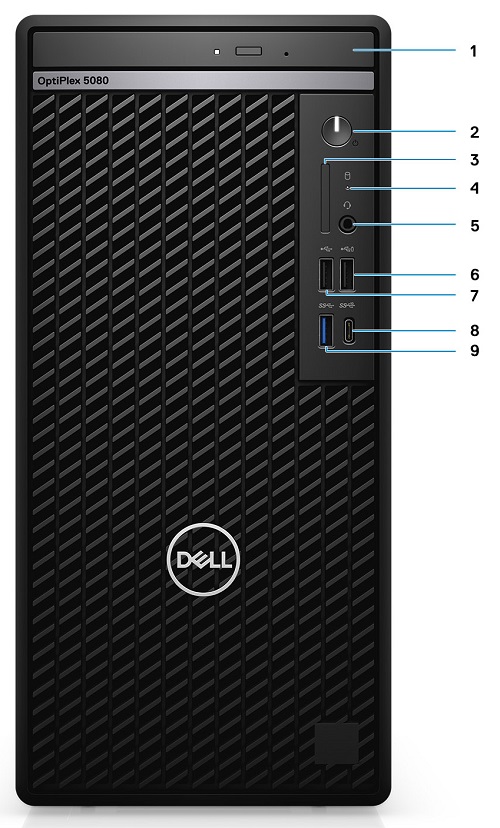
(Figure.1 MT Front View)
| 1 | Optical Disc Drive (Optional) | 2 | Power Button with Diagnostic LED Indicator |
| 3 | SD 4.0 Card Reader (Optional) | 4 | Hard Disk Drive Activity LED Indicator |
| 5 | Universal Audio Jack Connector | 6 | USB 2.0 Connector w/PowerShare |
| 7 | USB 2.0 Connector | 8 | USB 3.2 Gen2 Type-C Connector |
| 9 | USB 3.2 Gen2 Type-A Connector |
Causa
N/A
Resolução
Mini Tower (MT) Rear View
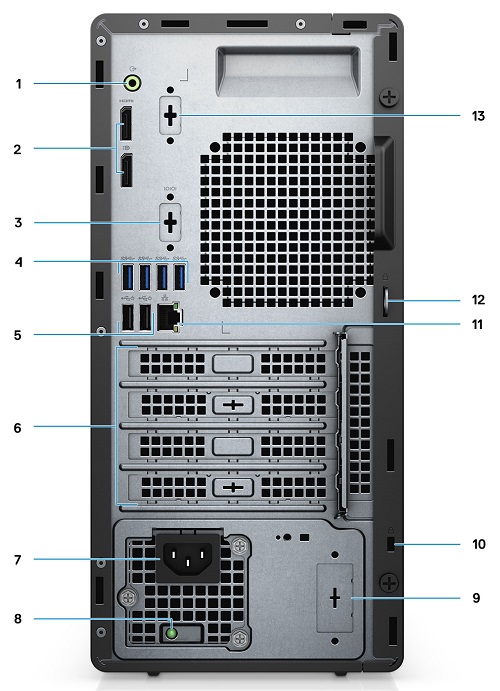
(Figure.2 MT Rear View)
| 1 | Line-Out Re-tasking Line-In Audio Connector | 2 | DisplayPort 1.4 Connector x2 |
| 3 | Knock Out slot Video Port (Optional) | 4 | USB 3.2 Gen2 Type-A Connector x4 |
| 5 | USB 2.0 Connector w/Smart Power On x2 | 6 | Expansion Card Slots x4 |
| 7 | Power Connector | 8 | Power Supply Diagnostic LED Indicator |
| 9 | Knock out slot (Optional SMA Connector) | 10 | Kensington Security-Cable Slot |
| 11 | Ethernet (NIC) Connector (10/100/1000 Mbps) | 12 | Padlock Loop |
| 13 | Knock out slot Serial/PS2 (Optional) |
Small Form Factor (SFF) Front View

(Figure.3 SFF Front View)
| 1 | Power Button w/Diagnostic LED Indicator | 2 | SD 4.0 Card Reader (Optional) |
| 3 | Hard Drive Activity LED Indicator | 4 | Universal Audio Jack Connector |
| 5 | USB 2.0 Type-A Connector w/PowerShare | 6 | USB 2.0 Type-A Connector |
| 7 | USB 3.2 Gen2 Type-C Connector | 8 | USB 3.2 Gen2 Type-A Connector |
| 9 | Optical Disc Drive (Optional) |
Small Form Factor (SFF) Rear View
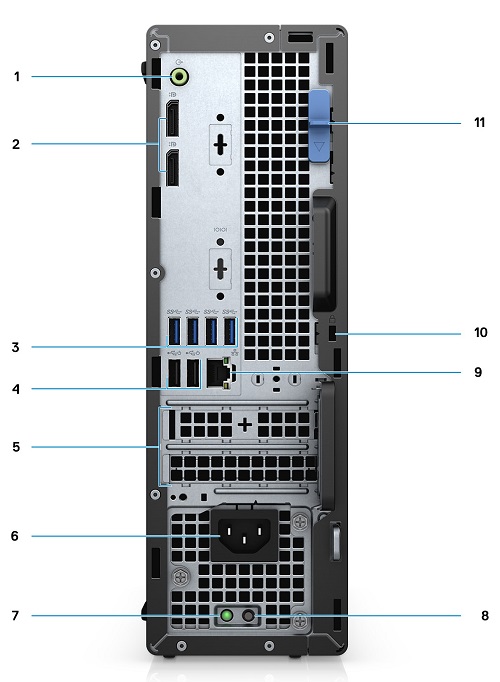
(Figure.4 SFF Rear View)
| 1 | Audio Line-Out/In Connector (Re-tasking) | 2 | DisplayPort 1.4 Connector x2 |
| 3 | USB 3.2 Gen2 Type-A Connector x4 | 4 | USB 2.0 Connector w/Smart Power On x2 |
| 5 | Half Height Expansion Slot x2 | 6 | Power Connector |
| 7 | Power Supply Diagnostic LED Indicator | 8 | Power Supply BIST |
| 9 | Ethernet (NIC) Connector | 10 | Kensington Security-Cable Slot |
| 11 | Release Latch |
Micro Form Factor (MFF) Front View
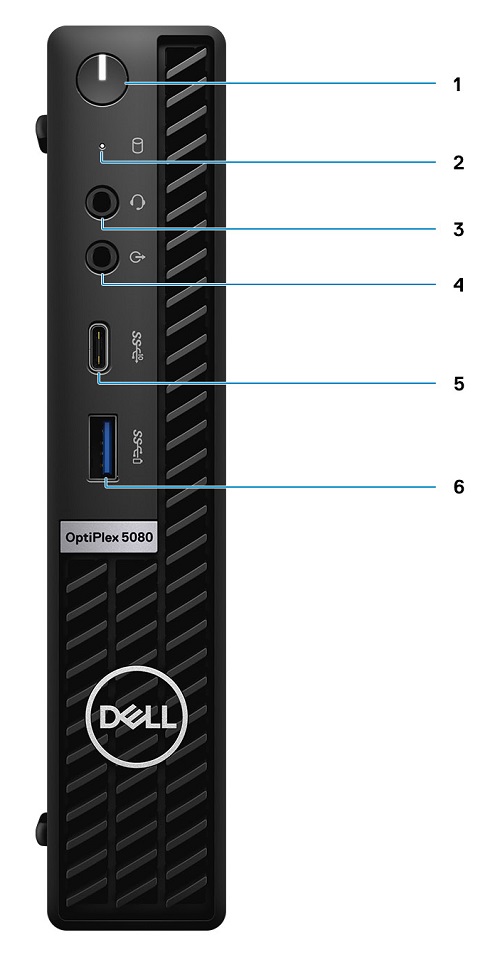
(Figure.5 MFF Front View)
| 1 | Power Button w/Diagnostic LED Indicator | 2 | Hard Disk Drive Activity LED Indicator |
| 3 | Universal Audio Jack Connector | 4 | Line-Out Connector (Re-taskable Line-In) |
| 5 | USB 3.2 Gen2 Type-C Connector | 6 | USB 3.2 Gen1 Type-A Connector w/PowerShare |
Micro Form Factor (MFF) Rear View

(Figure.6 MFF Rear View)
| 1 | External Antenna Connectors | 2 | Serial/Video Port (Serial/PS2/DP 1.4/HDMI 2.0/VGA/USB 3.2 Gen 2 Type-C with DP Alt Mode) (optional) |
| 3 | USB 3.2 Gen1 Type-A Connector w/Power On | 4 | USB 3.2 Gen1 Type-A Connector x2 |
| 5 | Cable Holder | 6 | Thumbscrew |
| 7 | Padlock Ring | 8 | Power Connector |
| 9 | DisplayPort 1.4 Connector x2 | 10 | Kensington Security-Cable Slot |
| 11 | USB 3.2 Gen2 Type-A Connector | 12 | Ethernet (NIC) Connector (10/100/1000 Mbps) |
Additional Info:
- OptiPlex 5080 Customer replaceable unit (CRU) teardown index
- Micro Form Factor Mounting Options and installation methods
- OptiPlex 5080 Documentation Support site page
Mais informações
Vídeos
Produtos afetados
OptiPlex 5080 Tower, OptiPlex 5080 Micro, OptiPlex 5080 Small Form FactorPropriedades do artigo
Número do artigo: 000126230
Tipo de artigo: Solution
Último modificado: 12 jun. 2025
Versão: 8
Encontre as respostas de outros usuários da Dell para suas perguntas.
Serviços de suporte
Verifique se o dispositivo está coberto pelos serviços de suporte.