Dell OptiPlex 3080 Visual Guide
Resumo: The following article provides a visual guide to your Dell OptiPlex 3080 and lists the external ports and features of your computer.
Este artigo aplica-se a
Este artigo não se aplica a
Este artigo não está vinculado a nenhum produto específico.
Nem todas as versões do produto estão identificadas neste artigo.
Instruções
For a more detailed description about each location, go to the system manuals at Dell Drivers and Downloads.
Table of Contents:
- Mini Tower (MT) Front View
- Mini Tower (MT) Rear View
- Small Form Factor (SFF) Front View
- Small Form Factor (SFF) Rear View
- Micro Form Factor (MFF) Front View
- Micro Form Factor (MFF) Rear View
- Additional Info
Mini Tower (MT) Front View
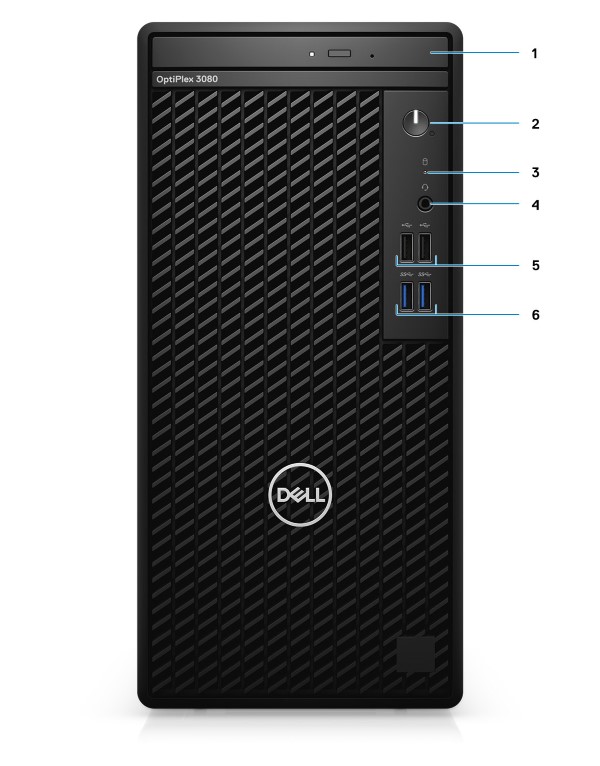
(Fig.1 OptiPlex 3080 MT Front View)
| 1 | Optical Disk Drive (optional) | 2 | Power button with diagnostic LED |
| 3 | Hard-disk drive activity light | 4 | Universal audio jack port |
| 5 | Two USB 2.0 ports | 6 | Two USB 3.2 Gen 1 Type-A ports |
Mini Tower (MT) Rear View
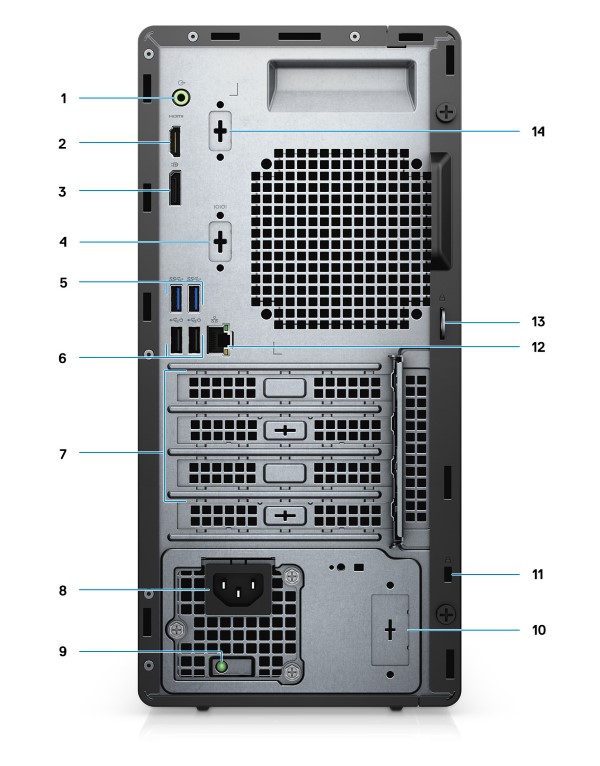
(Fig.2 OptiPlex 3080 MT Rear View)
| 1 | Line-out re-tasking Line-in audio port | 2 | HDMI 1.4b port |
| 3 | DisplayPort 1.4 | 4 | Slot for Serial/PS2 |
| 5 | Two USB 3.2 Gen 1 Type-A ports | 6 | Two USB 2.0 ports with Smart Power on |
| 7 | Three expansion card slots:
Supports only Slot 1, Slot 2, and Slot 3.
|
8 | Power connector port |
| 9 | Power supply diagnostic light | 10 | Knock out slot (optional SMA connector) |
| 11 | Kensington security-cable slot | 12 | Ethernet port (10/100/1000 Mbps) |
| 13 | Padlock loop | 14 | Slot for 3rd Video Port (VGA/DP 1.4/HDMI 2.0b) (optional) |
Small Form Factor (SFF) Front View
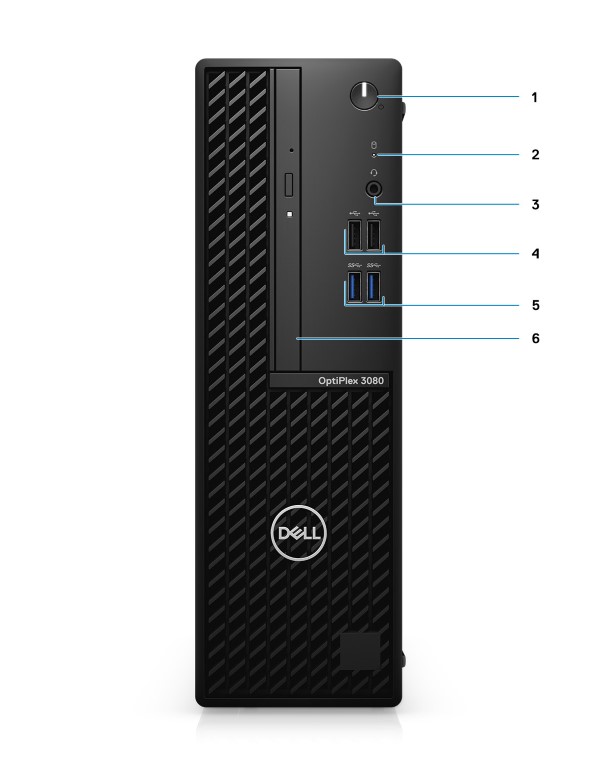
(Fig.3 OptiPlex 3080 SFF Front View)
| 1 | Power button with diagnostic LED | 2 | Hard-disk drive activity light |
| 3 | Universal audio jack port | 4 | Two USB 2.0 ports |
| 5 | Two USB 3.2 Gen 1 Type-A ports | 6 | Optical Disk Drive (optional) |
Small Form Factor (SFF) Rear View
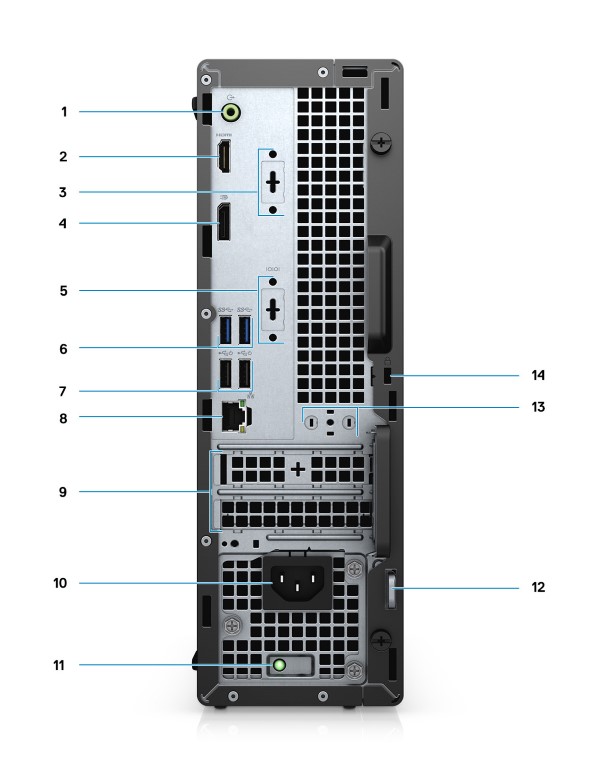
(Fig.4 OptiPlex 3080 SFF Rear View)
| 1 | Line-out re-tasking Line-in audio port | 2 | HDMI 1.4b port |
| 3 | Slot for 3rd Video Port (VGA/DP 1.4/HDMI 2.0b) (optional) | 4 | DisplayPort 1.4 |
| 5 | Serial/PS2 slot (Optional) | 6 | Two USB 3.2 Gen 1 Type-A ports |
| 7 | Two USB 2.0 ports with Smart Power on | 8 | Ethernet port (10/100/1000 Mbps) |
| 9 | Two expansion card slots | 10 | Power connector port |
| 11 | Power supply diagnostic light | 12 | Padlock loop |
| 13 | Antenna module slot | 14 | Kensington security-cable slot |
Micro Form Factor (MFF) Front View
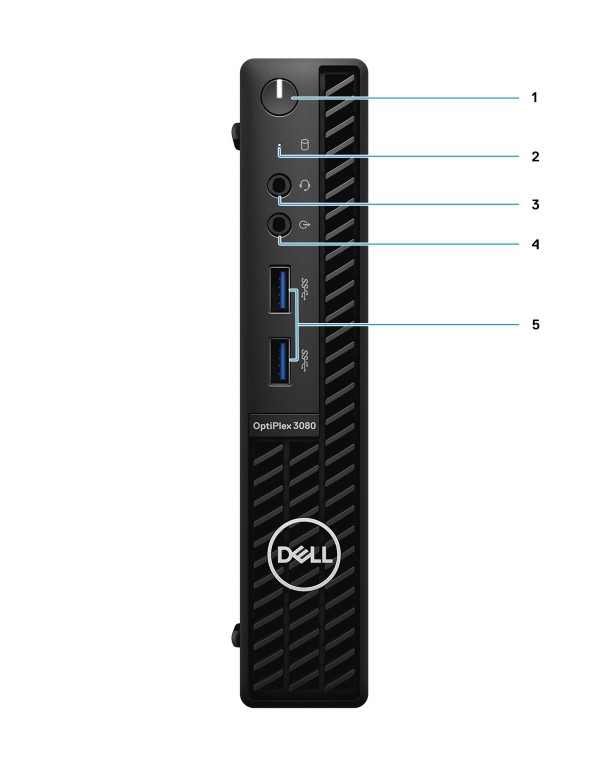
(Fig.5 OptiPlex 3080 MFF Front View)
| 1 | Power Button with status LED | 2 | Hard drive activity LED |
| 3 | Headset/Universal Audio Connector | 4 | Line-out port (retaskable Line-in) |
| 5 | USB 3.2 Gen 1 Type-A ports x2 |
Micro Form Factor (MFF) Rear View
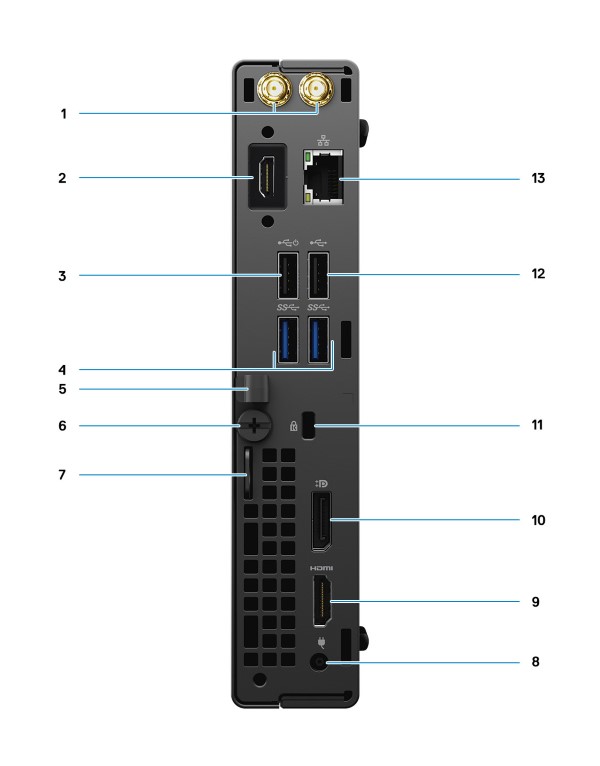
(Fig.6 OptiPlex 3080 MFF Rear View)
| 1 | External antenna connectors | 2 | Serial/Video Port (Serial/PS2/DP 1.4/HDMI 2.0b/VGA) (Optional) |
| 3 | USB 2.0 port with Smart Power on | 4 | USB 3.2 Gen 1 Type-A ports x2 |
| 5 | Cable holder | 6 | Thumbscrew |
| 7 | Padlock loop | 8 | Power connector port |
| 9 | HDMI 1.4 port | 10 | DisplayPort 1.4 |
| 11 | Kensington security-cable slot | 12 | USB 2.0 port |
| 13 | Ethernet port 10/100/1000 Mbps |
Additional Info:
Produtos afetados
OptiPlex 3080 Tower, OptiPlex 3080 Micro, OptiPlex 3080 Small Form FactorPropriedades do artigo
Número do artigo: 000180604
Tipo de artigo: How To
Último modificado: 01 dez. 2025
Versão: 9
Encontre as respostas de outros usuários da Dell para suas perguntas.
Serviços de suporte
Verifique se o dispositivo está coberto pelos serviços de suporte.