PowerStore: Active alerts detected by health checks
Resumo: Active alerts detected by the systems health checks.
Este artigo aplica-se a
Este artigo não se aplica a
Este artigo não está vinculado a nenhum produto específico.
Nem todas as versões do produto estão identificadas neste artigo.
Sintomas
System Health may display a message saying There are X active major or critical alerts. (KB#000192609), in one of the following scenarios:
- Running a System Check using PowerStore Manager (UI) with the Run Upgrade Extensions option:

Tip: The Profile field displays Upgrade Extensions when the Run Upgrade Extensions option is used to perform a System Check. - Running a System Check using PowerStore Manager (UI) with the Run System Check option:
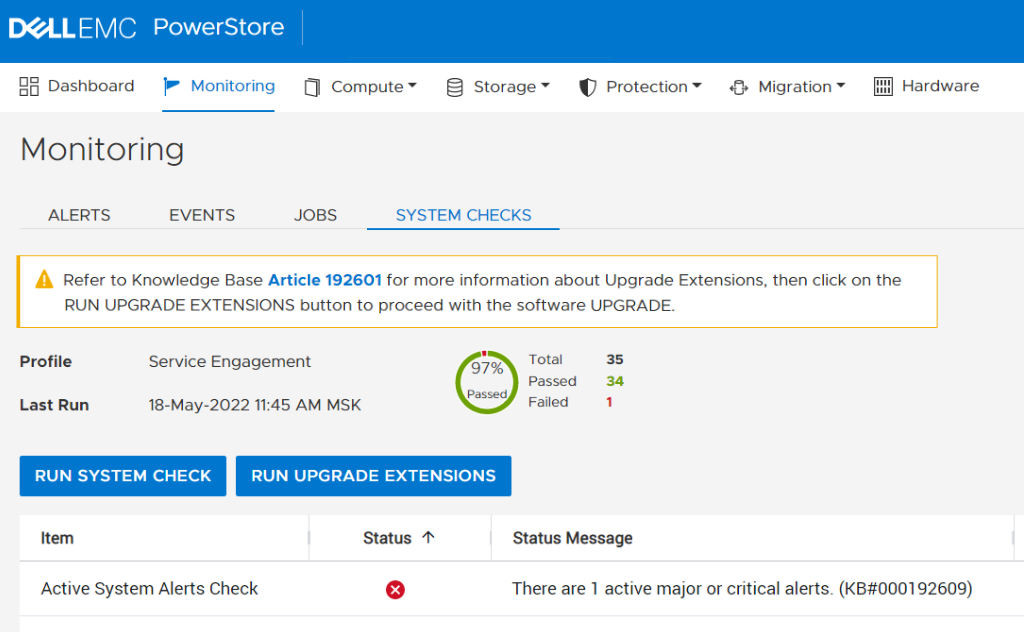
Tip: The Profile field displays Service Engagement when the Run System Check option is used to perform a System Check. - Running the System Health Service Script (svc_health_check) using an SSH connection:
$ svc_health_check run -rhc active_system_alert_check
Name                          Location Status     Description
Active System Alerts Check    node_a   FAILED     There are 1 active major or critical alerts. (KB#000192609)
Causa
PowerStore monitors system health and raises alerts if any issues are found. Maintenance operations and software upgrade (NDU) should be avoided when there are alerts raised with the severity of major or critical. The health check warns that alerts are raised and should be resolved before proceeding with a service engagement.
Resolução
To ensure a healthy system and optimal performance, all Major and Critical alerts must be resolved as quickly as possible.
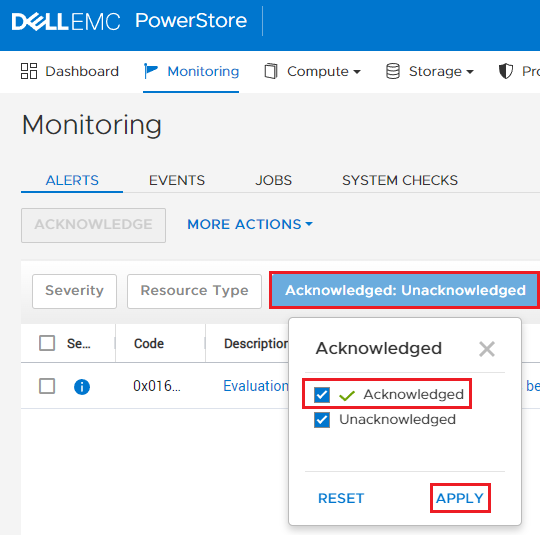
To see the existing major or critical alerts from the PowerStore Manager user interface, go to Monitoring > ALERTS, and select both Acknowledged and Unacknowledged alerts (by default, only Unacknowledged are shown):
Notes:
To see the existing major or critical alerts from the PowerStore Manager user interface, go to Monitoring > ALERTS, and select both Acknowledged and Unacknowledged alerts (by default, only Unacknowledged are shown):
Notes:
- Major and Critical severity alerts should never be acknowledged as acknowledging does not resolve the issues but only removes the alerts from view.
- Maintenance operations and upgrades should not be performed when there are outstanding alerts of major and critical severity unless approved by Technical Support.
Produtos afetados
PowerStorePropriedades do artigo
Número do artigo: 000192609
Tipo de artigo: Solution
Último modificado: 13 jun. 2025
Versão: 10
Encontre as respostas de outros usuários da Dell para suas perguntas.
Serviços de suporte
Verifique se o dispositivo está coberto pelos serviços de suporte.