Alienware Headset Does Not Work When Connected Using 3.5 mm Cable
Summary: This article provides information about an issue with the Dell Alienware headset when connected using a 3.5mm cable.
Acest articol se aplică pentru
Acest articol nu se aplică pentru
Acest articol nu este legat de un produs specific.
Acest articol nu acoperă toate versiunile de produs existente.
Symptoms
Alienware headset users may experience a lack of sound or microphone functionality when it is connected to their computer using a 3.5mm cable.
Affected Product
- Alienware Tri-Mode Wireless Gaming Headset AW725H
- Alienware Tri-Mode Wireless Gaming Headset AW920H
- Alienware Dual Mode Wireless Gaming Headset AW720H
Cause
There are several reasons why the headset may not work when connected using a 3.5mm cable:
- Connecting the wrong end of the 3.5mm cable to the headset and computer.
- Audio is muted when the headset is charging using the USB-C cable.
- The headset software is not up to date.
Resolution
Follow these steps to resolve the issue:
- Connect the microphone end of the 3.5mm cable to the headset (highlighted box in red Figure 1) and the other end to the computer. If the cable is reversed the cable does not work.
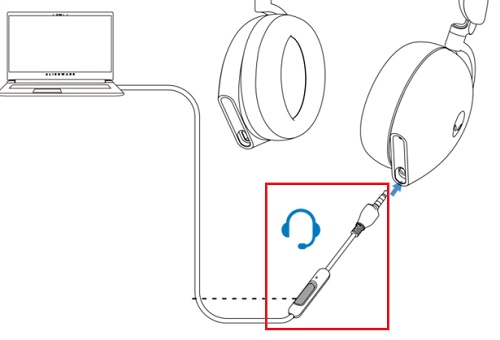
- When the 3.5mm cable is used, all audio and microphone functions are automatically routed through it, regardless of whether the headset is powered on or off.
- Ensure that the headset software is up to date. To update the software, see the following article: Drivers and Downloads FAQs.
Produse afectate
Alienware Tri-Mode Wireless Gaming Headset AW725H, Alienware Tri-Mode Wireless Gaming Headset AW920H, Alienware Dual Mode Wireless Gaming Headset AW720HProduse
Alienware, Inspiron, OptiPlex, Vostro, XPS, G Series, G Series, Alienware, Inspiron, Latitude, Vostro, XPS, Fixed Workstations, Mobile WorkstationsProprietăți articol
Article Number: 000209764
Article Type: Solution
Ultima modificare: 16 May 2026
Version: 6
Găsiți răspunsuri la întrebările dvs. de la alți utilizatori Dell
Servicii de asistență
Verificați dacă dispozitivul dvs. este acoperit de serviciile de asistență.