Avamar: Enabling debug logging for Exchange VSS plugin
Summary: The purpose of this KB is to help to enable debug logging for the Exchange VSS plugin.
Instructions
When troubleshooting Exchange VSS backup or restore issues, client logs must be collected for analysis.
Use the following article to collect the Exchange plugin logs: Avamar: Exchange VSS plugin - How to collect logs and environment information for troubleshooting (000021922)
Occasionally, the support or engineering teams require more details than what is provided in the default logs. This is achieved by enabling log debugging.
To enable debug and verbose logging:
Option 1 (for a single client only):
- Create a command file on the client computer under the install directory /var (example: C:\Program Files\avs\var).
- Name the command file as the binary's name that the debugging is being enabled for
- Below is an example of how it would be named:
- avagent.cmd (for client and server communication and activation process - backup/restore/activation)
- Use a text editor to create the files and add the follow two lines before saving:
--debug --verbose
Option 2 (for single or multiple clients):
It is possible to enable debug and verbose logging through the UI for single or multiple clients using the dataset.
See the latest Avamar System Administrator guide for current details but in general this requires the following:
-
- Select the "More Options" button while starting a new backup or restore or by editing a dataset,
- Choose "Advanced Options" and then mark the "Enable Debugging Messages" checkbox:

-
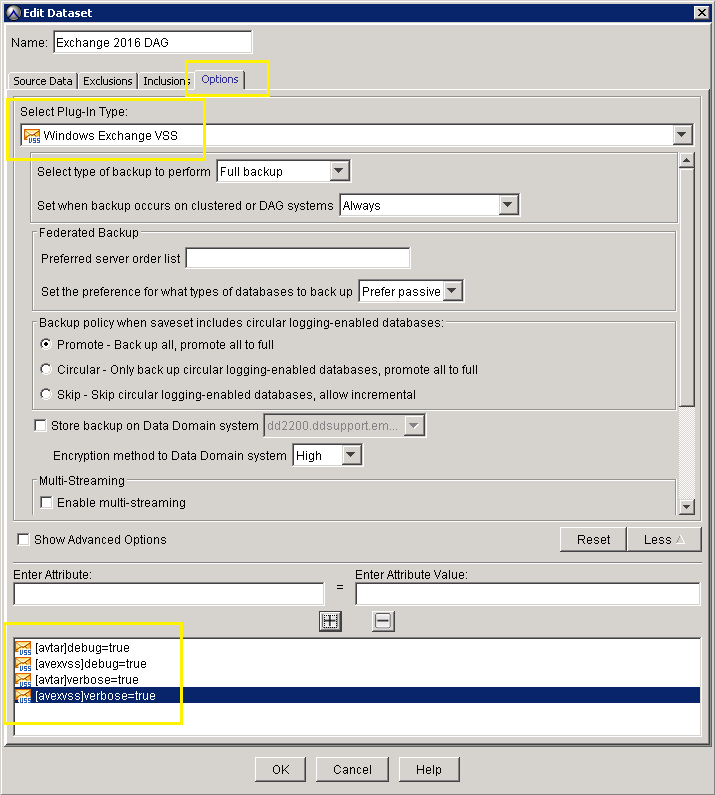
- Alternatively, the "--debug=true" and "--verbose=true" options can be added to a dataset,
- For this option, the plugin type must be specified unless the flag is for the selected plugin
- Once in the "More Options" tab of the dataset, select the button "More" (bottom right) and enter the flags as per example below:
Additional Information
Important Notes:
- When providing logs to support, use standard ZIP files and not some other compression utility such as Winrar or Winace. The technical support team may not have access to programs to decompress other archive types.
- The best practice is to attach log files directly to the Service Request. Apart from email attachment types and size limitations, if your support case passes ownership to another Support Engineer, the new engineer may not have access to the log files.
- Avoid permanent use of the "--debug" and "--verbose" flags as it may fill up the disk if there is not enough free space on it.
- If possible and if the issue is reproducible, provide both the "non-debug" and the "full debug" logs.
Related Articles that may be of use:
- Avamar: Exchange VSS plugin - How to collect logs and environment information for troubleshooting (000021922)
- Avamar: How to gather logs to troubleshoot backup and restore issues (000081546)
- Avamar: How to configure client log retention and how to limit the amount of space Avtar logs consume on a client (000060840)