ViPR SRM 4.01: Unable to access the SRM GUI using https
Sammanfattning: Unable to access the SRM GUI using https
Den här artikeln gäller för
Den här artikeln gäller inte för
Den här artikeln är inte kopplad till någon specifik produkt.
Alla produktversioner identifieras inte i den här artikeln.
Symptom
Unable to load the SRM GUI interface using ssl interface using the URL as: https://<ipaddress>:58443/APG
We get the error message as:
ERR_SSL_OBSOLETE_CIPHER
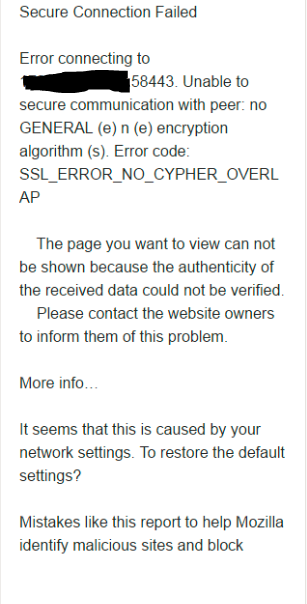
The issue is present for all the browsers, i.e. Chrome, Firefox and IE.
We get the error message as:
ERR_SSL_OBSOLETE_CIPHER
The issue is present for all the browsers, i.e. Chrome, Firefox and IE.
Orsak
The cause occurs due to upgrade of the browsers. The ciphers used earlier is not updated to new.
earlier the cipher under server.xml file:
earlier the cipher under server.xml file:
ciphers="TLS_DHE_RSA_WITH_AES_128_CBC_SHA, TLS_DHE_RSA_WITH_AES_256_CBC_SHA"The correct ciphers in upgraded server.xml shuld be:
ciphers="TLS_ECDHE_RSA_WITH_AES_256_GCM_SHA384, TLS_RSA_WITH_AES_256_GCM_SHA384, TLS_ECDH_RSA_WITH_AES_256_GCM_SHA384, TLS_ECDHE_RSA_WITH_AES_128_CBC_SHA, TLS_ECDHE_RSA_WITH_AES_128_CBC_SHA256, TLS_ECDHE_RSA_WITH_AES_128_GCM_SHA256"
Upplösning
Perform the below steps:
1. Login to SRM frontend server to the location: /opt/APG/Web-Servers/Tomcat/Default/conf
2. vi server.xml
3. Under the section the ciphers present are:
connector should be using the OpenSSL style configuration
described in the APR documentation -->
4. Modify the ciphers section as below:
6. Go to the path: /opt/APG/bin
7. Restart the tomcat service with the command: ./manage-modules.sh service restart tomcat
8. Open the browser window and check for the login using URL: https://<ipaddress>:58443/APG
9. This will load the SRM GUI interface successfully.
1. Login to SRM frontend server to the location: /opt/APG/Web-Servers/Tomcat/Default/conf
2. vi server.xml
3. Under the section the ciphers present are:
TLS_DHE_RSA_WITH_AES_128_CBC_SHA, TLS_DHE_RSA_WITH_AES_256_CBC_SHA
<!-- Define a SSL HTTP/1.1 Connector on port 8443
This connector uses the JSSE configuration, when using APR, the
connector should be using the OpenSSL style configuration
described in the APR documentation -->
   <Connector port="58443" protocol="HTTP/1.1" SSLEnabled="true"
               maxThreads="150" scheme="https" secure="true"
               compression="2048" compressableMimeType="text/"
               clientAuth="false" sslProtocols="TLSv1.2"
               sslEnabledProtocols="TLSv1.2" URIEncoding="UTF-8"
               keystoreFile="/opt/APG/Web-Servers/Tomcat/Default/conf/.keystore"
              keystorePass="watch4net"
               ciphers="TLS_DHE_RSA_WITH_AES_128_CBC_SHA, TLS_DHE_RSA_WITH_AES_256_CBC_SHA"
               SSLDisableCompression="true" />
4. Modify the ciphers section as below:
ciphers="TLS_ECDHE_RSA_WITH_AES_256_GCM_SHA384, TLS_RSA_WITH_AES_256_GCM_SHA384, TLS_ECDH_RSA_WITH_AES_256_GCM_SHA384, TLS_ECDHE_RSA_WITH_AES_128_CBC_SHA, TLS_ECDHE_RSA_WITH_AES_128_CBC_SHA256, TLS_ECDHE_RSA_WITH_AES_128_GCM_SHA256"5. Save the file.
6. Go to the path: /opt/APG/bin
7. Restart the tomcat service with the command: ./manage-modules.sh service restart tomcat
8. Open the browser window and check for the login using URL: https://<ipaddress>:58443/APG
9. This will load the SRM GUI interface successfully.
Berörda produkter
SRMArtikelegenskaper
Artikelnummer: 000065198
Artikeltyp: Solution
Senast ändrad: 01 okt. 2025
Version: 4
Få svar på dina frågor från andra Dell-användare
Supporttjänster
Kontrollera om din enhet omfattas av supporttjänster.