Latitude 3510: Keyboard Function Key Guide
Sammanfattning: The following guide lists the keyboard shortcuts available and the functions they perform on the Dell Latitude 3510 laptop.
Den här artikeln gäller för
Den här artikeln gäller inte för
Den här artikeln är inte kopplad till någon specifik produkt.
Alla produktversioner identifieras inte i den här artikeln.
Symptom
Keyboard Shortcut Key Functions
The below table is a list of combination short-cut key functions available on the Latitude 3510 Notebook
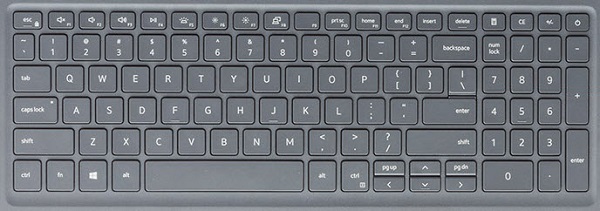
| Keys | Primary behavior | Secondary behavior (Fn + Key) |
|---|---|---|
| Fn + Esc | Escape |
Toggle Fn-key lock |
| Fn + F1 |
Mute audio |
F1 |
| Fn + F2 |
Decrease volume |
F2 |
| Fn + F3 |
Increase volume |
F3 |
| Fn + F4 |
Mute microphone |
F4 |
| Fn + F5 |
Turn on/off keyboard backlight |
F5 |
| Fn + F6 |
Decrease brightness |
F6 |
| Fn + F7 |
Increase brightness |
F7 |
| Fn + F8 |
Switch to external display |
F8 |
| Fn + F10 |
Print screen |
F10 |
| Fn + F11 |
Home |
F11 |
| Fn + F12 |
End |
F12 |
| Fn + Ctrl |
Open application menu |
-- |
Note: The keyboard backlight functionality depends on having a backlight capable keyboard fitted on your laptop.
Orsak
Not Applicable.
Upplösning
 Visit our Keyboard knowledge base for additional resources and information.
 For additional articles and information visit our Touchpad support page.
 Additional articles and information can also be found on our Mouse support page.
Berörda produkter
Latitude 3510Artikelegenskaper
Artikelnummer: 000129906
Artikeltyp: Solution
Senast ändrad: 04 juni 2025
Version: 7
Få svar på dina frågor från andra Dell-användare
Supporttjänster
Kontrollera om din enhet omfattas av supporttjänster.