PowerStore: How to connect to the service console over SSH
Sammanfattning: Instructions to connect to the service console (service container) on PowerStoreT and PowerStoreX
Den här artikeln gäller för
Den här artikeln gäller inte för
Den här artikeln är inte kopplad till någon specifik produkt.
Alla produktversioner identifieras inte i den här artikeln.
Symptom
PowerStore T and PowerStore X models use different physical ports for the management network access.
- PowerStore T uses port labelled 6.
- PowerStore X uses ports 0-1 (or bond) on the module labelled 1.

For ssh access using the service port instead of the management port, see PowerStore: SSH and PowerStore Manager access using the Service LAN Ports.
Note: When connecting to the service port, do not disconnect the management cables.
The ssh port used to log in to the service container is:
- 22 - After the cluster creation is completed.
- 26 - Before the Initial Configuration Wizard (ICW) is run.
Orsak
SSH access to the nodes may be required for troubleshooting.
Upplösning
SSH is not enabled for PowerStore appliances by default. To enable SSH access to the appliance:
- Go to Settings.
- Select SSH Management from the Security section.
- Select the appliance or appliances on which to enable SSH.
- Click ENABLE SSH. To disable SSH access, follow the same procedure, but click DISABLE SSH.
Only the user service can log in over ssh. The error below is observed if the wrong username is entered:
No supported authentication methods available (server sent: publickey,gssapi-keyex,gssapi-with-mic)
Example: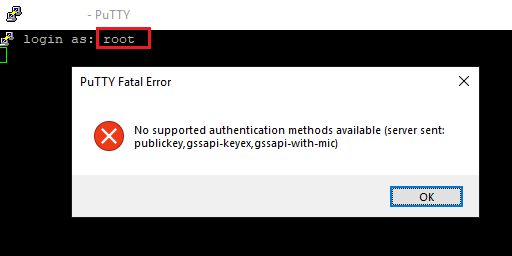
The service user password is the password that you have setup during the Initial Configuration Wizard (ICW). The service password can be reset from the PowerStore Manger user interface, under Settings > Support > Service Account.
Berörda produkter
PowerStoreArtikelegenskaper
Artikelnummer: 000131579
Artikeltyp: Solution
Senast ändrad: 19 dec. 2022
Version: 6
Få svar på dina frågor från andra Dell-användare
Supporttjänster
Kontrollera om din enhet omfattas av supporttjänster.