AppSync: Uploading .xml license file in UI receives error: Adding the license failed due to "Invalid license file"
Sammanfattning: Uploading .xml license file in UI receives error: Adding the license failed due to "Invalid license file".
Den här artikeln gäller för
Den här artikeln gäller inte för
Den här artikeln är inte kopplad till någon specifik produkt.
Alla produktversioner identifieras inte i den här artikeln.
Symptom
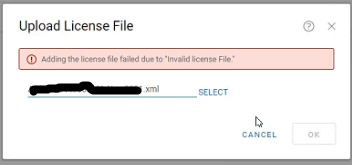
In AppSync UI, when uploading .xml license in Settings > License > Upload, receive an error:
Adding the license failed due to "Invalid license file"
Orsak
The first scenario seen was the entire <lockingID> section was missing from the license file.
There should be a lockingID section like the following:
<LockingIds>

	<LockingId>

		<LockingIdCode>HOSTID</LockingIdCode>

		<LockingIdValue>value</LockingIdValue>

	</LockingId>

</LockingIds>
The second scenario seen was the LockingIdCode being inappropriately found to be XIOD like so:
<LockingId>

	<LockingIdCode>XIOID</LockingIdCode>
When it should be HOSTID
<LockingId>

	<LockingIdCode>HOSTID</LockingIdCode>
Upplösning
The internal licensing generation mechanism is updated to ensure the Locking ID section is populated.
A new license is needed. Obtain a new license from the licensing team.
Ytterligare information
AppSync 4.2 and later supports XML type licenses.
Berörda produkter
AppSyncArtikelegenskaper
Artikelnummer: 000193800
Artikeltyp: Solution
Senast ändrad: 10 sep. 2025
Version: 4
Få svar på dina frågor från andra Dell-användare
Supporttjänster
Kontrollera om din enhet omfattas av supporttjänster.