AppSync: In AppSync UI customer was unable to set the logging mode to debug as Apply button stayed disabled when debug option was selected.
Sammanfattning: In AppSync UI customer was unable to set the logging level to debug as Apply button stayed disabled when debug option was selected.
Den här artikeln gäller för
Den här artikeln gäller inte för
Den här artikeln är inte kopplad till någon specifik produkt.
Alla produktversioner identifieras inte i den här artikeln.
Symptom
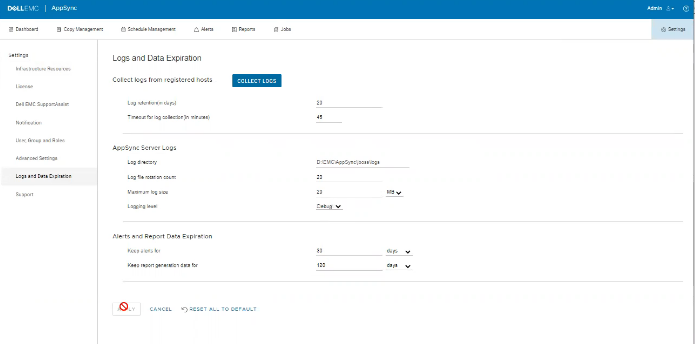
No errors in the logs but the issue can be observed on the UI as shown in the below.
Orsak
The Issue is because customer on the same screen, had set "Timeout for log collection(in minutes)" option value to 45 which is invalid.
Upplösning
Set The value for "Timeout for log collection(in minutes)" option to a valid value of 90 and 120.
Ytterligare information
AppSync 4.5 will not allow an invalid value for "Timeout for log collection(in minutes)."
Valid values can be from 90 to 120.
Valid values can be from 90 to 120.
Berörda produkter
AppSync, AppSyncArtikelegenskaper
Artikelnummer: 000203604
Artikeltyp: Solution
Senast ändrad: 09 sep. 2025
Version: 8
Få svar på dina frågor från andra Dell-användare
Supporttjänster
Kontrollera om din enhet omfattas av supporttjänster.