Data Domain: How to Generate a Support Bundle
摘要: This article provides steps on how to generate a support bundle (SUB) using the UI (aka. DDSM - DD Storage Manager) or Data Domain Enterprise Manager (DDEM)
本文适用于
本文不适用于
本文并非针对某种特定的产品。
本文并非包含所有产品版本。
说明
A support bundle is a collection of logs that are in the /ddr/var/support directory.
Generating a support bundle performs the following tasks:
- Identifies a list of log files in the system
- Each log file is added to a temporary archive.
- Once all the log files identified are added to the temporary archive, the temporary archive is compressed.
- Once the temporary archive is compressed, the file is renamed.
There are two alternative methods to generate a support bundle on a Data Domain system:
- A bundle can be generated using the UI or DDSM, using a web browser, which is covered in this knowledge base article.
- Using the Data Domain Command-Line Interface (CLI) -
- Command:
# support upload bundle
- Command:
No matter what method is used, generating a support bundle is not immediate and can take up to 15 minutes on larger systems.
The resulting Support Bundle (.tar.gz) file can be downloaded directly from the UI or an NFS/CIFS connection to the /ddr folder on the DD.
其他信息
The following procedure can be used on the Data Domain Operating System (DDOS) to generate a support bundle using the UI or DDEM in a web browser:
- Access the Data Domain IP or hostname in a web browser.
- Log in with a user that has system administration privileges.
- Select Maintenance.
- Select Support.
- Select the Support Bundles tab.
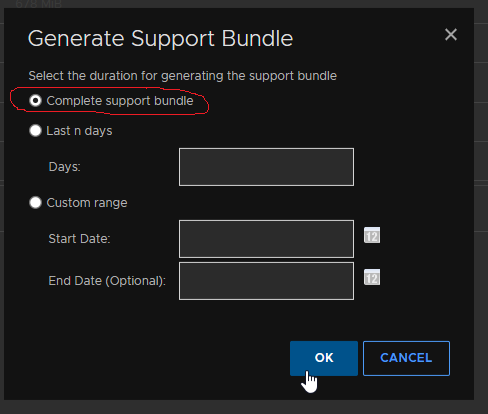
- Click the Generate Support Bundle button and if asked, select Complete Support Bundle. Support often requires a complete set of logs for investigation.
NOTE:
- The web page may have to be refreshed to ascertain if the support bundle generation is complete. See the 'Last Modified' field to locate the latest support bundle.
- The maximum number of support bundles that are allowed is five. If the maximum of five is reached, the system automatically deletes the oldest bundles.
- An incomplete support bundle has a 'File Name' ending with four or more digits. This indicates that one of the above tasks is still running, that is, the support bundle is still being generated.
- A complete support bundle has a 'File Name' ending with the string ".tar.gz."

Once the support bundle is generated, it can be:
- Downloaded to the local system that is where the web browser is running, by selecting the file name (which is a URL).
- Accessed using an NFS/CIFS share to the /ddvar file system
Watch this video:
See related Dell article (Customer login required):
- KB 22926: Data Domain: How to collect and upload a support bundle (SUB) from a Data Domain Restorer (DDR). (Login required)
受影响的产品
Data Domain产品
Data Domain, DD OS文章属性
文章编号: 000020621
文章类型: How To
上次修改时间: 20 5月 2025
版本: 10
从其他戴尔用户那里查找问题的答案
支持服务
检查您的设备是否在支持服务涵盖的范围内。