NVP-vProxy: Windows VM FLR Fails With "Error while browsing: 200: Error received from vProxy "could not get directory contents:"
摘要: A Microsoft Windows Virtual Machine (VM) FLR performed through the NetWorker VMware Protection (NVP) vProxy appliance fails to browse directory contents due to Admin Approval Mode (or heightened UAC) settings on the VM operating system ...
本文适用于
本文不适用于
本文并非针对某种特定的产品。
本文并非包含所有产品版本。
症状
vProxy File Level Recovery (FLR) for a Microsoft Windows VM fails with the following error:
Error while browsing: 200: Error received from vProxy "could not get directory contents: Unable to retrieve file list from 'host' (vm-moref) path 'path'"
The Windows VM does not contain Windows Distributed File System (DFS): NVP vProxy: Virtual Machine FLR Consistently Failing With "Could not get the directory content…"
原因
This error can appear if the Admin Approval Mode (AAM) is enabled on the operating system. This prevents an administrative user from performing an FLR to the end user s profile. For any User Account Control (UAC) interactions, the administrator must wait for the mount operation to complete, and then access the mountpoint on the target machine.
解决方案
There are three options available:
Option 1:
Perform the FLR from the NetWorker Web User Interface (NWUI). There is an option inside the FLR process called "run with elevated privileges." Check this option when performing the FLR.
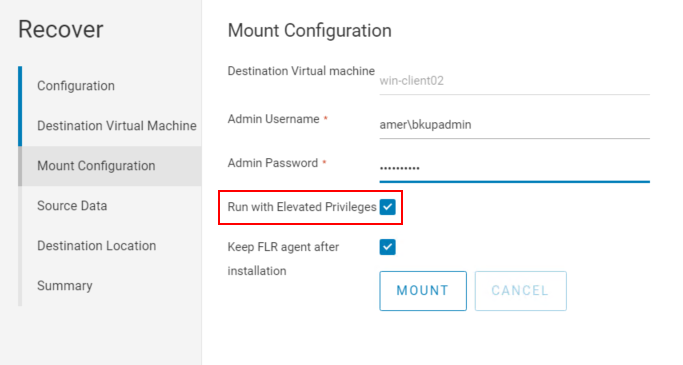
NOTE: This option is not available inside the NetWorker Management Console (NMC).
Option 2:
1. Initiate the FLR mount from the NetWorker Management Console (NMC):
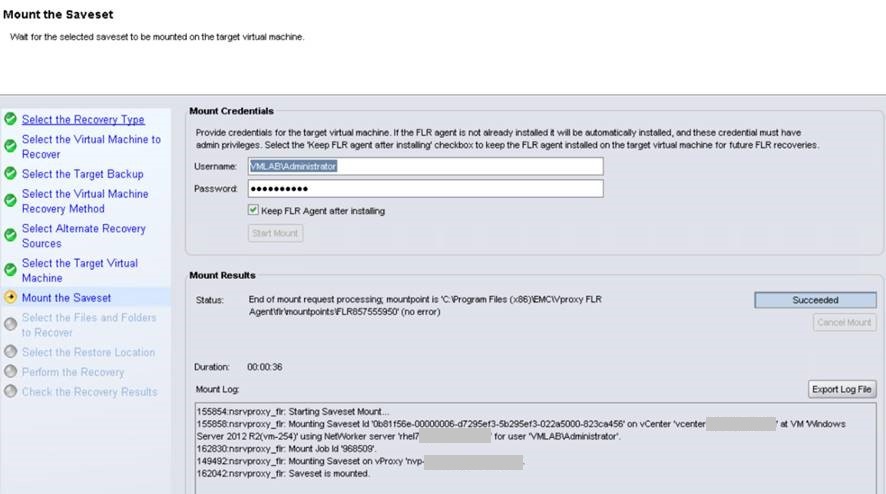
2. Do not proceed with the restore from the NMC. Log in to the target restore Virtual Machine and go to the "C:\Program Files (x86)\EMC\vProxy FLR Agent\flr\mountpoints" using Windows File Explorer. Open the mountpoint for the mount initiated from the NMC, e.g:

You can browse to the needed folders/files and copy them to the Virtual Machine. Files can also be copied using xcopy  :
:
3. When done, close the Recover Wizard in the NMC to disconnect the mount point.
: xcopy mountpoint_folder/file recover_destination /EH
3. When done, close the Recover Wizard in the NMC to disconnect the mount point.
Option 3:
Instant Access restores can also be used as an FLR workaround. This process is documented under:
NVP vProxy: Perform VM FLR without vProxy FLR Agent
其他信息
User Account Control Admin Approval Mode: https://docs.microsoft.com/en-us/windows/security/threat-protection/security-policy-settings/user-account-control-admin-approval-mode-for-the-built-in-administrator-account
受影响的产品
NetWorker产品
NetWorker文章属性
文章编号: 000044625
文章类型: Solution
上次修改时间: 25 9月 2025
版本: 6
从其他戴尔用户那里查找问题的答案
支持服务
检查您的设备是否在支持服务涵盖的范围内。