SC7020 Series (Dell Compellent) Reference Articles
摘要: A guide to the SC7020 Dell EMC Storage unit. There are sections on General Overview, Getting Started, Troubleshooting, and SCOS information. The SC7020 provides more capacity and greater flexibility as you manage various workloads. Realize rack space savings with a 3U, 30-drive bay chassis that can expand up to 500 drives with 12Gb SAS expansion enclosures. ...
本文章適用於
本文章不適用於
本文無關於任何特定產品。
本文未識別所有產品版本。
症狀
Support Library - SC7020 Series (Dell Compellent)
原因
Product Overview:
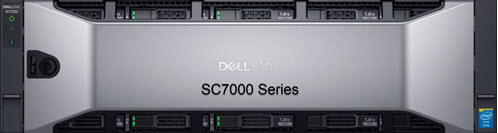
The SC7020 provides more capacity and greater flexibility as you manage various workloads. Realize rack space savings with a 3U, 30-drive bay chassis that can expand up to 500 drives with 12Gb SAS expansion enclosures. It is powered by dual Intel® Xeon® E5 processors with 8 cores each for enhanced application performance. SC7020’s multiprotocol connectivity options allow you to expand your front-end network connectivity and increase capacity with expansion enclosures.
解析度
Note: Some documents may only be available in English.
General Overview:
- SC7020 and SC7020F Storage System Owner's Manual
- SC7020 and SC7020F Manuals and Documents
- Dell EMC Switch Configuration Guide for Dell EMC Unity, SC Series (Compellent) , PS Series (EqualLogic) for iSCSI SANs
- Dell SC Series (Compellent) Best Practices with VMWare vSphere 5.x to 7.x
- SC Series technical documents and videos
- Citrix XenServer with Dell SC Series Storage Configuration and Deployment
Getting Started:
- Dell EMC SC Series and Active Directory Integration
- SC Storage Customer Notification: How to apply Host Server Best Practice settings using the Dell Storage Manager Client
- Dell EMC SC Series Storage and Microsoft Multipath I/O
- Dell EMC SC Series and Active Directory Integration
- Dell SC Series Storage with SAS Front-end Support for VMWare vSphere
- Citrix XenServer with Dell SC Series Storage configuration and Deployment
- Attaching Hosts to Dell EMC Storage Center Arrays (Videos)
- Deploying SharePoint 2016 utilizing Dell Storage SC Series Arrays
- SC Series VASA (VMware® vSphere Storage APIs for Storage Awareness) Provider
Troubleshooting:
- Drivers and Downloads
- SC Storage Customer Notification: Dell Storage Manager server setup fails with Error Turning on MPIO
- SC Storage Customer Notification: SCv3000, SC5020 and SC7020 systems do not retain iDRAC Email Alert Information
- SC Storage Customer Notification: Deduplication Operation can result in unexpected system behavior
- SC Storage Customer Notification: Troubleshooting DSM "Error setting up connection" Message During Initial Deployment
- SC Storage Customer Notification: Consistency snapshots fail when volume(s) in Recycle Bin
System Software:
Storage Enclosures:
- For information about Dell EMC SC Series Expansion Enclosures Click here
- Dell SC400, SC420, and SC420F Expansion Enclosure Owner's Manual
- Dell Storage SC460 Owners Manual and Support page
受影響的產品
Dell Storage SC400, Dell Storage SC420F, Dell Storage SC460, Dell Storage SC7020, Dell Storage SC7020F文章屬性
文章編號: 000178219
文章類型: Solution
上次修改時間: 06 5月 2026
版本: 8
向其他 Dell 使用者尋求您問題的答案
支援服務
檢查您的裝置是否在支援服務的涵蓋範圍內。