PPDM vProxy 中斷連線,並顯示「無主機路由」
摘要: PowerProtect Data Manager vProxy 備份失敗,並顯示「no route to host」,因為備份會使用 NBD 傳輸模式路由。
本文章適用於
本文章不適用於
本文無關於任何特定產品。
本文未識別所有產品版本。
症狀
PowerProtect Data Manager vProxy 備份失敗,並顯示「no route to host」。
記錄顯示:
記錄顯示:
2023-06-15T11:43:39.933Z INFO [Timer-1] [][][][][] [c.e.b.v.a.VmdmAlertsClientImpl.processAlert(108)] -  Raise alert id=PEN0002, taskId=null [NameValuePair[name=vCenterName,value=LOCATION vCenter], NameValuePair[name=vproxy,value=VPROXYName [VPROXYName]]]
2023-06-15T11:43:39.942Z ERROR [Timer-1] [][ALERT:PEN0002][][][] [c.e.d.e.c.s.m.DefaultMessageResourceModifier.printAlertLog(143)] -  Date: Jun 15, 2023 06:43:39 AM; Summary: Virtual Machine Proxy VPROXYName [VPROXYName] on vCenter LOCATION vCenter is unreachable or unresponsive.; Details: null; Recommended Action: Contact system administrator.; Detail Summaries: null; Status: UNACKNOWLEDGED

2023-06-15T11:51:20.196Z INFO [vproxyMonitor] [][][][][] [c.e.d.v.c.VProxyManager.descriptionChanged(1218)] -  description changed: 'Unable to check vProxy status. Get "https://VPROXYName:9090/api/v1/VproxyEngines": context deadline exceeded (proxy: VPROXYName [VPROXYName])' - ManagedProxySession(state=Ready, id=b4dd411e-d7dc-46b3-91b1-a4c2f70adbd7)
2023-06-15T11:52:10.265Z INFO [vproxyMonitor] [][][][][] [c.e.d.v.c.VProxyManager.reportComplete(1540)] -  Session completed BackupJobSession(state=Failure, id=e00e81ce-4722-47e3-9f71-07001c6b210c, error: code=500, text=Unable to send Get request:  Get "https://VPROXYName:9090/api/v1/BackupVmSessions/5fa7be6e-b127-48ac-8490-99e8ed49c292": dial tcp ##.##.##.##:9090 [##.##.##.##]: connect: no route to host (proxy: VPROXYName [VPROXYName]), target=abc)
"error" : "Unable to send Get request:  Get \"https://VPROXYName:9090/api/v1/BackupVmSessions/5fa7be6e-b127-48ac-8490-99e8ed49c292\": dial tcp ##.##.##.##:9090 [##.##.##.##]: connect: no route to host (proxy: VPROXYName [VPROXYName]) (500)",
"proxyHostName" : "VPROXYName [VPROXYName]"
原因
備份使用 NBD 傳輸模式路由。這會導致 vProxy 失敗。
解析度
調整 VM 直接引擎容量設定,以避免網路頻寬問題;
本檔記錄于下列檔第 32 頁。
HTTPs://dl.dell.com/content/manual45487542-powerprotect-data-manager-19-13-virtual-machine-user-guide.pdf?language=en-us編輯 VM Direct Engine 的容量設定。
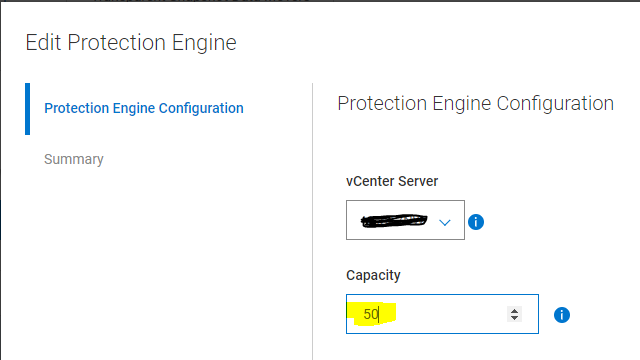
新增 VM Direct Engine 後,您可以變更將使用的保護引擎容量百分比。例如,您可能會希望將容量設定變更為較低值,以避免網路頻寬問題。
請執行下列步驟,以變更將使用的 VM Direct 引擎最大百分比:
1。在「保護引擎」視窗中,從 VM Direct Engine 窗格中的表格中選取 VM Direct Engine。
2.按一下「編輯」。「編輯保護引擎」精靈隨即顯示。
3.在「Protection Engine Configuration」(保護引擎組態) 頁面上,輸入容量的最大百分比值。
4.按一下[Next] (下一步),直到您到達「Summary」(摘要) 頁面為止。
5.在「Summary」(摘要) 頁面上,確認新值,然後按一下[Finish] (完成)。
文章屬性
文章編號: 000215904
文章類型: Solution
上次修改時間: 20 9月 2023
版本: 2
向其他 Dell 使用者尋求您問題的答案
支援服務
檢查您的裝置是否在支援服務的涵蓋範圍內。