Dell Optimizer 6.0 Overview and Common Questions
摘要: Explore the power of Dell Optimizer - your guide to enhanced performance, AI-driven optimizations, and seamless Windows experiences. Learn more now.
本文章適用於
本文章不適用於
本文無關於任何特定產品。
本文未識別所有產品版本。
說明
Affected Platforms:
- Dell Desktops
- Dell Laptops
- Dell Pro Desktops and All-in-Ones
- Dell Pro Laptops
- Dell Pro Max Workstations
- Dell Pro Rugged Tablets
- Inspiron Laptops
- Inspiron Desktops
- Latitude
- Latitude Rugged Tablets
- OptiPlex
- Precision Workstations
- Vostro Laptops
- Vostro Desktops
Affected Products:
- Dell Optimizer 6.0 and Later
Affected Operating Systems:
- Windows 10 21H2 (64-bit) or Later
- Windows 11 21H2 (64-bit) or Later
Table of Contents:
What is Dell Optimizer?
Dell Optimizer is an application for Dell computers that allows customizing computer settings for power and battery, display, collaboration touchpad, and more.
Starting with version 6.x, the new Dell Optimizer replaces older versions of Dell Optimizer and the MyDell application to offer a simplified set of performance and productivity-enhancing features for most Dell branded computers.
This also replaces the Dell Digital Delivery application for downloading the apps purchased with your new computer.
What does Dell Optimizer do:
Depending on your computer, with the new Dell Optimizer you can:
- Extend your computer’s battery life and longevity with Intelligent Battery Extender and Dynamic Charge
- Tune your computer’s performance, power consumption, cooling, and fan noise with selectable thermal modes
- Access Zoom and Microsoft Teams meeting controls with the Collaboration Touchpad
- Customize display modes and color profiles to match your viewing preferences
- Access and secure your computer based on your physical presence
- Download and redeem the apps purchased with your computer
Downloading and Installing:
To get Dell Optimizer, follow these steps (dell support):
- Go to the Dell Support page.
- Under Which product do you need help with, enter the Service Tag of your supported Dell device and click Submit, or click Detect PC.
- On the Product Support page for your Dell device, click Drivers & Downloads.
- Click Manually find a specific driver.
- Check the Application checkbox under the Category dropdown.
- Locate Dell Optimizer in the list and select Download on the right side of the page.
- Locate the downloaded file on your computer (in Google Chrome, the file appears at the bottom of the Chrome window), and run the executable file.
- Follow the on-screen instructions to install Dell Optimizer.
User Interface:
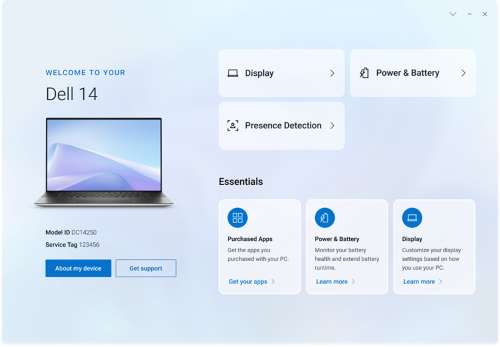
FAQ:
- Why is my computer getting locked within a short period when my Windows setting for screen lock is set up for a longer period?
- Walk Away Lock settings in the Proximity Sensor option of Dell Optimizer locks the computer when the user is not in the field of view. The default lock timer is set to 60 seconds which is shorter than the default Windows screen lock timer.
- Why is the Audio feature disabled?
- The Audio module is no longer available in Dell Optimizer 6.x
- Can I use Dell Optimizer on my non-Dell laptop or desktop?
- No. Dell Optimizer software is designed to only optimize the performance of a Dell computer.
- Why does the Dell Optimizer installer fail with a message stating that my computer is not supported?
- You cannot install Dell Optimizer on operating systems other than Windows 10 1803 or later. Dell Optimizer is only supported on all Dell computers launched after September 2024 (excluding ARM)
- Will there be an update to previous Software (Dell Optimizer or MyDell)?
- Dell Optimizer prior versions and MyDell attain their End of Life (EOL) status in 2025. As a result, these older applications only receive security patches before Dell Optimizer v6 fully replaces them in mid-2025
- Why is the user interphase blank? (or) Why does Dell Optimizer not launch?
- Check if the computer has the .Net 8 desktop runtime library.
- Check if Dell Tech Service is started. If not, start Dell Tech Service.
- Reopen Dell Optimize Graphics user interphase to see if the issue is gone.
- If Dell Tech Hub (DTH) is started and DellOptimizer.exe is not running.
- Check if there are any IT management tools blocking the start of DellOptimizer.exe such as Trellix.
- Why is the message Dell Optimizer service was not detected displayed after launching the Dell Optimizer application from the Start Menu?
- This issue occurs when Dell Optimizer is not installed properly. Uninstall and reinstall Dell Optimizer using Apps & features > Dell Optimizer Service.
- Why is the message Dell Optimizer service is not running displayed after launching the Dell Optimizer application from the Start Menu?
- Windows starts the default services once Windows 10/11 restarts. Dell Optimizer windows service is configured as automatic (delayed start), which may take two minutes after Windows 10/11 restart. If you do not restart your computer, you can check or start the Dell Optimizer service using Task Manager or the Services console.
- How do I find the battery manufacturer name, battery health and if it is a Dell Battery?
- On the home screen, click Power & Battery and on the next screen click Battery Details
- Why Dell Optimizer does not sync with the Windows power mode setting?
- In the Power & Battery page under Thermal Management, ensure the Allow Dell Optimize to synchronize thermal management mode with Windows power settings and vice versa checkbox is checked
- Can I access SupportAssist from Optimizer?
- Yes, click Get Support in the home page, it opens SupportAssist
其他資訊
受影響的產品
Dell Pro All-in-One, Dell Pro Max Micro, Dell Pro Max Slim, Dell Pro Max Tower, Dell Pro Micro, Dell Pro Slim, Dell Pro Tower, Dell Slim, Dell Tower, Inspiron, OptiPlex, Vostro, XPS, Dell Laptops, Dell Pro, Dell Pro Max, Inspiron, Latitude
, Dell Pro Rugged, Vostro, XPS, Fixed Workstations, Mobile Workstations, Dell Optimizer, Dell Pro Max Micro XE FCM2250
...
文章屬性
文章編號: 000273253
文章類型: How To
上次修改時間: 07 8月 2025
版本: 2
向其他 Dell 使用者尋求您問題的答案
支援服務
檢查您的裝置是否在支援服務的涵蓋範圍內。