Alienware 16X Aurora AC16251 Encounters an Error When Attempting HTTPs Boot Over the Onboard LAN
Oversigt: Learn about an error that occurs when booting through HTTPs with onboard Ethernet.
Denne artikel gælder for
Denne artikel gælder ikke for
Denne artikel er ikke knyttet til et bestemt produkt.
Det er ikke alle produktversioner, der er identificeret i denne artikel.
Symptomer
An error message may display when performing the following steps: "Failed to initialize network connection"
- Secure Boot is enabled in the BIOS setup.
- Connect an Ethernet cable to the onboard LAN port.
- Turn on the computer and press F12 key to enter One-Time Boot Settings.
- Select UEFI HTTPs Boot.
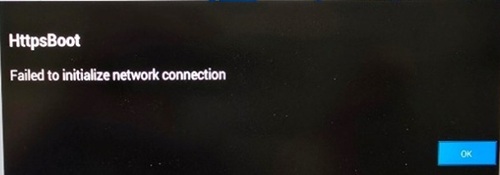
Affected Platform:
- Alienware 16X Aurora AC16251
Affected BIOS Version:
- 2.4.0
Årsag
This issue is caused by BIOSConnect code corruption in BIOS.
Løsning
Note: Before starting the update, perform the following:
- Back up all personal data. For more information, refer to Back Up and Recovery.
- Connect the AC adapter.
Updating the BIOS to version 2.6.0 or later on the computer resolves the issue. To download and install the BIOS, refer to the BIOS Update Guide.
Berørte produkter
Alienware 16X Aurora AC16251Artikelegenskaber
Artikelnummer: 000502489
Artikeltype: Solution
Senest ændret: 27 aug. 2026
Version: 1
Find svar på dine spørgsmål fra andre Dell-brugere
Supportservices
Kontrollér, om din enhed er dækket af supportservices.