PowerScale: Understanding NFSv4 nondefault settings
Summary: Understanding NFSv4 nondefault settings on a PowerScale cluster.
This article applies to
This article does not apply to
This article is not tied to any specific product.
Not all product versions are identified in this article.
Instructions
Sometimes, the default NFSv4 setup produces unexpected results. The following issues can occur and be adjusted as indicated. Best practice recommends avoiding non-default settings because they often break NFSv4 access control list (ACL) support.
- NFSv4 domain not configured:
- Root ownership appears as
nobody:nobody, while non-root users display correctuser:groupcontext. Without domain information, ACL support on the mount is unlikely. Refer to PowerScale: NFSv4 clients cannot access resources cause owner/group is listed as nobody/nogroup for more details.
- Root ownership appears as
- NFSv4 domain is configured:
- Root ownership appears as
root:wheelinstead ofroot:root. This happens because NFSv4 returns UID and GID names from the server. In OneFS, UID 0 and GID 0 maps toroot:wheel. Linux systems may lack the wheel group or assign it GID 10. A potential workaround is adding root to the wheel group on the Linux client. This would require changes to every client but avoids server-side configuration changes. A cluster side alternative would be settingnfsv4-no-namesto yes, but this has caveats.
- Root ownership appears as
- NFSv4 No Names set to non-default YES:
- This setting sends UIDs/GIDs instead of
user@domain. Root ownership appears asroot:root, but ACL support fails because the protocol requiresuser@domainsyntax per RFC. This setting is not recommended as a permanent workaround because it breaks NFSv4 ACL functionality.
- This setting sends UIDs/GIDs instead of
Technical details for NFS zone settings are available by running the following command:
# isi nfs settings zone modify -h
Description:
    Change the default NFS zone options.

Required Privileges:
    ISI_PRIV_NFS

Usage:
    isi nfs settings zone modify
        [--nfsv4-domain <string>]
        [--revert-nfsv4-domain]
        [--nfsv4-replace-domain <boolean>]
        [--revert-nfsv4-replace-domain]
        [--nfsv4-no-domain <boolean>]
        [--revert-nfsv4-no-domain]
        [--nfsv4-no-domain-uids <boolean>]
        [--revert-nfsv4-no-domain-uids]
        [--nfsv4-no-names <boolean>]
        [--revert-nfsv4-no-names]
        [--nfsv4-allow-numeric-ids <boolean>]
        [--revert-nfsv4-allow-numeric-ids]
        [--zone <string>]
        [{--verbose | -v}]
        [{--help | -h}]

Options:
    --nfsv4-domain <string>
        NFSv4 domain name.
    --revert-nfsv4-domain
        Set value to system default for --nfsv4-domain.
    --nfsv4-replace-domain <boolean>
        Replace owner/group domain with nfs domainname. (v4).
    --revert-nfsv4-replace-domain
        Set value to system default for --nfsv4-replace-domain.
    --nfsv4-no-domain <boolean>
        Send owners/groups without domainname (v4).
    --revert-nfsv4-no-domain
        Set value to system default for --nfsv4-no-domain.
    --nfsv4-no-domain-uids <boolean>
        Send UIDs/GIDs without domainname (v4).
    --revert-nfsv4-no-domain-uids
        Set value to system default for --nfsv4-no-domain-uids.
    --nfsv4-no-names <boolean>
        Always send owners/groups as UIDs/GIDs (v4).
    --revert-nfsv4-no-names
        Set value to system default for --nfsv4-no-names.
    --nfsv4-allow-numeric-ids <boolean>
        Send owners/groups as UIDs/GIDs when lookups fail or if no_names=1 (v4).
    --revert-nfsv4-allow-numeric-ids
        Set value to system default for --nfsv4-allow-numeric-ids.
    --zone <string>
        Access zone.

  Display Options:
    --verbose | -v
        Display more detailed information.
    --help | -h
        Display help for this command.
Defaults from command line interface:
# isi nfs settings zone view
           NFSv4 Domain: localhost
   NFSv4 Replace Domain: Yes
        NFSv4 No Domain: No
   NFSv4 No Domain UIDs: Yes
         NFSv4 No Names: No
NFSv4 Allow Numeric IDs: Yes
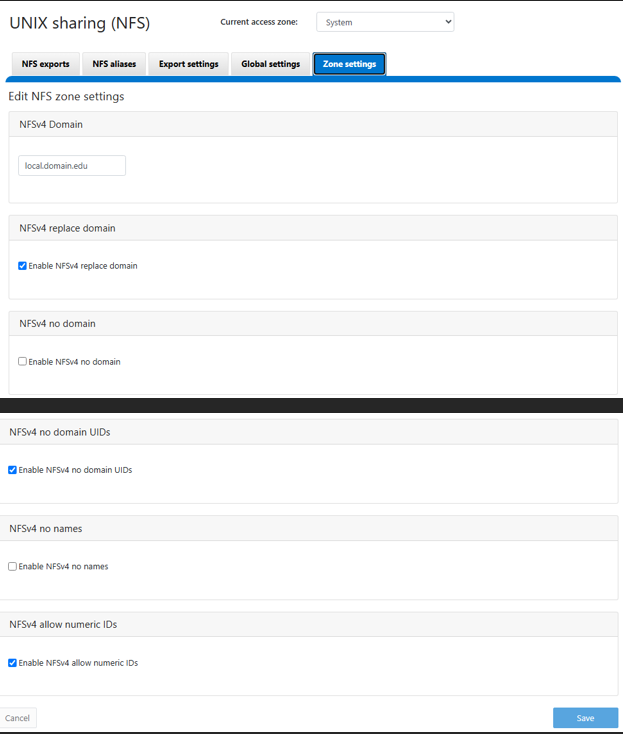
Defaults as seen in OneFS WebU, this image is from a OneFS 9.13 WebUI but should be similar is earlier releases:
Additional Information
Affected Products
PowerScale OneFSArticle Properties
Article Number: 000023023
Article Type: How To
Last Modified: 05 ربيع الآخر 1448
Version: 5
Find answers to your questions from other Dell users
Support Services
Check if your device is covered by Support Services.