PowerScale:無法隨需分配 Dell SupportAssist OneFS 代碼 9.5x 及更新版本
Summary: 本文說明如何在 PowerScale 叢集上佈建 Dell SupportAssist。
This article applies to
This article does not apply to
This article is not tied to any specific product.
Not all product versions are identified in this article.
Symptoms
嘗試在 PowerScale 叢集上隨需分配 Dell SupportAssist 時,出現下列錯誤。
"An error occurred when trying to activate SupportAssist"
從 WebUI: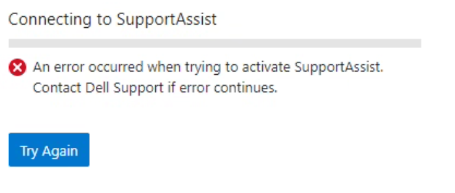
從 CLI:
Provision Status:   Current State: COMPLETED
       Sub-state: completed
 Success or Fail: Fail
Percent Complete: 100%
           Error: Exceeded API retries in provision_post_get_universal_key.
Cause
這可能是由於兩種可能的情況所導致的:
1.從支援網站產生存取金鑰時,請在叢集上使用節點序號或其他形式的識別。這會取代使用叢集的 OneFS 授權 ID。
2.為超過四位數字的訪問金鑰創建 PIN。
Resolution
為避免在隨需分配 Dell SupportAssist 時發生此錯誤,請按照下列步驟操作:
建立存取金鑰:
- 使用 Dell 認證存取支援網站
- 使用搜尋方塊,尋找叢集的 OneFS 授權 ID。它位於右上角的 OneFS WebUI 上。
- 按照訪問金鑰 的要求 生成訪問金鑰。請參閱 OneFS 管理指南
從 WebUI:
- 開啟 OneFS WebUI,以根使用者認證 登入 ,在一般設定下按一下 SupportAssist
- 按一下「SupportAssist」標籤底下的「 再試 一次」選項
- 複製ServicesConnectivity_Noreply@dell.com 傳送的電子郵件中提供的存取金鑰詳細資料
- 等待系統隨需分配 SupportAssist
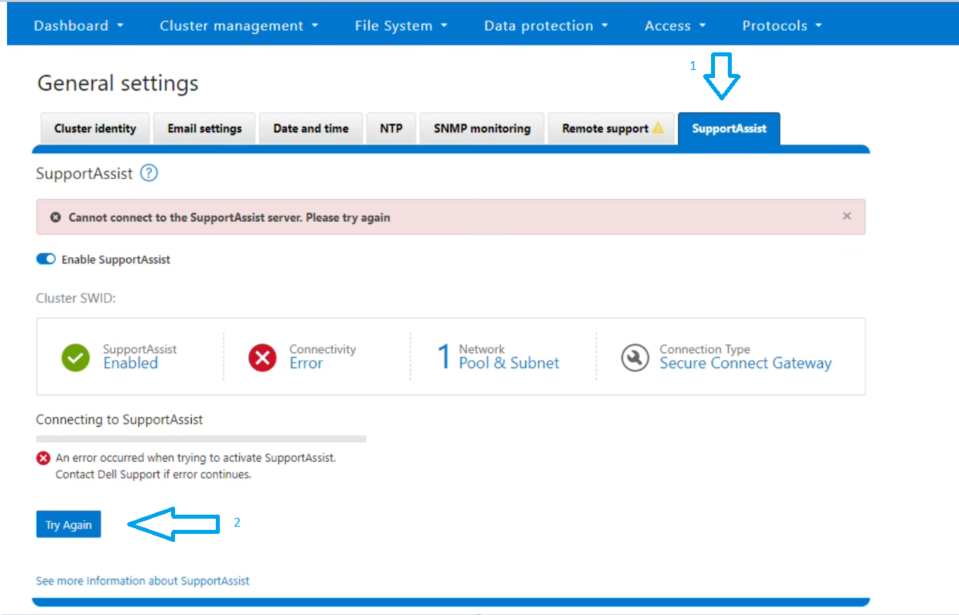
從 CLI:
2.使用電子郵件中收到的存取金鑰和 Pin 執行隨需分配命令:
isilon-1# isi supportassist provision start --access-key <Access Key> --pin <4-digit PIN>
3.等待佈建狀態顯示「成功」。
4.執行下列命令以確認狀態:
isilon-1# isi supportassist provision view

isilon-1# isi supportassist view
注意:如果上述步驟未能修正您的問題,請收集完整的收集記錄集,並聯絡 PowerScale 支援部門。
Article Properties
Article Number: 000215531
Article Type: Solution
Last Modified: 02 شوال 1445
Version: 5
Find answers to your questions from other Dell users
Support Services
Check if your device is covered by Support Services.