PowerScale:无法调配 Dell SupportAssist OneFS 代码 9.5x 及更高版本
Summary: 本文介绍如何在 PowerScale 群集上调配 Dell SupportAssist。
This article applies to
This article does not apply to
This article is not tied to any specific product.
Not all product versions are identified in this article.
Symptoms
尝试在 PowerScale 群集上调配 Dell SupportAssist 时出现以下错误。
"An error occurred when trying to activate SupportAssist"
从 WebUI: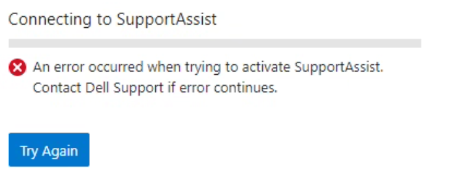
从 CLI:
Provision Status:   Current State: COMPLETED
       Sub-state: completed
 Success or Fail: Fail
Percent Complete: 100%
           Error: Exceeded API retries in provision_post_get_universal_key.
Cause
这可能是由于两种可能的情况而发生的:
1.从支持网站生成访问密钥时,在群集上使用节点序列号或其他形式的标识。这将代替使用群集的 OneFS 许可证 ID。
2.为超过四位数的访问密钥创建 PIN。
Resolution
为了防止在配置 Dell SupportAssist 时遇到此错误,请按照以下步骤操作:
创建访问密钥:
- 使用戴尔凭据访问支持网站
- 使用搜索框并找到群集的 OneFS 许可证 ID。它位于 OneFS WebUI 右上角。
- 按照访问密钥 的要求 生成访问密钥。请参阅 OneFS 管理指南
从 WebUI:
- 打开 OneFS WebUI,使用 root 用户凭据登录,然后在“General settings”下单击“SupportAssist”
- 单击“SupportAssist”选项卡下的“重 试 ”选项
- 复制ServicesConnectivity_Noreply@dell.com 发送的电子邮件中提供的访问密钥的详细信息
- 等待将 SupportAssist 调配到您的系统
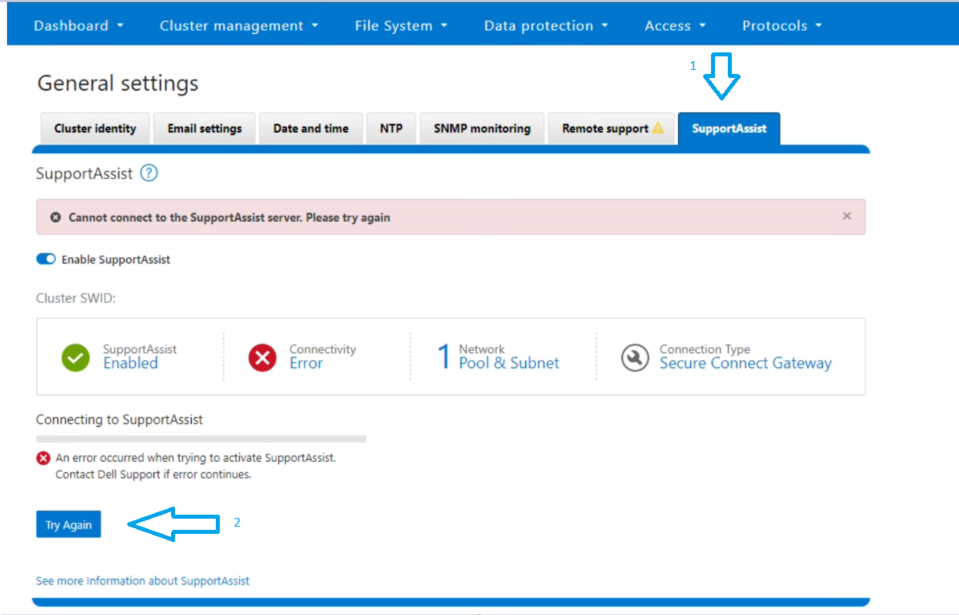
从 CLI 中:
2.使用电子邮件中收到的访问密钥和 PIN 运行资源调配命令:
isilon-1# isi supportassist provision start --access-key <Access Key> --pin <4-digit PIN>
3.等待资源调配状态显示“成功”。
4.通过运行以下命令确认状态:
isilon-1# isi supportassist provision view

isilon-1# isi supportassist view
提醒:如果上述步骤未能解决您的问题,请收集完整的日志收集集并联系 PowerScale 支持。
Article Properties
Article Number: 000215531
Article Type: Solution
Last Modified: 02 شوال 1445
Version: 5
Find answers to your questions from other Dell users
Support Services
Check if your device is covered by Support Services.