ECS: GeoDrive experiences performance issues
Oversigt: Troubleshooting GeoDrive slow performance and timeout errors
Denne artikel gælder for
Denne artikel gælder ikke for
Denne artikel er ikke knyttet til et bestemt produkt.
Det er ikke alle produktversioner, der er identificeret i denne artikel.
Symptomer
- Slow performance identified when archiving to the ECS using Geo Drive on Windows Storage Server.
- Also noticed 404 errors for requests on ECS.
Årsag
A possible cause is a very large change-log found for each cloud-drives. The change log contains things like permission, attribute changes, file/folder deletes, folder creates, file renames. It is a first-in/first-out queue that must preserve the ordering of operations. If the count of the change log is huge, that causes performance issues.
Løsning
Resolution:
For all Geodrive Versions:
Find the size of the change log and if huge, disable it from saving file security/description in cloud server: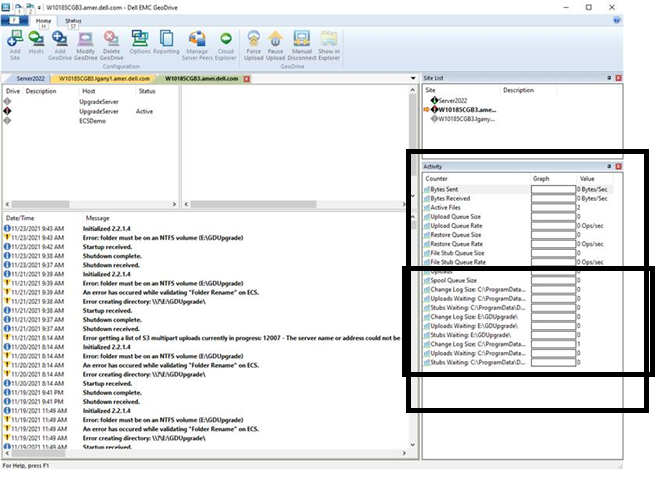
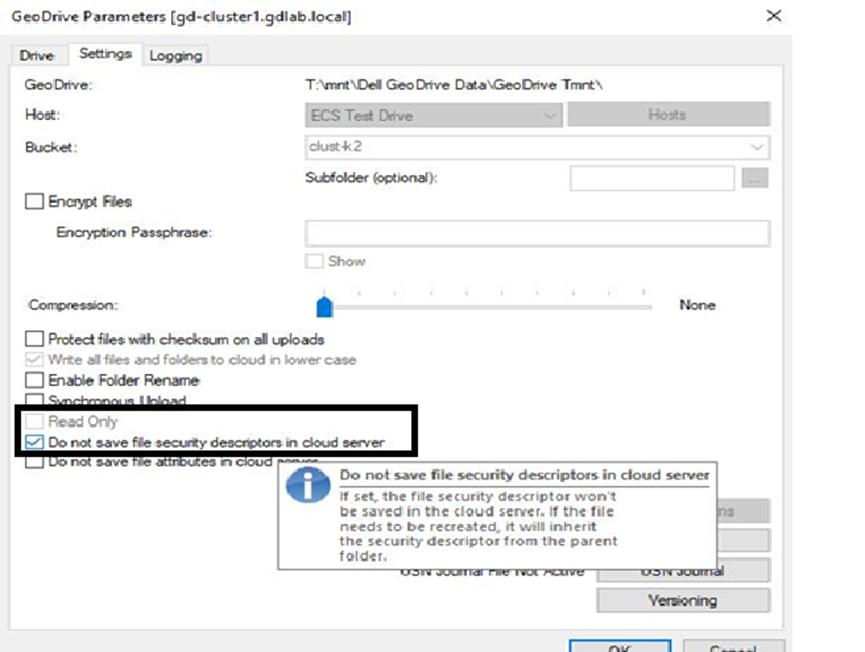
For all Geodrive Versions:
Find the size of the change log and if huge, disable it from saving file security/description in cloud server:
- From the screenshot over on the right in the Activity Window, it shows the size of the change log for each of the cloud drives.
- Right-click on the cloud drives, go to Settings, and checkmark "DO not save file security/description in cloud server". Click “OK”
Berørte produkter
GeoDrive for Windows, Elastic Cloud StorageArtikelegenskaber
Artikelnummer: 000194162
Artikeltype: Solution
Senest ændret: 12 maj 2026
Version: 3
Find svar på dine spørgsmål fra andre Dell-brugere
Supportservices
Kontrollér, om din enhed er dækket af supportservices.