PowerProtect: How to Troubleshoot Reporting node issues
Summary: This article outlines how to approach initial analysis of PowerProtect Data Manager (PPDM) reporting issues.
Instructions
Log locations
Pre-19.17 versions:
Base Log Location: /opt/emc/dpa/
Agent Logs: /opt/emc/dpa/agent/dpaagent.log
Server Logs: //opt/emc/dpa/services/server.logs
DataStore Logs: /opt/emc/dpa/services/datastore*.logs
Reporting Management: /opt/emc/dpa/reporting/reportingmgmt.log
Version 19.17 and Later Versions:
Base Log Location: /var/log/dellemc/reporting
Reporting Data Collector (Agent): /var/log/dellemc/reporting/reporting-data-collector/reporting-data-collector.log
Reporting Service: /var/log/dellemc/reporting/reporting-service/reporting-service.log
PostgresSQL: /var/log/dellemc/reporting/postgresql/postgresql*.log
Reporting Management: /var/log/dellemc/reporting/reportingmgmt/reportingmgmt.log
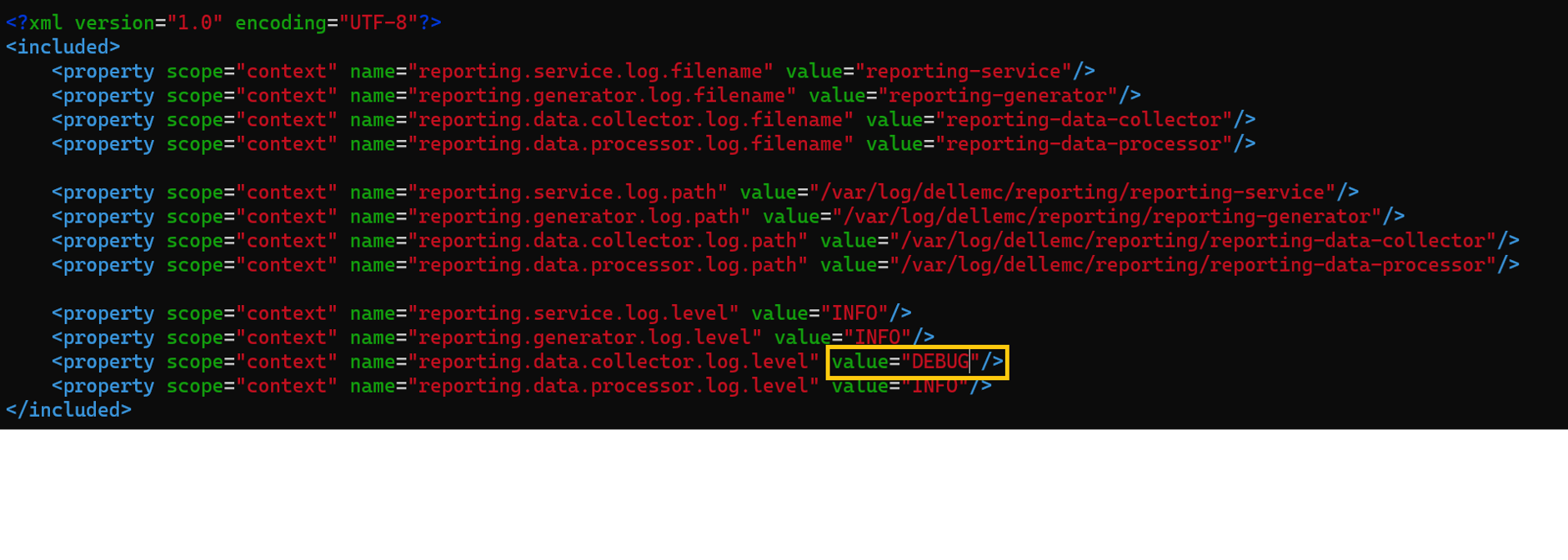
Changing log levels for version 19.17 and later versions:
- Configuration location at:
/var/lib/dellemc/reporting/config/logback-config.xml - Service-specific logging levels:
<service-name>.log.level
Pre-19.17 Versions:
Command Format:
Base location: /opt/emc/dpa/services/bin
dpa.sh <service> <operation>
Operation: start, stop, restart
Services: svc, app, ds, agent
Example: dpa.sh svc start
Version 19.17 and Later Versions:
Command Format: systemclt <operation> <service name>
Operation: start, stop, restart, status
Services:
Reporting services: reporting-service, reporting-data-collector, reporting-generator, reporting-data-processor
External services: postgresql , rabbitmq-server
Example: systemclt restart reporting-service
Each service is to be managed individually.
Known issues/ troubleshooting
Deployment/upgrade failure: For a successful reporting engine deployment, make sure the network configuration is correct. Both Forward and reverse lookup should be resolved to the PPDM host and from PPDM to the reporting engine host.
Error observed:Error : InfrastructureNodeSessions unsuccessful during initialization. Unable to deploy node <Reporting/Search_Engine_FQDN>. Unable to determine the state of node VM '<Reporting/Search_Engine_FQDN>' or the 'vProxy Agent' agent running on it. Unable to connect to Node VM: dial tcp: lookup <Reporting/Search_Engine_FQDN> on <DNS_Server>:53: no such host
Check name resolution:nslookup PPDM FQDNnslookup PPDM IPnslookup reporting node FQDNnslookup reporting node IP
In versions prior to 19.18 an issue was noted with failed update due to multiple Domain Name System (DNS) hosts configured. Refer to this article to fix the issue: Deployment or Upgrading of PowerProtect Data Manager Reporting Engine to 19.17 Reporting Engine may fail
Reporting node stuck in maintenance mode after upgrade to 19.20 and later versions:
The reportingmgmt.log shows this data-migration error:
2025-08-11T12:54:33.434+09:30: reportingmgmt: data-migration: ERROR: Error while checking if data is present: relation "reportdata.client_config_tmp" does not exist
LINE 1: SELECT COUNT(1) FROM reportdata.client_config_tmp
Follow the workaround from this KB article: Powerprotect Data Manager: Reporting Engine Stuck In Maintenance Mode after Upgrade
Reporting node services fails to start due to the certificate error:
The reporting-service log /opt/dell/reporting/log/reporting-service/reporting-service.log shows the following missing required certificates error.
2025-03-04T00:00:06.416Z ERROR [17574] [main] [c.e.c.s.CoreStartupApplication.init(39)] -  Not able to initialize services, missing required certificates.
2025-03-04T00:00:06.418Z ERROR [17574] [main] [c.e.c.s.CoreStartupApplication.init(43)] -  Error in initializing services
java.lang.IllegalArgumentException: Context must not be null

Follow the workaround form the below KB to regenerate the certificates
Refer to KB article PowerProtect Data Manager: Failed to start reporting services due to the certificate error
Reporting node unable to send emails:
Connect to the mail server from the reporting node and check for name resolution.
On the reporting-service.log similar errors appear:
2024-02-05 15:32:37,010 ERROR [com.emc.dpa.command.notification.NotificationSenderMDB] (Thread-131073) Problems while sending e-mail notification: com.sun.mail.smtp.SMTPSendFailedException: 451 5.7.3 STARTTLS is required to send mail [MailServer 2024-02-05T08:32:36.994Z 08DC257F199B3AC5]
Follow this KB article to manually enable start TLS switch on the reporting node: PowerProtect: Data Manager report browser unable to send email report using SMTP server that has StartTLS enabled.
From version 19.20 and later versions, the switch on the UI in the SMTP configuration page, enables TLS startup.