PowerProtect Data Manager: Backup Fails with Error Code ABV0016
Summary: PowerProtect Data Manager Virtual Machine (VM) backups are failing with the following message: Error code: ABV0016VM direct engine local host is unable to backup the virtual machine because an API issue. ...
This article applies to
This article does not apply to
This article is not tied to any specific product.
Not all product versions are identified in this article.
Symptoms
VM backups fail after running for sometime. The UI shows the error code ABV0016 and the message:
VM direct engine local host is unable to backup the virtual machine because the API issue
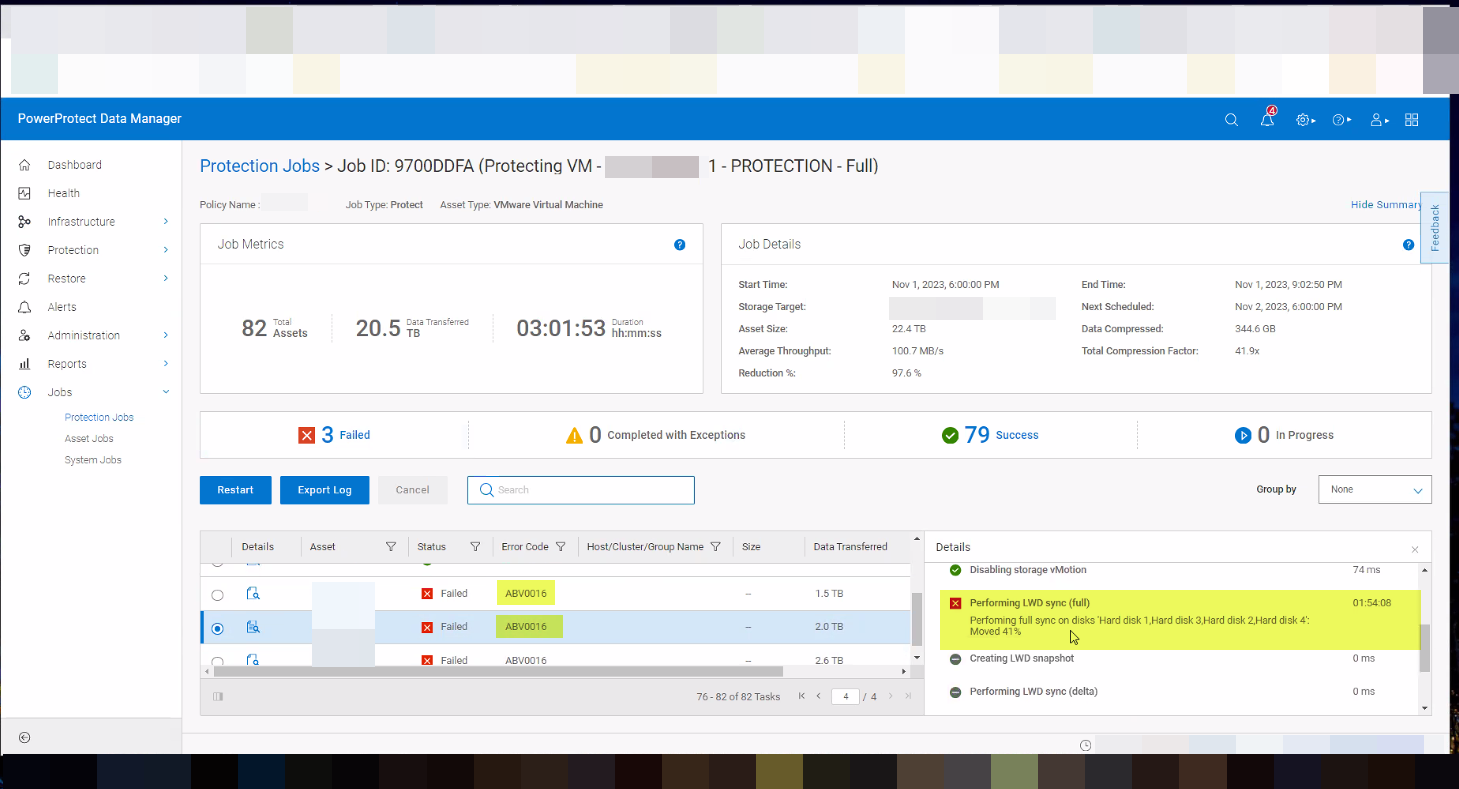
The vmdm.log has the following error messages:
YYYY-MM-DDThh:mm:ssZ DEBUG: [a85c3e1a9c5ee77b;ac8bc10a5b7b4009] Sending state of 'Running' (last: state=Running, progress=27).
YYYY-MM-DDThh:mm:ssZ ERROR: [a85c3e1a9c5ee77b;ac8bc10a5b7b4009] SDM Data Mover: SDM Full Sync: The vCenter task failed: dp.vpx.fault.DiskClosing.summary
YYYY-MM-DDThh:mm:ssZ ERROR: [a85c3e1a9c5ee77b;ac8bc10a5b7b4009] SDM Data Mover: SDM Full Sync: The vCenter task for 'SDM Snapshot Sync fullSync' completed with state 'error'.
YYY-MM-DDThh:mm:ssZ INFO: [a85c3e1a9c5ee77b;ac8bc10a5b7b4009] Connect vCenter: Set custom attribute 'Dell VM Direct Engine Cleanup Descriptor' value for object vm-200 to '{"DataMover":"SDM","SessionType":"Backup","SessionUuid":"0c1dafe9-8d4f-4701-93fd-65c6024b8503","SessionStartTime":"YYYY-MM-DDT14:18:58Z","VmMORef":"vm-243","VmName":"infosys","VProxyMORef":"","SnapshotMORef":"","VmdkBaseFileNames":null,"DpdVendorId":"","LwdDiskIds":null,"DpdTaskMORef":"","LwdSnapshotUuid":""}'.
YYYY-MM-DDThh:mm:ssZ DEBUG: [a85c3e1a9c5ee77b;ac8bc10a5b7b4009] SDM Data Mover: SDM Full Sync: Set VM Cleanup Descriptor. YYYY-MM-DDT15:hh:mm:ssZ ERROR: [a85c3e1a9c5ee77b;ac8bc10a5b7b4009] SDM Data Mover: SDM Full Sync: Unsuccessful after 1 attempts over 42m23.015355429s. YYYY-MM-DDT15:hh:mm:ssZ ERROR: [a85c3e1a9c5ee77b;ac8bc10a5b7b4009] SDM Data Mover: SDM Full Sync: Unable to successfully complete SDM Full Sync operation.
From the vSphere UI, the following failure is seen:
Task Name Status: Perform LWD-based snapshot sync
Cannot complete the operation. See the event log for details. A disk was closed during the operation. This can happen due to VM lifeCycle events such as VM power off, vMotion and HA failover. The operation should be retried.
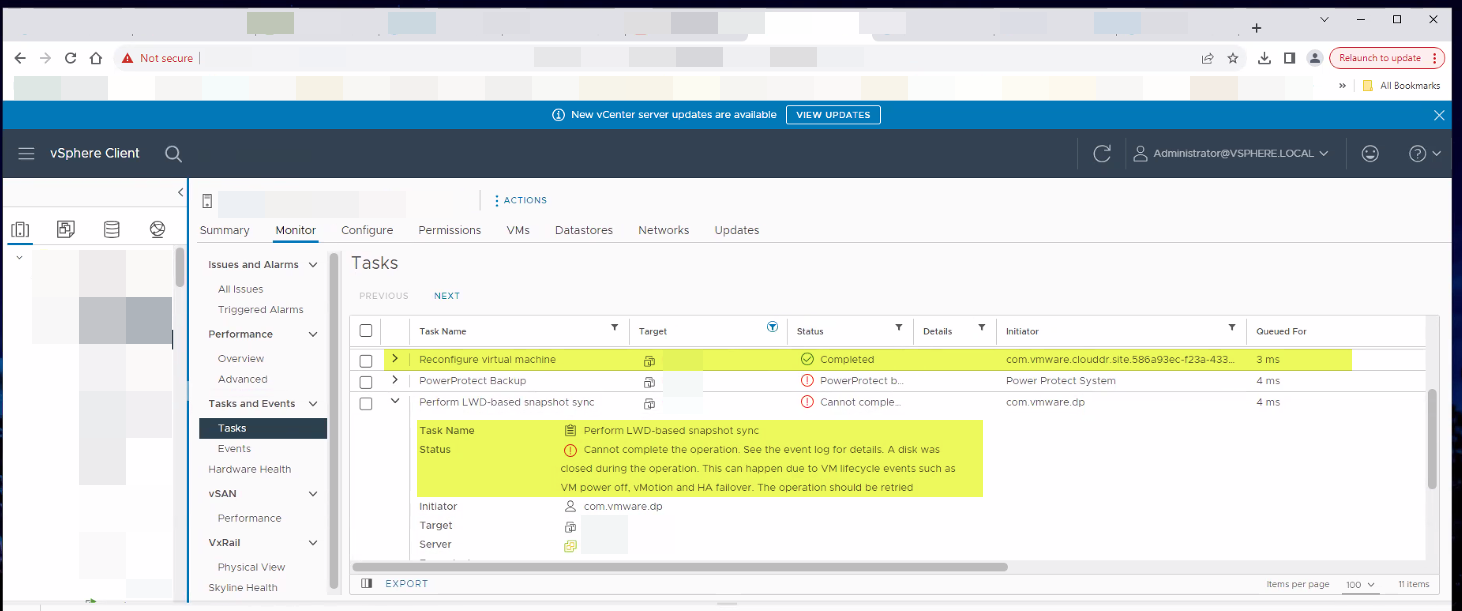
VMware's Product CloudDR is performing snapshot actions on the VM at the time of VM backup by PowerProtect Data Manager. In the above screenshot, we see the task 'Reconfigure virtual machine' being carried out by CloudDR when the PowerProtect Data Manager backup is running. This causes the PowerProtect Data Manager backup to fail.
Cause
Overlap of PowerProtect Data Manager backup and VMware's CloudDR activities
Resolution
Change the Schedule of VMware's CloudDR to prevent overlap between CloudDR activities and PowerProtect Data Manager backup.
Affected Products
PowerProtect Data ManagerArticle Properties
Article Number: 000219443
Article Type: Solution
Last Modified: 01 Mar 2024
Version: 3
Find answers to your questions from other Dell users
Support Services
Check if your device is covered by Support Services.