NMC 安裝失敗,並出現錯誤「無法驗證驗證服務器的主機名稱或埠」
Summary: Windows 主機上的 NMC 安裝失敗,並顯示錯誤:無法驗證驗證服務器的主機名稱或埠。
This article applies to
This article does not apply to
This article is not tied to any specific product.
Not all product versions are identified in this article.
Symptoms
- Windows 主機上的 NetWorker 管理主控台 (NMC) 安裝失敗,並出現驗證失敗訊息。
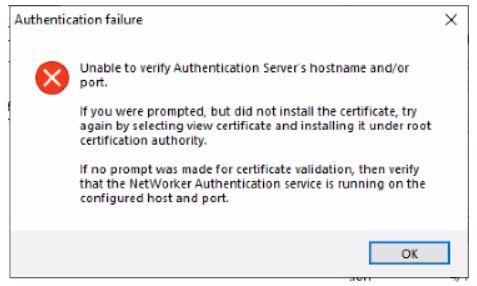
圖 1:在 Windows 上安裝 NMC 時,出現驗證失敗訊息。
- NMC 伺服器安裝在與 NetWorker 伺服器分離的 Windows 主機上。
- NetWorker 驗證服務已啟動並正在執行中。
- 埠 9090 已開啟。
nsrports -t NetWorker_ServerName -p 9090
Cause
NMC 安裝會透過 TLS 與 1.2 版之前的 NetWorker 驗證服務交涉。
Resolution
在 NetWorker 伺服器上執行下列步驟:
- 製作下列內容的備份複本:
C:\Program Files\EMC NetWorker\nsr\authc-server\tomcat\conf\server.xml.
- 編輯 server.xml 檔案並尋找字串。
sslEnabledProtocols="TLSv1.2"
將字串變更為
sslEnabledProtocols="TLSv1.2, TLSv1.1, TLSv1"
注意:這些變更是暫時性的,僅用於完成 NMC 安裝。NMC 安裝完成後即可還原。
- 將變更儲存 至檔案。
- 重新開機 NetWorker 服務。
net stop nsrexecd /y
net start nsrd
- 安裝 NMC 伺服器上的 NetWorker 和 NMC。此時應會出現安裝憑證的提示。
- 將 憑證新增至 Root 可信賴憑證清單。繼續,直到安裝完成。
Affected Products
NetWorker FamilyArticle Properties
Article Number: 000219009
Article Type: Solution
Last Modified: 23 Jul 2024
Version: 4
Find answers to your questions from other Dell users
Support Services
Check if your device is covered by Support Services.